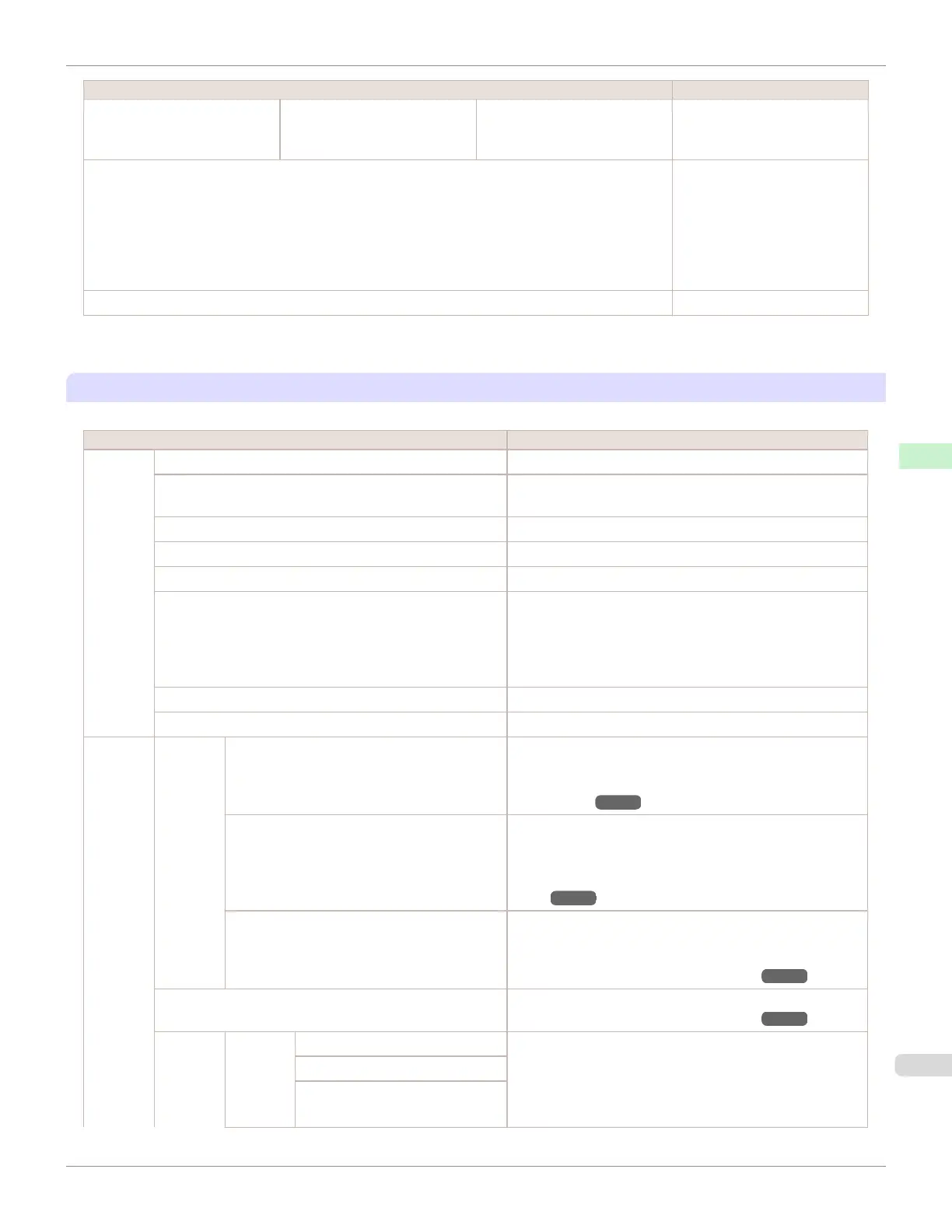
Setting Item Description, Instructions
Job Log (Choose from information
about the last three print jobs.)
Adjustment req. A counter for maintenance pur-
poses. Indicates adjustment
conditions appliedto jobs.
Print Job Log Print Job Log information.
The maximum number of histo-
ry records in models fitted with
a hard disk is 32.
The maximum number of histo-
ry records in models not fitted
with a hard disk is 10.
Pause Print Choose On to stop printing.
*1:Canon cannot guarantee the accuracy of these estimates. These estimates will also vary depending on the conditions of printer
use.
Set./Adj. Menu
Limited items are displayed during printing. The displayed items are indicated by annotations.
Setting Item Description, Instructions
Test
Print
Nozzle Check Print a test pattern to check the nozzles.
Status Print Print information about the setting values and condition of
the printer.
Interface Print Print interface settings information.
GL2 Set Print Print the settings as specified in GL2 Settings.
Paper Details Print the paper settings as specified in Paper Details.
Print Job Log Print Job Log information.
The maximum number of history records in models fitted
with a hard disk is 32.
The maximum number of history records in models not fitted
with a hard disk is 10.
Menu Map Print the menu structure.
Color Palette Print the GL2 color palette.
Adjust
Printer
Head
Posi.
Adj.
Auto(Standard) The printer prints and reads a test pattern for automatic ad-
justment of Printhead alignment relative to the printing di-
rection. (See "Automatic Adjustment to Straighten Lines
and Colors.") ➔P.526
Auto(Advanced) The printer prints and reads a test pattern for automatic ad-
justment of Printhead alignment relative to the printing di-
rection and spacing between nozzles and colors. (See "Au-
tomatic Adjustment to Straighten Lines and Col-
ors.") ➔P.526
Manual Print a test pattern for adjustment of Printhead alignment
relative to the printing direction. Enter the adjustment value
manually based on the resulting pattern. (See "Manual Ad-
justment to Straighten Lines and Colors.") ➔P.527
Head Inc. Adj. Print a test pattern for adjustment of the Printhead orienta-
tion. (See "Adjusting Line Misalignment.") ➔P.529
Feed
Priority
Adj. Pri-
ority
Automatic Specify exact paper feeding, if desired. Normally, select Au-
tomatic. Choose Print Quality for attractive printing.
Choosing Print Quality also makes banding less noticea-
ble. Choose Print Length if you prefer to feed the paper an
exact amount.
Print Quality
Print Length
iPF670
Menu Settings
User's Guide
Control Panel Printer Menu
461













 To Next Page