4
4
4-25
4-25
Disassembly/Assembly > External Cover (MF5900/MF6100) > Removing the Rear Cover Unit
Disassembly/Assembly > External Cover (MF5900/MF6100) > Removing the Rear Cover Unit
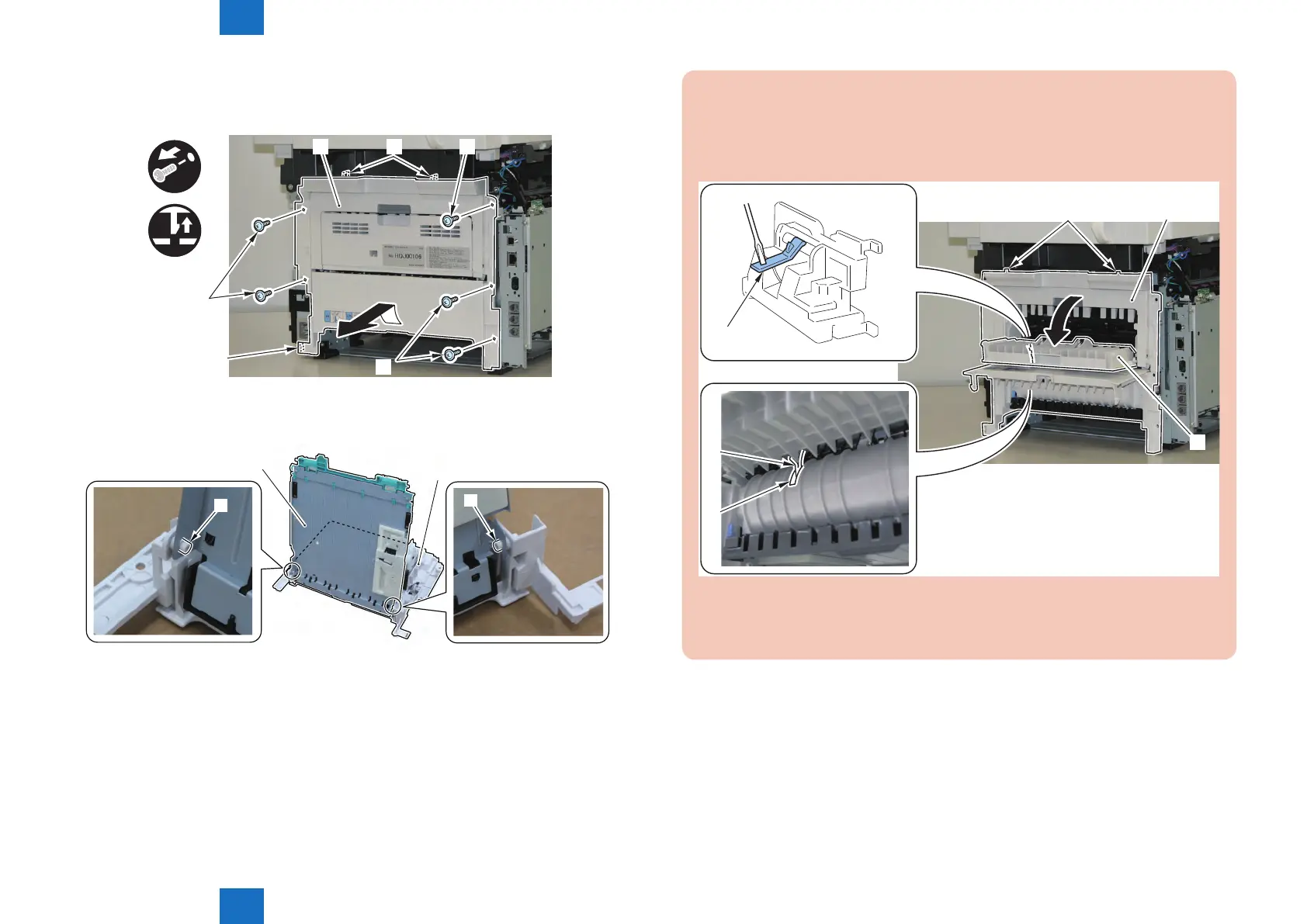
2) Remove the Rear Cover Unit [1].
• 5 Screws [2]
• 3 Claws [3]
x5
x3
[1] [2]
[2]
[3]
[3]
[2]
3) Remove the Duplex Feed Unit [2] from the Rear Cover Unit [1].
• 2 Bosses [3]
[1]
[2]
[3]
[3]
F-4-51
F-4-52
CAUTION: Points to Note at Installation
1) Fit the 2 Upper Claw [2] of the Rear Cover Unit [1] With the Upper Cover.
2) Open the Rear Sub Tray [3] and While Pushing the Duplex Reverse Sensor Flag [4]
Downward, Install the Rear Cover Unit.
[1][2]
[3]
[4]
[5]
[4]
3) Check That the Sensor Flag [4] Through the Hole [5] of the Back of the Duplex Unit
Cover.
F-4-53


 To Next Page
 Loading...





