12
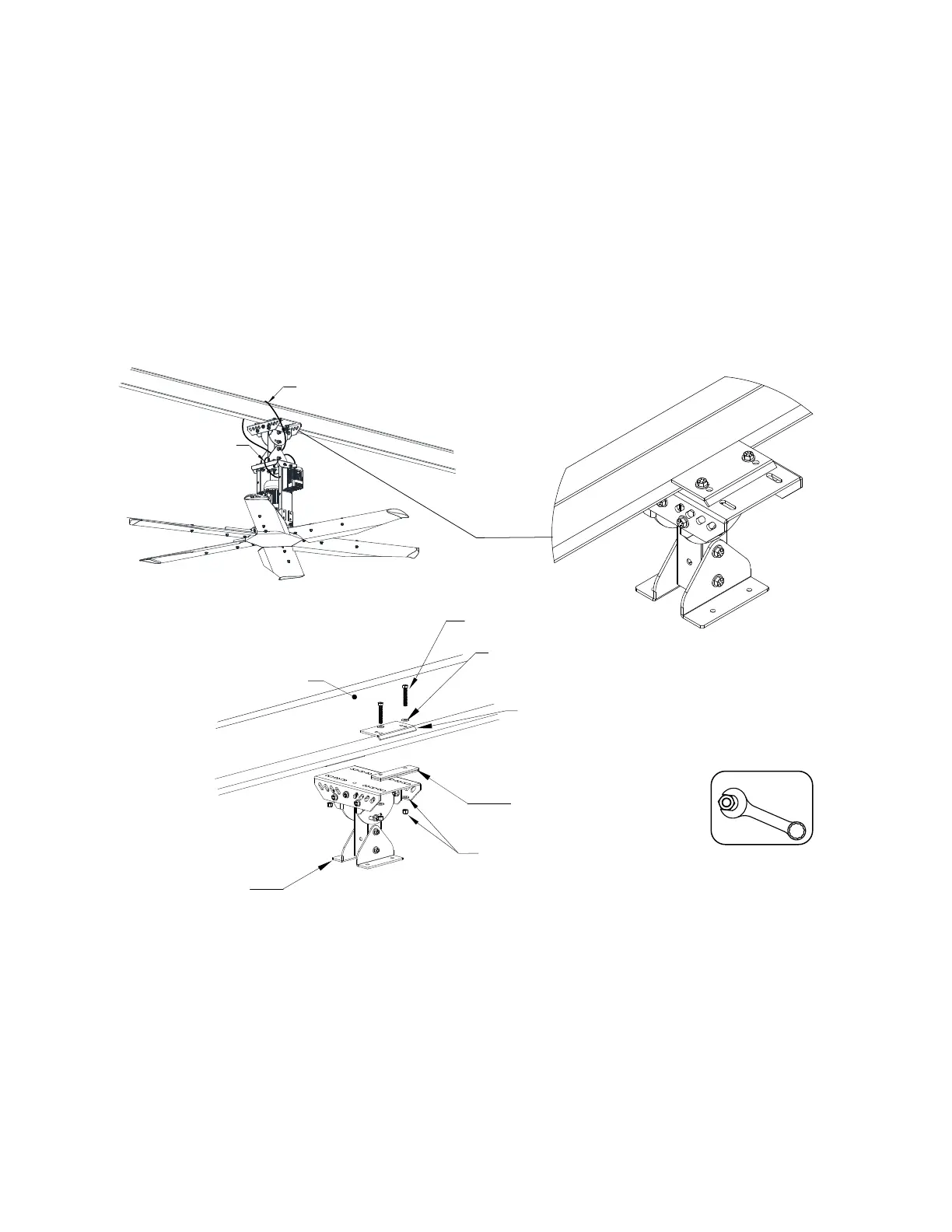
I-Beam Mount
Used to mount the fan directly under an I-Beam. The beam must be 3” to 10” wide and 1/4” to 1” thick. Use
I-beam spacers when the beam thickness is greater than 5/8” up to 1” thick.
1. Install 1/2”-13x3” bolts with 1/2” washers through the I-beam clamp. Keep clamps as close to the beam
as possible. Pivot mount should be centered along the width of the beam.
2. Place pivot extension assembly through bolts and secure with 1/2”-13 nylock nut and 1/2” washers.
NOTE: Use the I-beam clamp spacer provided if the beam is too thick to install to the pivot
extension assembly. Place the spacer between the I-beam clamp and pivot extension assembly.
3. Torque hardware to 75 ft-lbs/101 Nm.
To install extension assembly, refer to “Installing Pivot Mount Assembly” on page 25.
Figure 8 - I-Beam Top Mount Details
I-Beam
1/2”-13 x 2.5” Bolt
1/2” Washer
I-Beam
Clamp
I-Beam Spacer
(for Larger I-Beams)
1/2”-13 Nylock Nut
and 1/2” Washer
Pivot Extension
Assembly
NOTE: All hardware must
be Grade 8 or higher.
Hardware Torque
1/2” Hardware
75 Ft-lbs/101 Nm
Safety Cable
Safety Cable



 To Next Page