14
Concrete Multi-Beam Mount
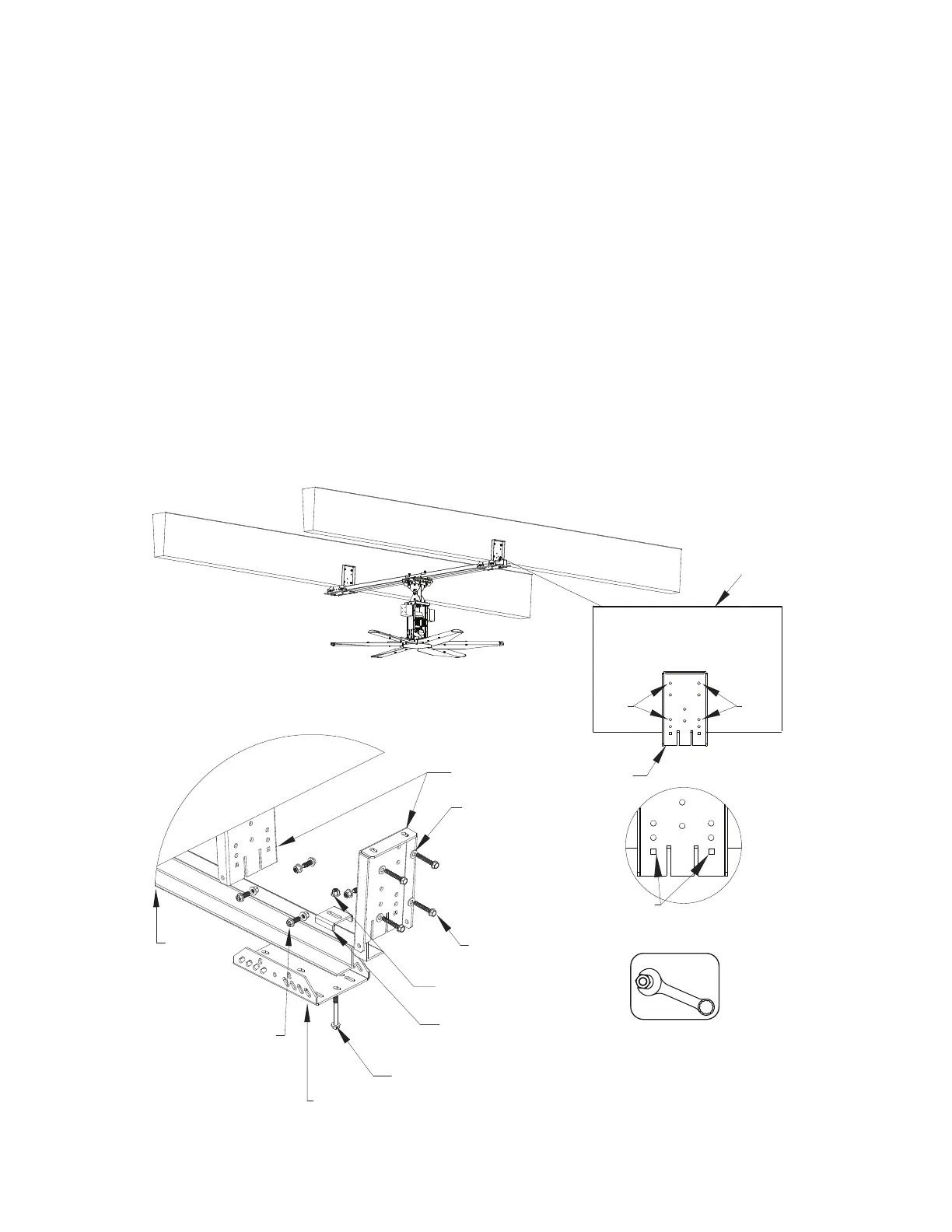
Used to mount fan between two concrete beams. Minimum thickness 6” / Maximum thickness 10”.
1. Use the square alignment holes to keep the beam mount bracket flush with the beam. Mark the four
mounting location holes.
2. Secure beam mount brackets to the concrete beam. Use four (4) 1/2” x 3” long tapcon screws with
1/2” washers on each bracket.
3. Install pivot plate to beam mount bracket. Insert 1/2”-13 x 1.5” bolts and 1/2” washers through the side
of the pivot plate into the beam mount bracket. Secure with 1/2”-13 nylock nut and 1/2” washer.
4. Repeat securing the mounting brackets on the other side.
5. Slide the angle iron through the grooves in the beam mount bracket. This will align with the angle iron.
6. Install angle top bracket over the angle iron sections.
7. Insert 1/2”-13 x 4.5” bolts and 1/2” washer through one of the bottom holes located in the pivot plate.
Secure with 1/2”-13 nylock nut and 1/2” washer.
8. Torque all hardware to 75 Ft-lbs/101 Nm.
To install extension assembly, refer to “Installing Pivot Mount Assembly” on page 25.
Figure 10 - Multi-Mount Concrete Details
Hardware Torque
1/2” Hardware
75 Ft-lbs/101 Nm
3” x 3“ x 1/4”
Long Angle Iron
1/2” Washer
1/2”-13 Nylock Nut
and 1/2” Washer
Beam Mount
Bracket
1/2 x 3” Long
Tapcon
Angle Top
Bracket
1/2”-13 x 4.5” Bolt
and 1/2” Washer
Pivot Plate
1/2”-13 x 1.5” Bolt,
1/2” Nylock Nut and
Washer
NOTE: All hardware must be minimum
Grade 8. Do not use torque value for
tapcon screws, follow package details for
installing tapcon screws.
Concrete
Beam Mount
Bracket
Mark
Holes
Mark
Holes
Square Alignment Holes
Align top square holes with bottom of beam.



 To Next Page