63
Device Instance, MAC Address, Baud Rate
Some applications may require that the Protocessor have a specific Device Instance, the default device
instance is 50,000. To change the Device Instance, you must access the Web Configurator by connecting
a computer to the Ethernet port of the Protocessor. The computer used must be assigned a static IP
address of 192.168.1.xxx and a subnet mask of 255.255.255.0.
To access the Web Configurator, type the IP address of the Protocessor in the URL of any web browser.
The default IP address of the Protocessor is 192.168.1.24. Once the landing page has loaded, if required,
log in using “admin” for the username and password.
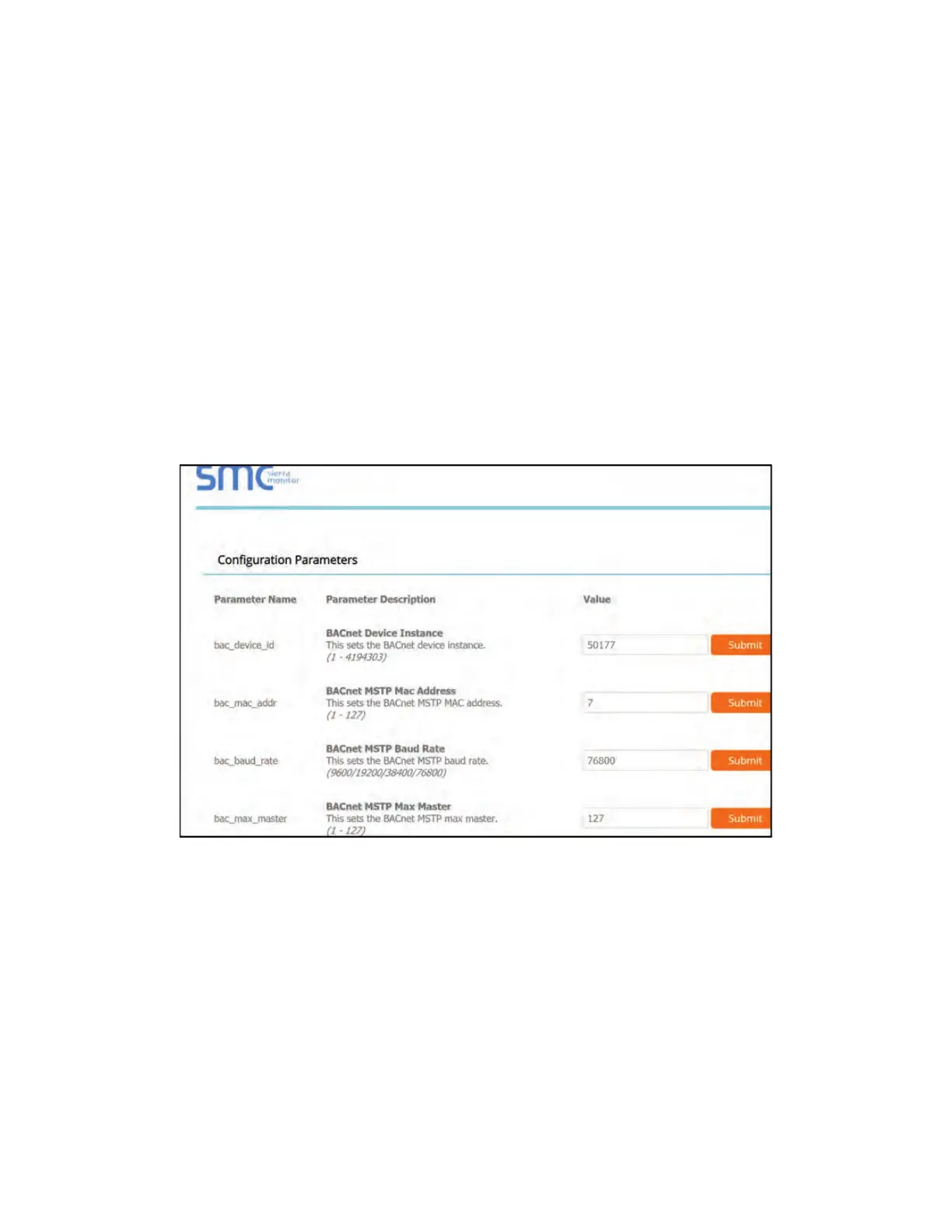
Go to the main configuration page, select “Configure” from the left-hand menu. Select “Profile
Configuration,” the following window shown in Figure 45 should appear.
The MAC address and Baud Rate, used by BACnet MTSP, are editable. The MAC address default is 127,
and the Baud Rate default is 38400.
If any changes are made, click on the submit button for each individual change. Each individual
change will require the system to restart.
Figure 45 - Configuration Parameters Page



 To Next Page