14
Infant Flow SiPAP set-up guide (continued)
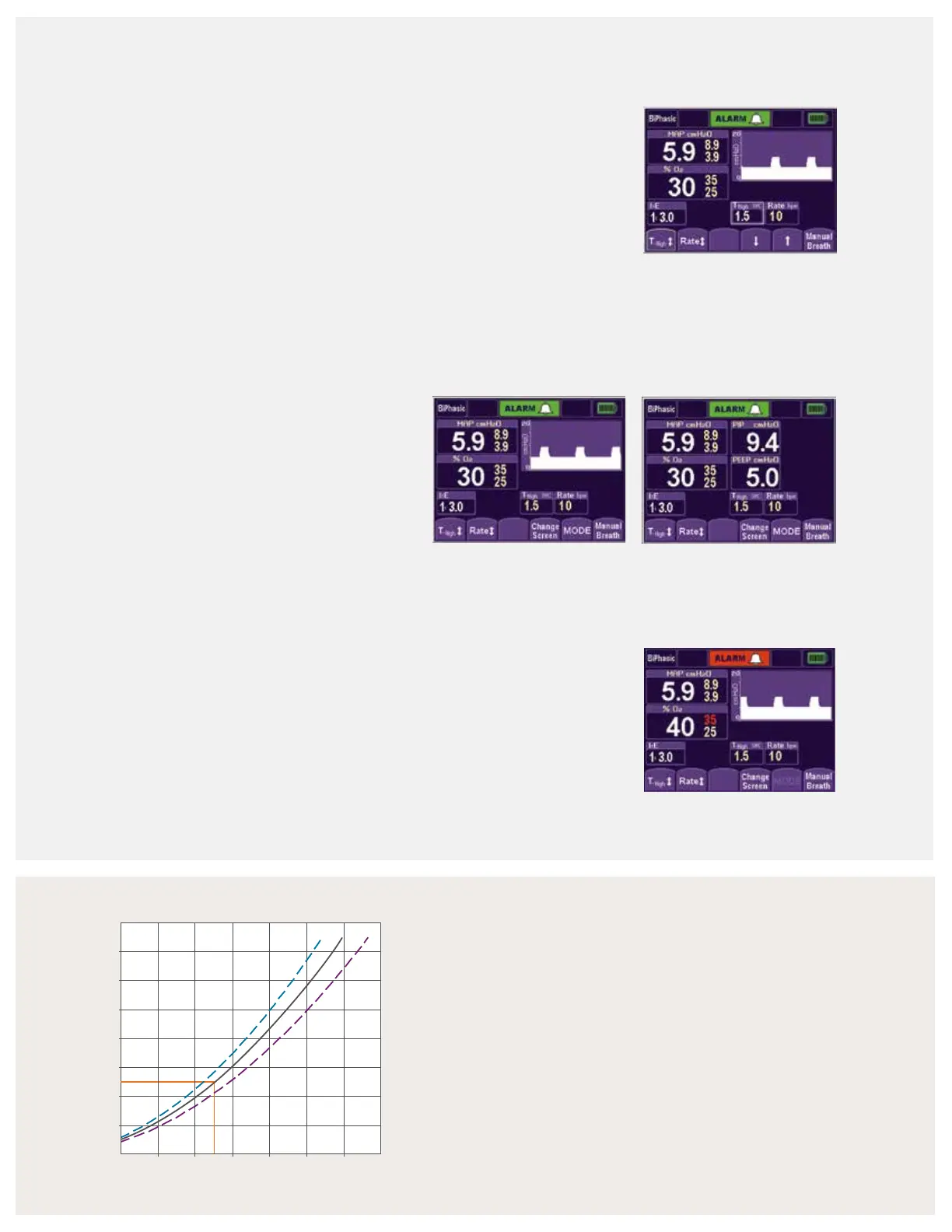
Parameter adjust screen
1. To change the settings during set-up and normal
operation, touch the desired parameter button.
2. Press the up or down arrows to adjust the parameter
to the desired setting.
3. Confirm the change by re-pressing the parameter button.
The main screen displays.
Note: nCPAP and BiPhasic pressure levels are set by
adjusting the flow.
Main screen and monitored parameter screen
1. To monitor therapy, use the main screen or
monitored parameter screen. The main screen
graphically displays the delivered pressure. The
monitored parameter screen displays numerical
values for the delivered pressure.
2. Press the Change Screen button to switch the
screen display.
Alarm reset/silence
1. Press the alarm bar to silence the active alarms
for 30 seconds.
2. Press the alarm bar for three seconds to clear resolved
and low-priority alarms and to reset alarm limits. Smart
alarm technology automatically sets high pressure, low
pressure and % oxygen thresholds.
Flow pressure nomogram
The Infant Flow SiPAP LP system is subject to a direct
relationship between the controlled gas flow and airway
pressure. For example, 9 LPM of gas flow provides
approximately 5 cmH
2
O CPAP.
Tip: Manual breath: The high pressure flowmeter must be
set to deliver a manual sigh/breath during CPAP. The boost
in pressure delivers for the time high that was entered during
the set-up process.
Parameter adjust screen
Main screen
Monitor parameter screen
Main screen with active alarm
2.0
4.0 6.0 8.0 10.0 12.0 14.0 16.0
4.0
6.0
8.0
10.0
12.0
14.0
2



 To Next Page