5.8
Programming
NOTE
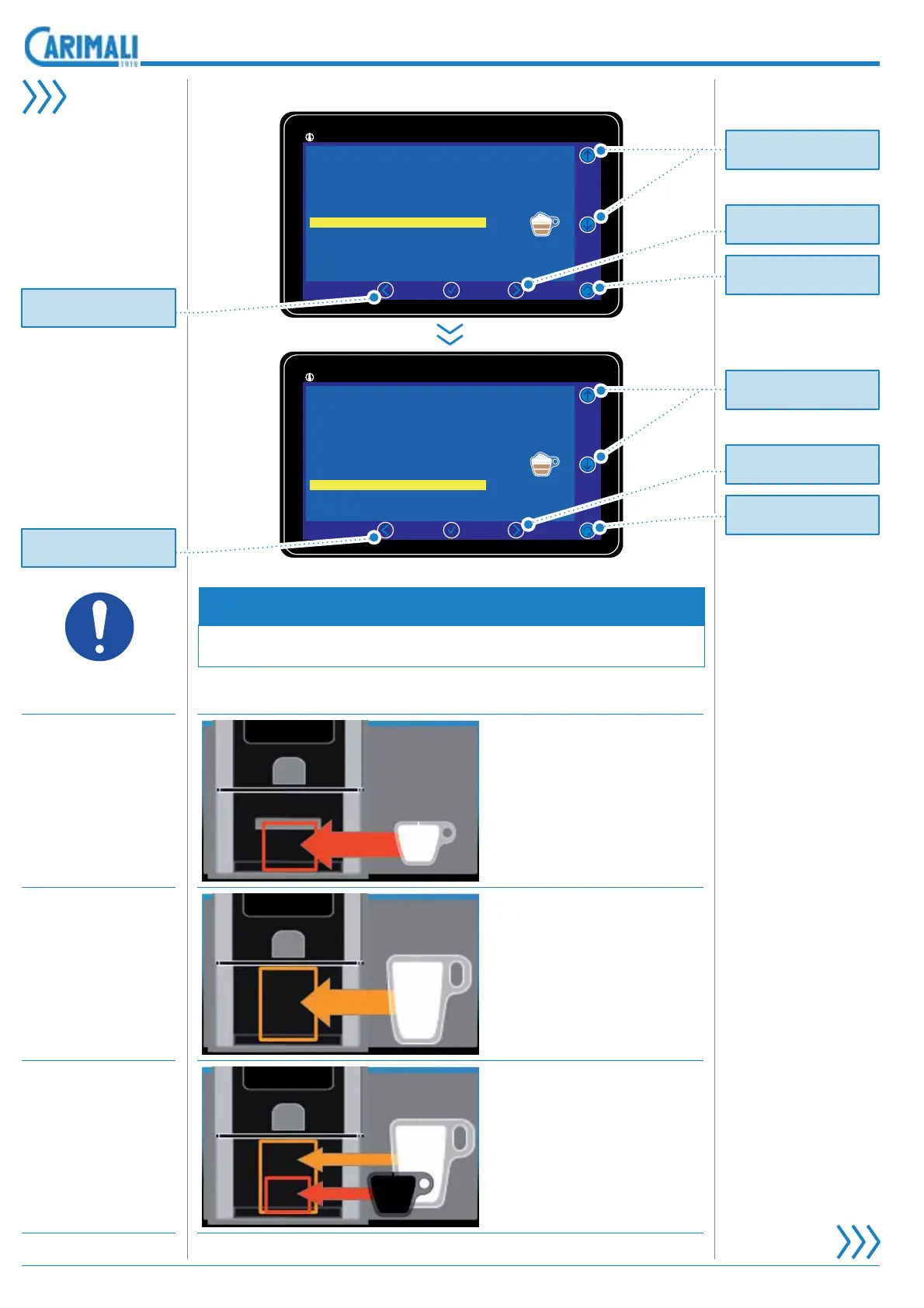
7KH&XS6HQVRURSWLRQLVYLVLEOHRQO\ZKHQWKH6\VWHP0DQDJHU
menu is enabled. Jolly is the default setting.
SENSOR DISPLAY OPERATION
/RZ
It enables dispensing if a
small cup is placed in cor-
UHVSRQGHQFH RI WKH ORZ
sensor.
High
It enables dispensing if a
small cup is placed in corre-
spondence of the high sen-
VRURUZKHQWKHUHLVQRFXS
SURWHFWLRQ GRRU LI D VPDOO
cup is positioned on the cup
KROGHU LQ FRUUHVSRQGHQFH
of the high sensor.
Jolly
It enables dispensing if a
FXSELJRUVPDOOLVSODFHG
in correspondence of one
RIWKHWZRVHQVRUVKLJKRU
ORZ
Select the icon of
the beverage from a
list provided by the
manufacturer.
,WZLOOEHSRVVLEOHWR
modify them thanks
to the PC interface.
Select the sensor
KLJK ORZ MROO\ WR
be used in order to
enable the dispens-
ing of the drink.
11:25 19 February 2017Drink settings
92°/145°
|
Cappuccino
Drink name
Drink enabled
Espresso
1
Yes
1,50
High
Products number
Cup Sensor
Price (EUR)
Drink icon
Selection option
11:25 19 February 2017Drink settings
92°/145°
|
Cappuccino
Drink name
Drink enabled
Espresso
1
Yes
1,50
High
Products number
Cup Sensor
Price (EUR)
Drink icon
Selection option
Pr
t
r
ll
the options.
Pr
t
r
ll
the options.
Pr
t
r
t
rn t
th
revious pa
e.
Pr
t
r
t
rn t
th
revious pa
e.
Pr
t
r
ll
the options.
Pr
t
r
ll
the options.
Pr
t
r
ll
th
m
n
ntri
.
Pr
t
r
ll
th
m
n
ntri
.









 To Next Page