5.7Programming
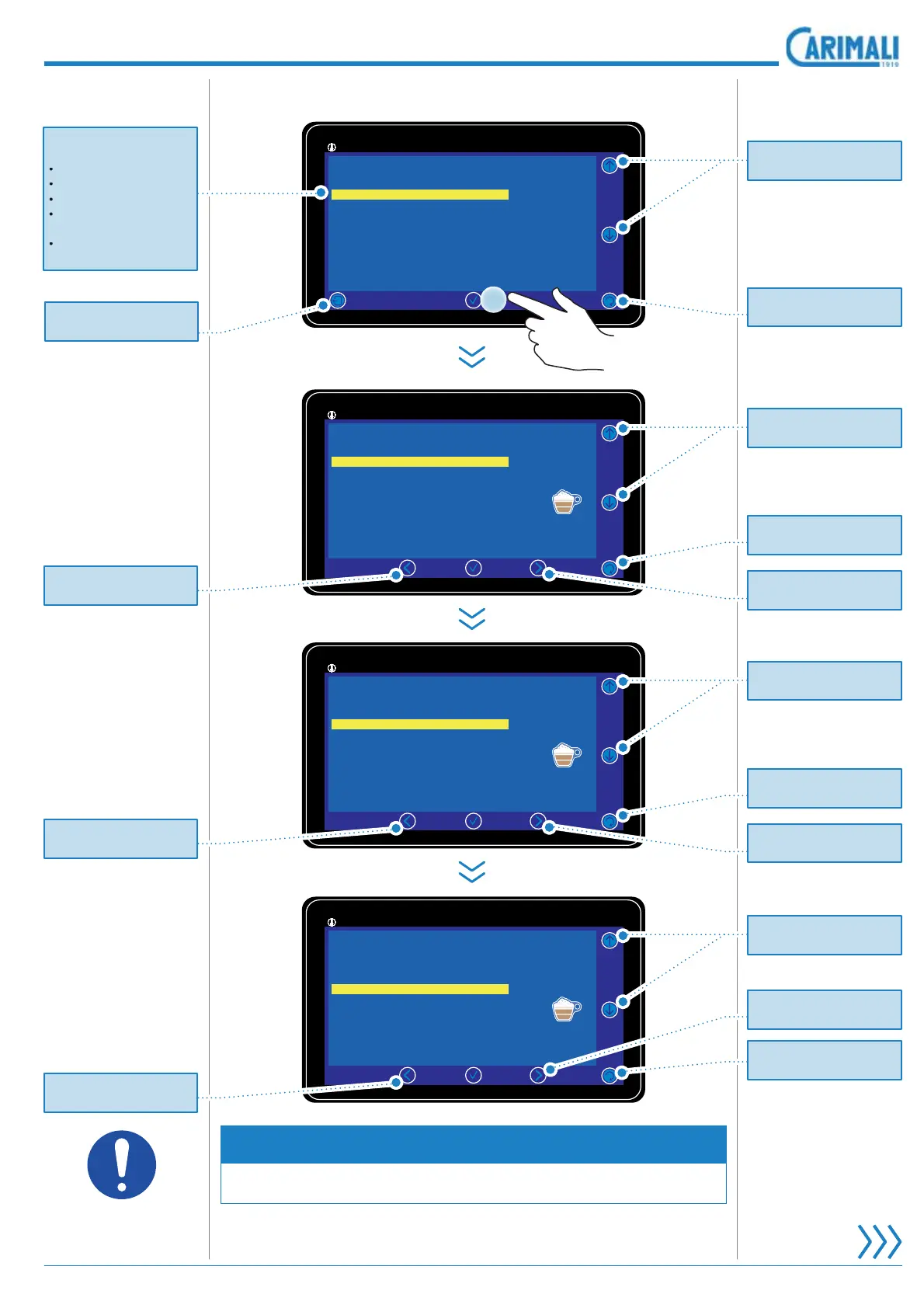
5.5.1 Selection options
Set the selected bev-
erage enabled “yes”
or disabled “no”.
Select the name of
the beverage from a
list provided by the
manufacturer.
Select the number
of products (from 1
WR WKDW PDNH XS
the beverage to be
delivered.
NOTE
The amount of products can modify the next menus.
11:25 19 February 2017Drink settings
92°/145°
|
Cappuccino
Product 1 settings
Selection option
Instant
EspressoProduct 2 settings
11:25 19 February 2017Drink settings
92°/145°
|
Cappuccino
Drink name
Drink enabled
Espresso
1
Yes
1,50
High
Products number
Cup Sensor
Price (EUR)
Drink icon
Selection option
11:25 19 February 2017Drink settings
92°/145°
|
Cappuccino
Drink name
Drink enabled
Espresso
1
Yes
1,50
High
Products number
Cup Sensor
Price (EUR)
Drink icon
Selection option
11:25 19 February 2017Drink settings
92°/145°
|
Cappuccino
Drink name
Drink enabled
Espresso
1
Yes
1,50
High
Products number
Cup Sensor
Price (EUR)
Drink icon
Selection option
Pr
t
r
t
rn t
th
revious pa
e.
Pr
t
r
t
rn t
th
revious pa
e.
Pr
t
r
t
rn t
th
revious pa
e.
Pr
t
r
ll
the options.
Pr
t
r
ll
the options.
Pr
t
r
ll
the options.
Pr
t
r
t
rn t
th
revious pa
e.
Pr
t
r
ll
the options.
Pr
t
r
ll
the options.
Pr
t
r
ll
the options.
Pr
t
r
t
rn t
th
Power
n pa
e.
elect to access the
ettin
s pa
e
or
Bevera
e ico
Bevera
e nam
Pr
t n
m
r
Drink enablin
disablin
up t
pe associated
t
th
rink.
Pr
t
r
ll
th
m
n
ntri
.
Pr
t
r
ll
th
m
n
ntri
.
Pr
t
r
ll
th
m
n
ntri
.
Pr
t
r
ll
th
m
n
ntri
.









 To Next Page