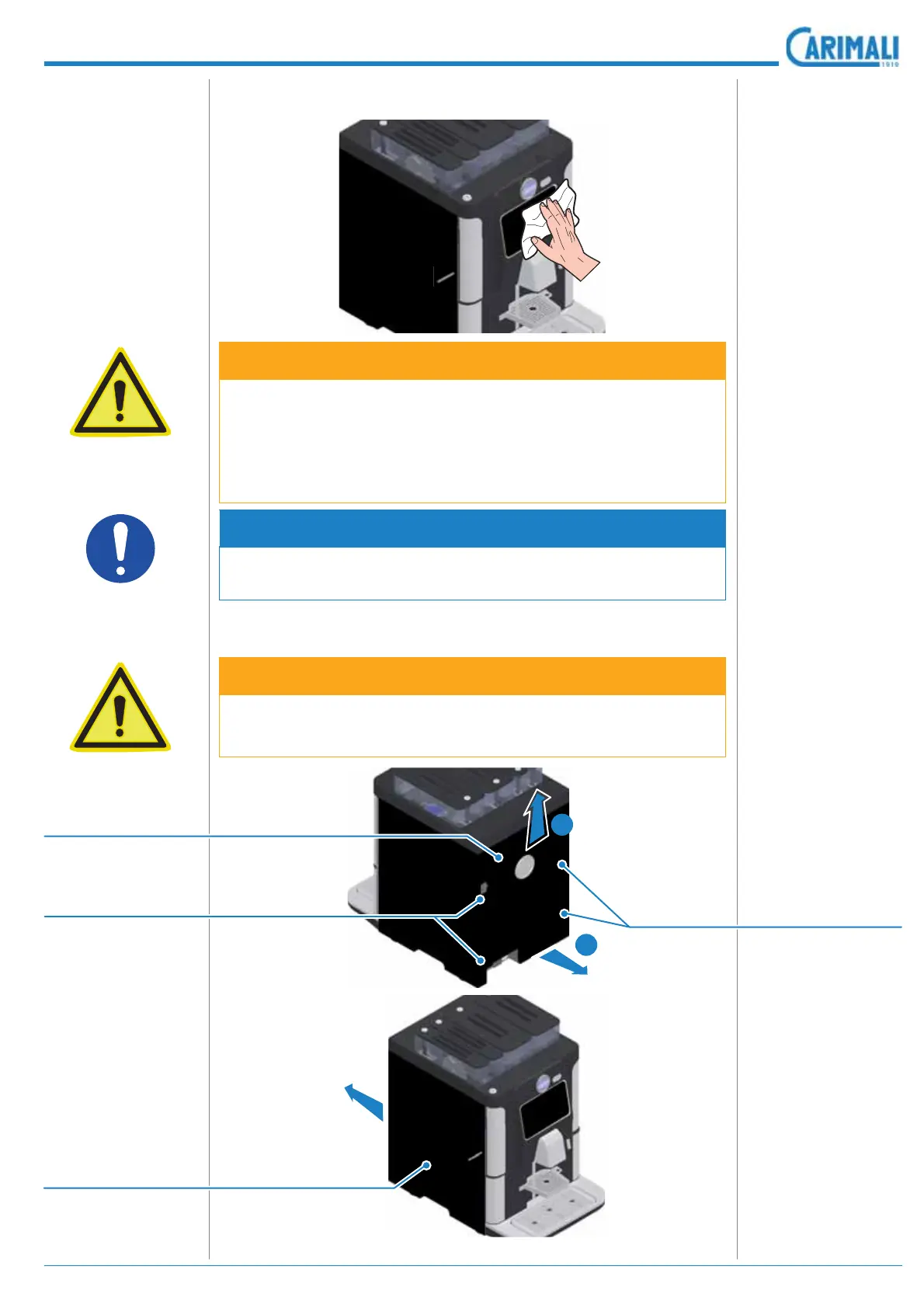
4.3Disassembly and cleaning procedures
4.4 MACHINE PANELS
4.4.1 External cleaning of the machine
ATTENTION
Be very careful when handling the machine panels to prevent them
from being damaged.
ATTENTION
Clean the outer surfaces using a non-abrasive cloth, dampened
with warm water.
Never use:
• Abrasive cloths or steel brushes.
• Aggressive, foaming detergents and/or other solvents.
• Hot water and acids.
NOTE
To access the inner components of the machine, remove the rear
panel and the side ones.
4.4.2 Panel removal for accessing the machine
Loosen the locking
screws of the rear
panel to release it.
Lift the panel up-
wards and remove
it towards the rear
side of the machine.
Remove the side
panels towards the
rear of the machine
by slightly pressing
them.
1
2
Rear panel
Side panel
Fastening screws
Fastening screws









 To Next Page