EasyManua.ls Logo

Carimali BlueDotPlus - Page 181

Carimali BlueDotPlus
262 pages
Print Icon
To Next Page IconTo Next Page
To Previous Page IconTo Previous Page
Loading...
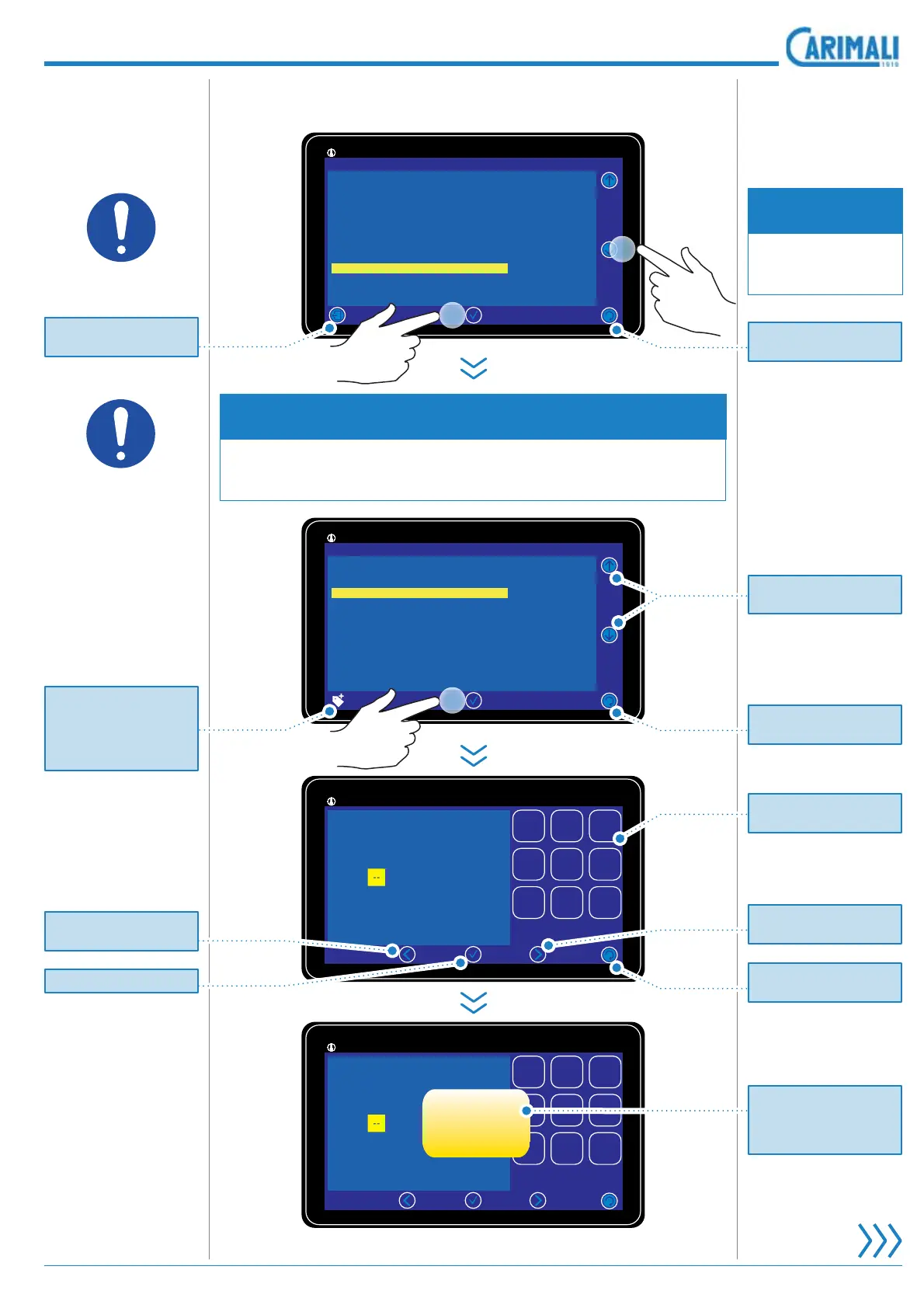
5.55Programming
NOTE
,WLVSRVVLEOHWRFKDQJHRQO\WKHSDVVZRUGVHOHFWHGDFFRUGLQJWR
access made or underlying levels.
 &KDQJH3DVVZRUG
NOTE
Enter the correct
SDVVZRUG WR DF-
cess this menu.
Access the pass-
ZRUG FKDQJH IXQF-
tion.
11:25 19 February 2017
92°/145°
|
System Manager
Display Regulation
System clock programming
Machine Configuration
Machine Parameter
Boiler Empty
Boiler Fill
Change Password
Energy Save
Calibration
GSM Service
11:25 19 February 2017
92°/145°
|
System Manager
Change Password
Roaster
Waiter
Owner
Service
Technician
11:25 19 February 2017
92°/145°
|
-- ------
Insert password
123
456
789
11:25 19 February 2017
92°/145°
|
-- ------
Insert password
123
456
789
WAIT PLEASE
2
1
x6
Pr
ess
t
o
r
e
t
u
rn t
o
the previous pa
g
e.
Pr
ess
t
o
r
e
t
u
rn t
o
the previous pa
g
e.
Pr
ess
t
o
r
e
t
u
rn t
o
the previous pa
g
e.
M
essa
g
e to save settin
g
s.
A
f
ter savin
g
, th
e
displa
y
will show the
Sy
stem Mana
g
er screen.
Press to scroll the di
g
it to
be
e
nt
e
r
ed
.
Pr
ess
t
o
r
e
t
u
rn t
o
th
e
Power
O
n pa
g
e.
Press to access the ta
g
au
th
e
nti
ca
ti
o
n.
Function enabled onl
y
wh
e
n th
e
RFID r
eade
r i
s
e
n
ab
l
ed
.
Press to scroll the di
g
it to
be
e
nt
e
r
ed
.
,WFRQ
¿
UPVWKHHQWU
\
Pr
ess
t
o
se
l
ect
the password level.
Numerical ke
y
pad per
p
assword entr
y
.

Table of Contents

Related product manuals