3-SETUP
DCM-300modemorAg3000™modem
NOTE:Themodemmustbeproperlyinstalledinthecab
ofthevehiclepertheinstructionsthataccompanytheunit.
NOTE:UsethisoptiontosetupCenterPoint™VRScor-
rection.
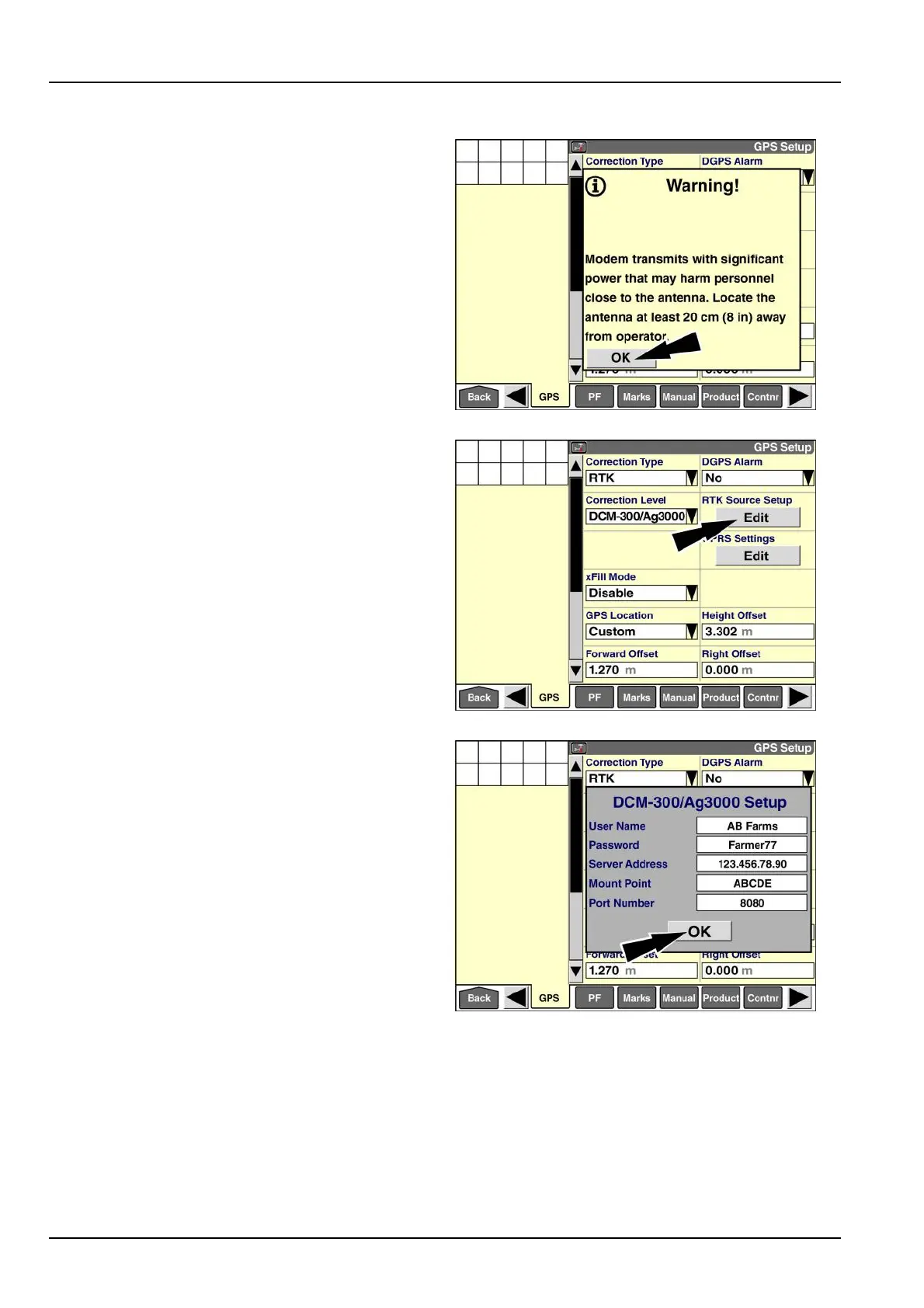
Whenyouselect“DCM-300/Ag3000”inthe“Correction
Level”window,apop-upmessagedisplays:“Modem
transmitswithsignicantpowerthatmayharmpersonnel
closetotheantenna.Locatetheantennaatleast20cm
(8in)awayfromoperator.”
Pressthe“OK”buttontoacknowledgethemessage.
RAIL14DSP1545BA24
Thescreenupdateswithadditionalwindowsfor
modem-basedRTKcorrection:
•
“RTKSourceSetup”
•
“GPRSSettings”
•
“xFillMode”
Pressthe“Edit”buttoninthe“RTKSourceSetup”window
toaccessthe“DCM-300/Ag3000Setup”pop-upwindow.
RAIL14DSP1546BA25
InputtheRTKnetworkinformationfromtheRTKnetwork
provider.
Pressthe“OK”buttontosavethevaluestothedisplay’s
memory.
RAIL14DSP1547BA26
3-56



 To Next Page