3-SETUP
RealTimeKinematic(RTK)setup
TherearetwopossiblesourcesforRTKsignalonavehicle:
•
Radio(AgGPS®):receivessignalfromadataradioatalocalbasestation
•
Modem(DCM-300orAg3000™):receivessignalfromawirelessGeneralPacketRadioService(GPRS)connec-
tionviaanetworkofmunicipallyorprivatelyownedreferencestations
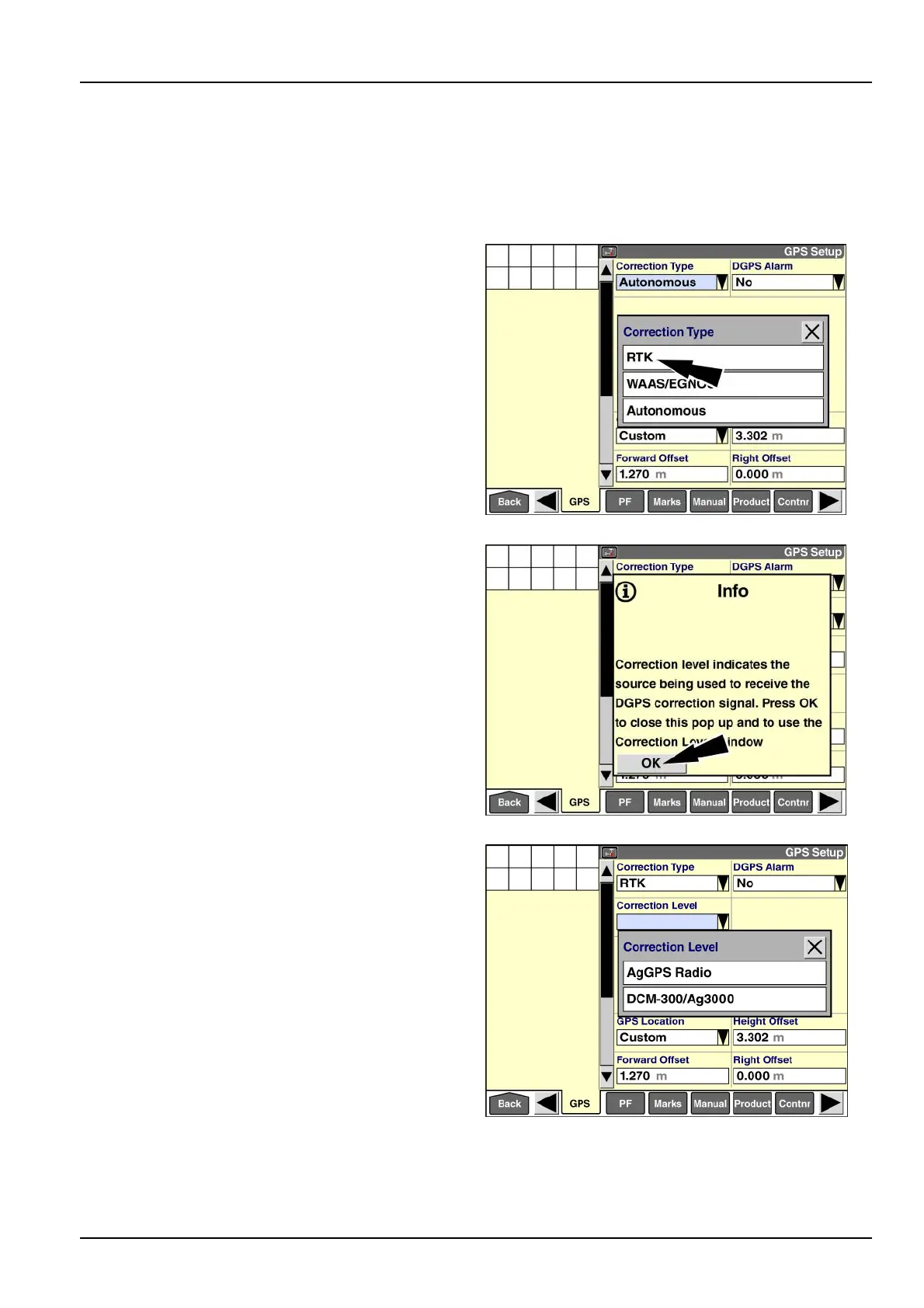
Usethe“CorrectionType”windowtoselectthecorrection
technologythatyouintendtouse.
Pressthe“CorrectionType”windowtodisplaythepop-up
optionswindow.
NOTE:Thepop-upoptionswindowonlyincludesthe
typesofcorrectionthathavebeenactivatedforyour
receiver.
Press“RTK”intheoptionswindow.
RAIL14DSP1523BA1
Apop-upmessagedisplays:“Correctionlevelindicates
thesourcebeingusedtoreceivetheDGPScorrection
signal.PressOKtoclosethispopupandtousethe
CorrectionLevelwindow.”
Pressthe“OK”buttontoacknowledgethemessage.
RAIL14DSP1524BA2
Usethe“CorrectionLevel”windowtoestablishhow
thevehiclewillreceivetheRTKcorrectionsignal.The
possibleoptionsare:
•
“AgGPSRadio”
•
“DCM-300/Ag3000”
Pressthe“CorrectionLevel”windowtoaccessthepop-up
optionswindow.
Pressthecorrectoptionforyourconguration.
RAIL14DSP1525BA3
Eachcongurationhasuniquesetuprequirementsthataredescribedbelow.
Informationaboutthewindowsthatarecommontobothcongurations–“xFillMode,”“xFillSetup,”and“Scintillation
Mode”–isattheendofthissection.
3-47



 To Next Page