3-SETUP
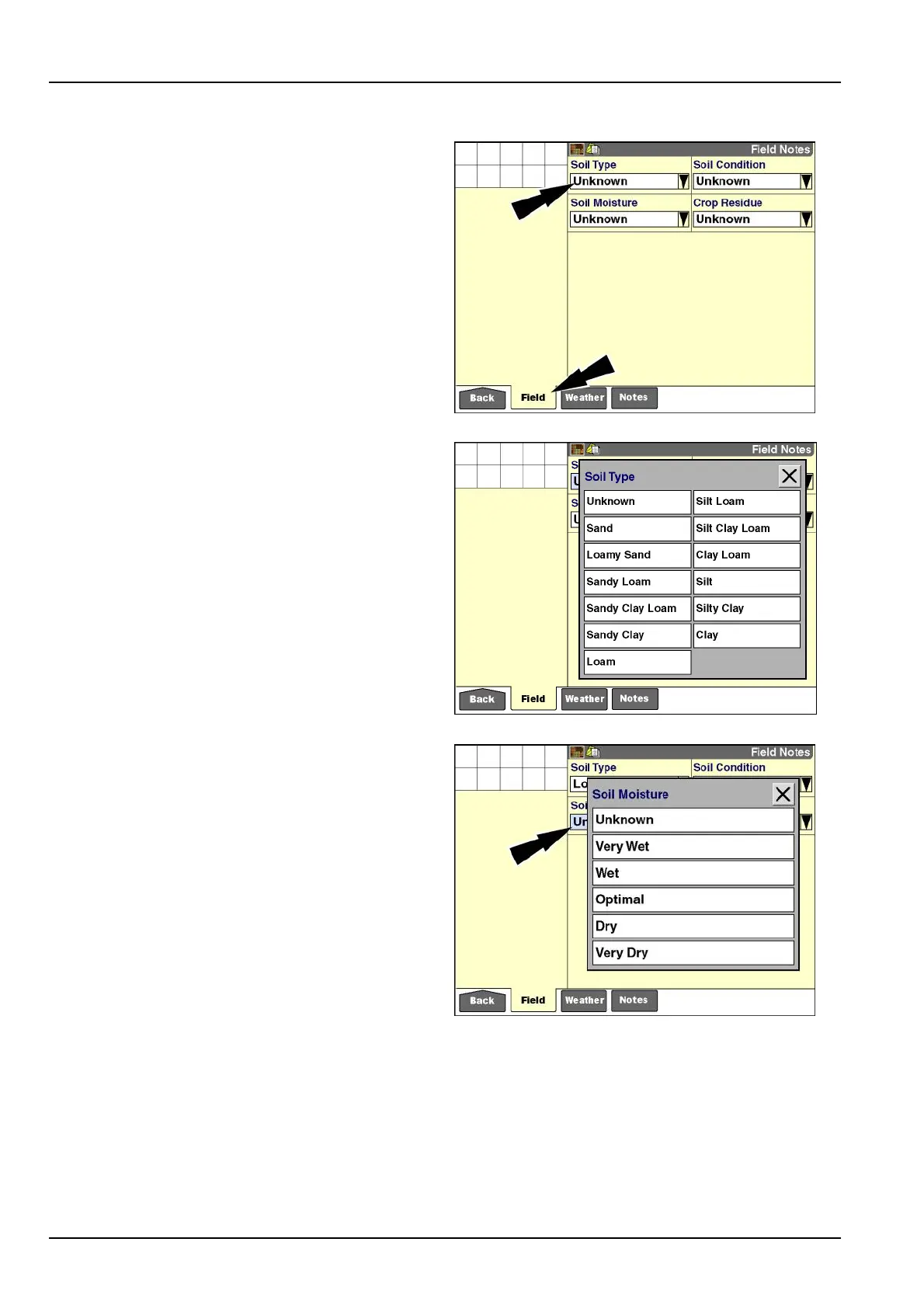
"FieldNotes"screen
The“FieldNotes”screendisplaysbydefault.
Ifadifferent“E-Notes”screendisplays,pressthe“Field”
icononthenavigationbartoaccessthe“FieldNotes”
screen.
Usethefourwindowswithpredenedliststoselectthe
soiltype,soilmoisture,soilcondition,andcropresiduefor
thecurrenteld.Thelistsofferstandardclassications
tobeusedforalleldsandcannotbemodiedbyan
operator.
Pressthe“SoilType”windowtoaccessthepop-upop-
tionswindow.
NOTE:Thedefaultsettingforallsoilandcropresidue
windowsis“Unknown.”
RCIL11DSP417BBG1
Presstheselectionthatbestmatchesthetypeofthesoil
inthecurrenteld.
RCIL11DSP418BBG2
Pressthe“SoilMoisture”windowtoaccessthepop-up
optionswindow.
Presstheselectionthatbestmatchesthemoistureofthe
soilinthecurrenteld.
RCIL11DSP420BBG3
3-170



 To Next Page