3-SETUP
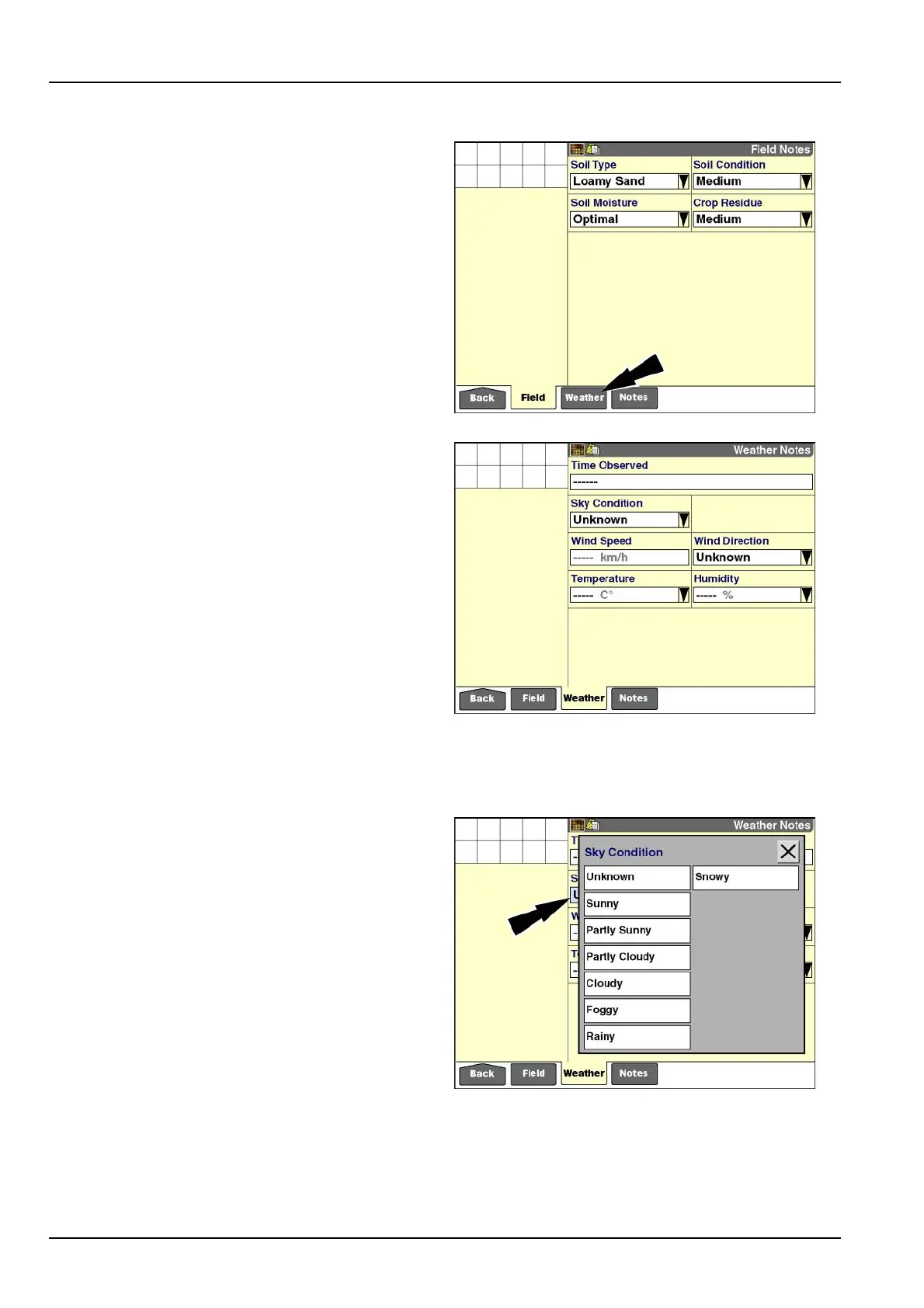
"WeatherNotes"screen
Pressthe“Weather”iconinthenavigationbartoaccess
the“WeatherNotes”screen.
RCIL11DSP426BBG1
Usethesixwindowsonthe“WeatherNotes”screen:
•
Toapplyatimeanddatestampforwhenthecurrent
weatherconditionswereenteredorselected
•
Toselectthecurrentskycondition
•
Toenterthecurrentwindspeed
•
Toselectthecurrentwinddirection
•
Toenterthecurrenttemperature
•
Toenterthecurrenthumiditypercentage
The“TimeObserved”windowonlybecomesactiveafter
aselectionorentryhasbeenmadeinanotherwindowon
thisscreen.Thereisnoobservationtotimestampuntil
oneofthewindowscontainsaselectionorentry.
The“SkyCondition”and“WindDirection”windowsonthis
screencontainpredenedlists.Thelistsofferstandard
classicationstobeusedforalltasksandcannotbemod-
iedbytheoperator.
RCIL11DSP428BBG2
Pressthe“SkyCondition”windowtoaccessthepop-up
optionswindow.
Presstheselectionthatmostcloselymatchesthecurrent
skycondition.
RCIL11DSP430BBG3
3-172



 To Next Page