3-SETUP
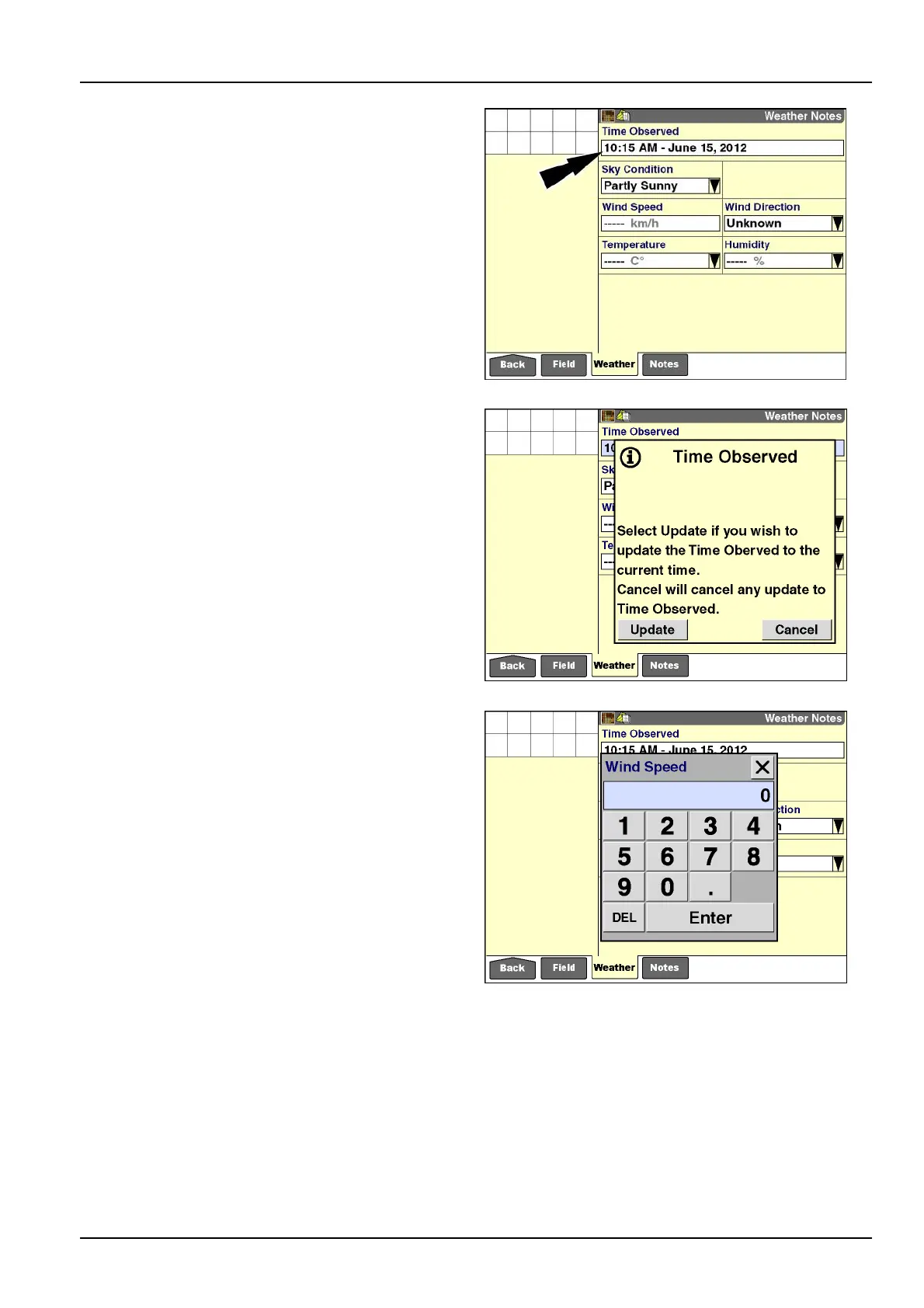
Onceanywindowonthe“WeatherNotes”screenispopu-
lated,the“TimeObserved”windowbecomesactive.The
currenttimeanddateautomaticallyappear.
Thetimeanddatevaluesdisplayedarefromthewindows
onthe“DisplaySetup”screenforthismomentofobser-
vation.
Thetimestampusestheformatselectedinthe“Time
Format”windowonthe“OperatorSetup”screen(Home
>Toolbox>Oper).Thedatestampusestheformatse-
lectedinthe“DateFormat”windowonthesamescreen.
Thereafter,atanytime,theoperatorcanupdatethetime
anddatestampforthemomentofobservationbypressing
the“TimeObserved”window.
RCIL11DSP432BBG4
Aninformationmessagedisplays:“SelectUpdateifyou
wishtoupdatetheTimeObservedtothecurrenttime.
CancelwillcancelanyupdatetoTimeObserved.”
Pressthe“Update”buttononthemessagetoupdatethe
“TimeObserved”valuetothecurrenttimeanddateand
clearthemessage.
Pressthe“Cancel”buttontoleavethecurrenttimeand
datestampunchangedandclearthemessage.
RCIL11DSP433BBG5
Pressthe“WindSpeed”windowtoaccessthenumeric
keypad.
Usethekeypadtoenterthecurrentwindspeedindec-
imalincrementsinkm/hormph,dependingontheunit
ofmeasurementselected.Theacceptablerangeis0.0-
160.9km/h(0.0-100.0mph).
Pressthe“Enter”buttononthekeypadtosavethevalue.
NOTE:Tochangethisvalue,theoperatormustaccess
thekeypad,deletethecurrentvalue,andenteranewone.
RCIL11DSP435BBG6
3-173



 To Next Page