3-SETUP
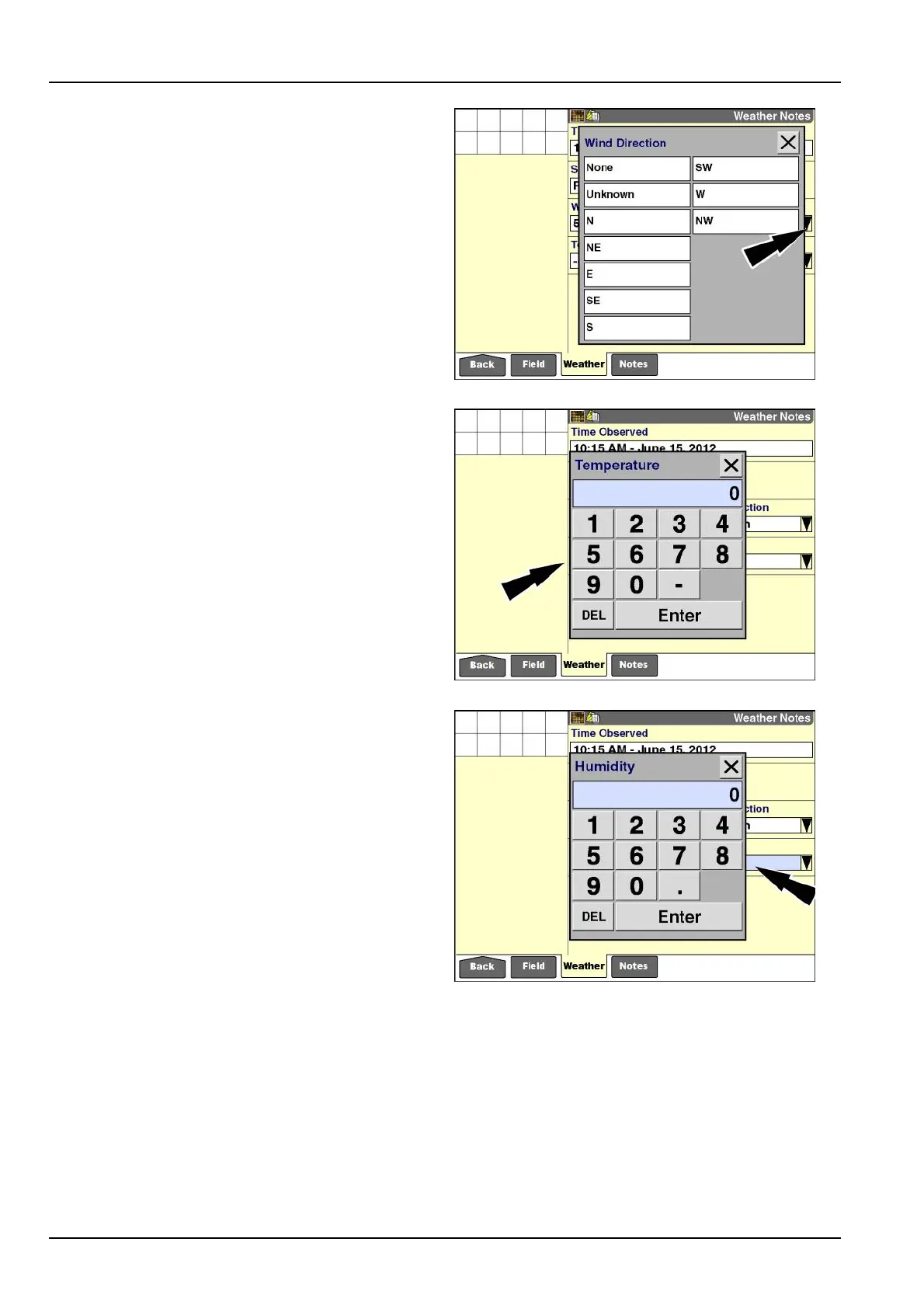
Pressthe“WindDirection”windowtoaccessthepop-up
optionswindow.
Presstheselectionthatmostcloselymatchesthecurrent
winddirection.
RCIL11DSP437BBG7
Pressthe“Temperature”windowtoaccessthenumeric
keypad.
Usethekeypadtoenterthecurrenttemperatureinde-
greesCelsiusorFahrenheit,dependingontheunitof
measurementselected.Theacceptablerangeis-50-
70°C(-58.0-158.0°F).Usetheminus(-)keytoenter
anegativevalue.
Pressthe“Enter”buttononthekeypadtosavethevalue.
NOTE:Tochangethisvalue,theoperatormustaccess
thekeypad,deletethecurrentvalue,andenteranewone.
RCIL11DSP439BBG8
Pressthe“Humidity”windowtoaccessthenumerickey-
pad.
Usethekeypadtoenterthecurrenthumidityasapercent-
age.Theacceptablerangeis0-100%.
Pressthe“Enter”buttononthekeypadtosavethevalue.
NOTE:Tochangethisvalue,theoperatormustaccess
thekeypad,deletethecurrentvalue,andenteranewone.
RCIL11DSP441BBG9
3-174



 To Next Page