3-SETUP
CenterPoint™RTX™setup
NOTE:YoumustenteravalidactivationcodeforCenterPoint™RTX™inthe“ActivationCode”windowbeforeyou
continue.
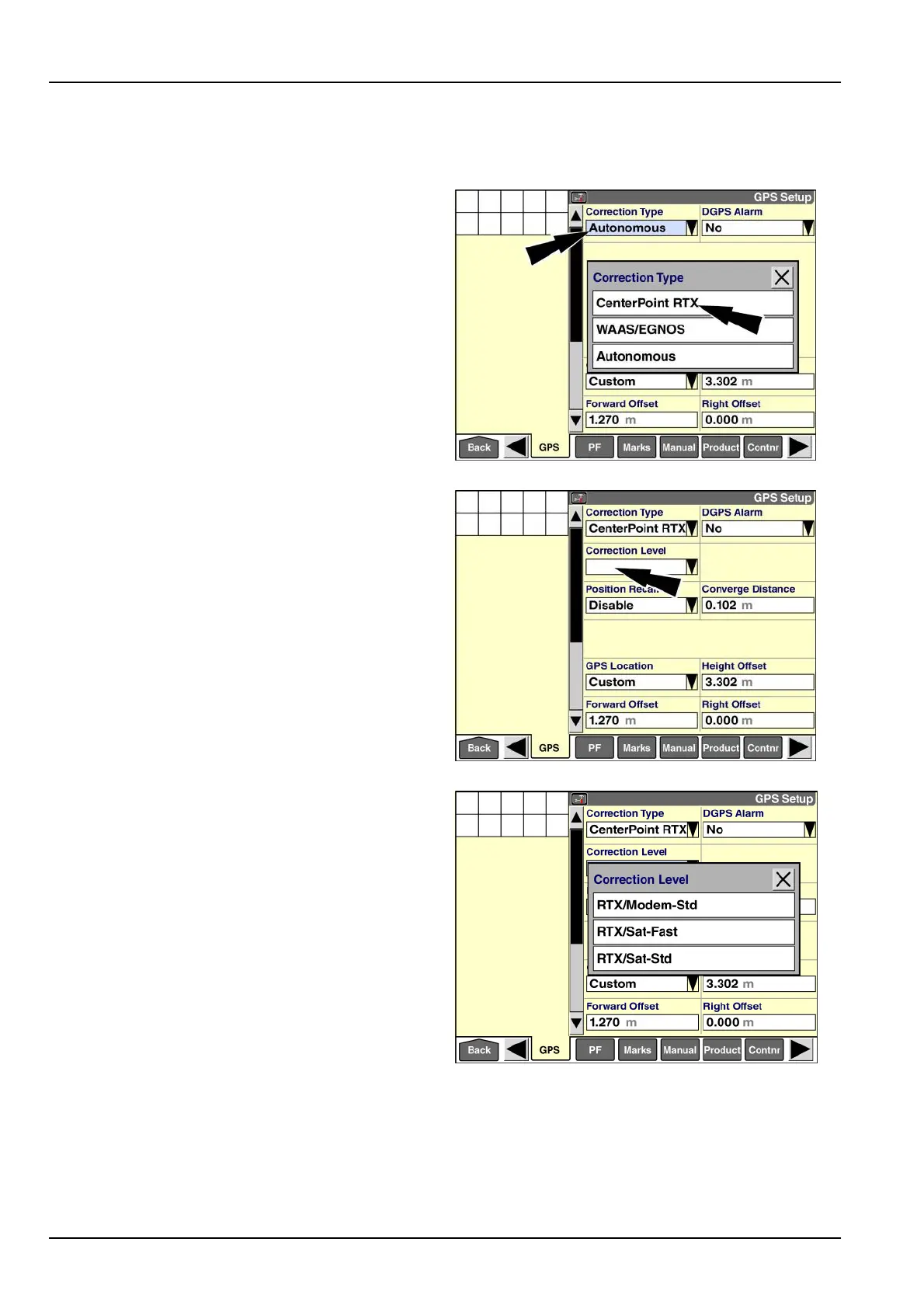
Pressthe“CorrectionType”windowtoaccessthepop-up
optionswindow.
Press“CenterPointRTX.”
RAIL14DSP1558BA1
The“CorrectionLevel,”“PositionRecall,”and“Converge
Distance”windowsareaddedtothescreen.
Usethe“CorrectionLevel”windowtoestablishhowthe
vehiclewillreceivetheCenterPoint™RTX™correction
signal.Thepossibleoptionsare:
•
“RTX/Sat-Std”(satellite,standardconvergence)
•
“RTX/Sat-Fast”(satellite,fastconvergence)
•
“RTX/Modem-Std”(modem,standardconvergence)
NOTE:Thepop-upoptionslistonlyincludestheoptions
thatareactivated.
Pressthe“CorrectionLevel”windowtoaccessthepop-up
optionswindow.
RAIL14DSP1559BA2
Pressthedesiredoptioninthelist.
RAIL14DSP1560BA3
3-62



 To Next Page