4-OPERATION
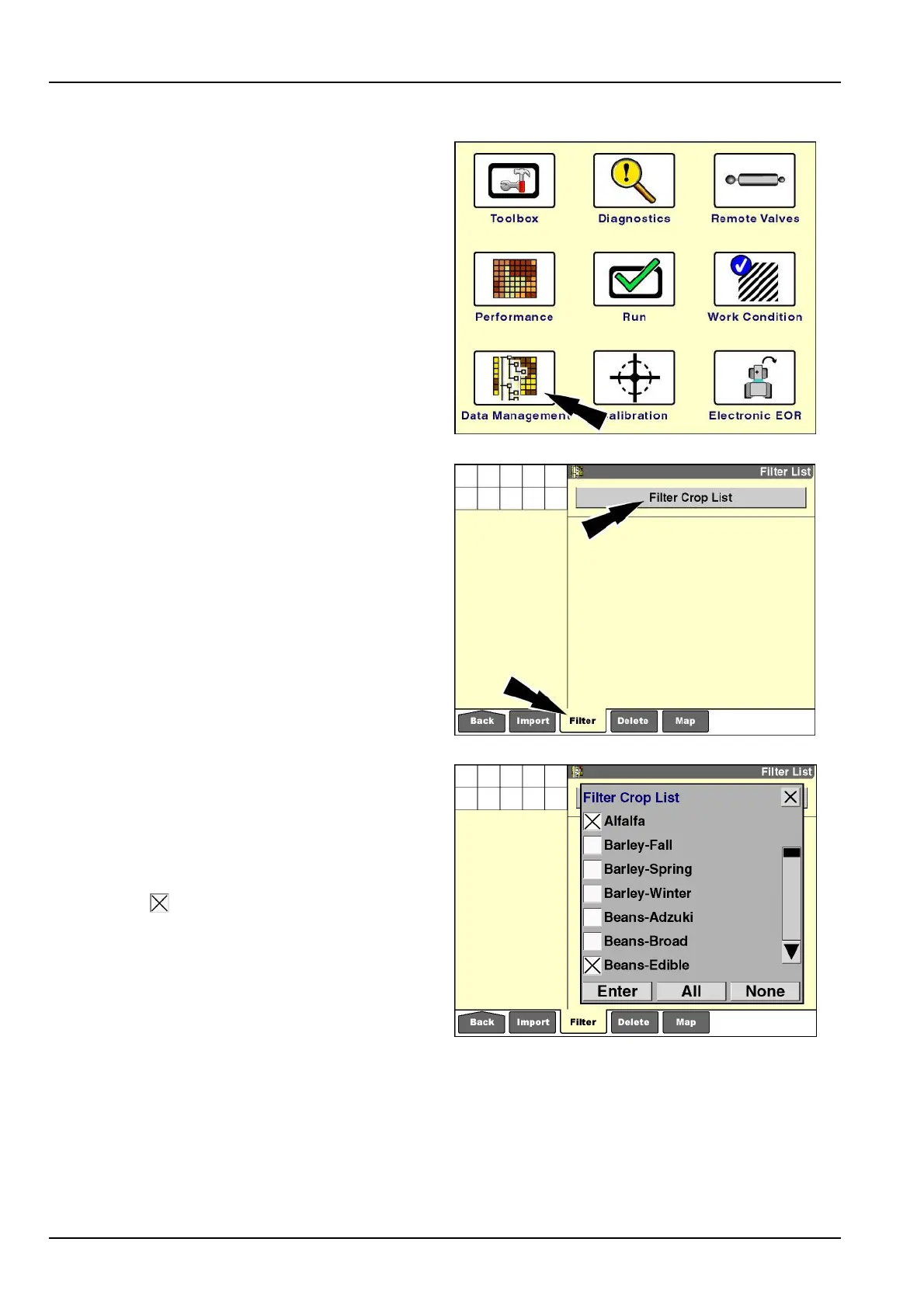
"FilterList"screen(croptypelter)
Thecompletecroplistisnotrequiredinmostfarmingop-
erations.Usethe“Filter”screentodeselectthecroptypes
thatwillnotbeused.Deselectingacroptypewiththis
screenremovesthecroptypeacrossallsoftwareonthe
display,reducingtheriskofselectinganincorrectcrop
type.
Thelteredlistofselectedcropscanbemodiedatany
time.Selectordeselectcroptypesasyourfarmingoper-
ationschange.
Onthe“Home”screen,pressthe“DataManagement”
icontoaccessthe“DataManagement”screens.
RCIL11DSP108BBG1
Pressthe“Filter”iconinthenavigationbartodisplaythe
“Filter”screen.
Thecroplistcontainsallavailablecroptypesforthevehi-
cle.Usethisscreentolimitthecroptypesthatappearin
the“CropType”windowtothoseusedinyouroperation.
Thislistmaybechangedatanytimewithoutaffectingany
recordeddata.
NOTE:Bydefault,allcroptypesareselected.
Pressthe“FilterCropList”buttontoaccessthe“Filter
CropList”pop-upwindow.
RCIL11DSP303BBG2
Thecropsselectedonthislistpopulatethe“CropType”
windowonthe“ProleSetup”screenorthe“Run”
screens.Ifacropisnotselectedonthislist,itcannotbe
selectedinthe“CropType”window.
NOTE:Thecropselectionlistvariesbyvehicletype–
combines,tractors,etc.
Presstheboxnexttothecropnametoselectorde-
selectit,dependingonitscurrentstate.An“X”indicates
thattheboxisselected.
Pressthe“None”buttontodeselectallcrops.
Pressthe“All”buttontoselectallcrops.
Pressthearrowsonthescrollbartopagedownorup
throughwindowentries.
Whenyouaresatisedwiththeselectedcrops,pressthe
“Enter”buttontosavetheselection.
RCIL11DSP305BBG3
4-6



 To Next Page