3-SETUP
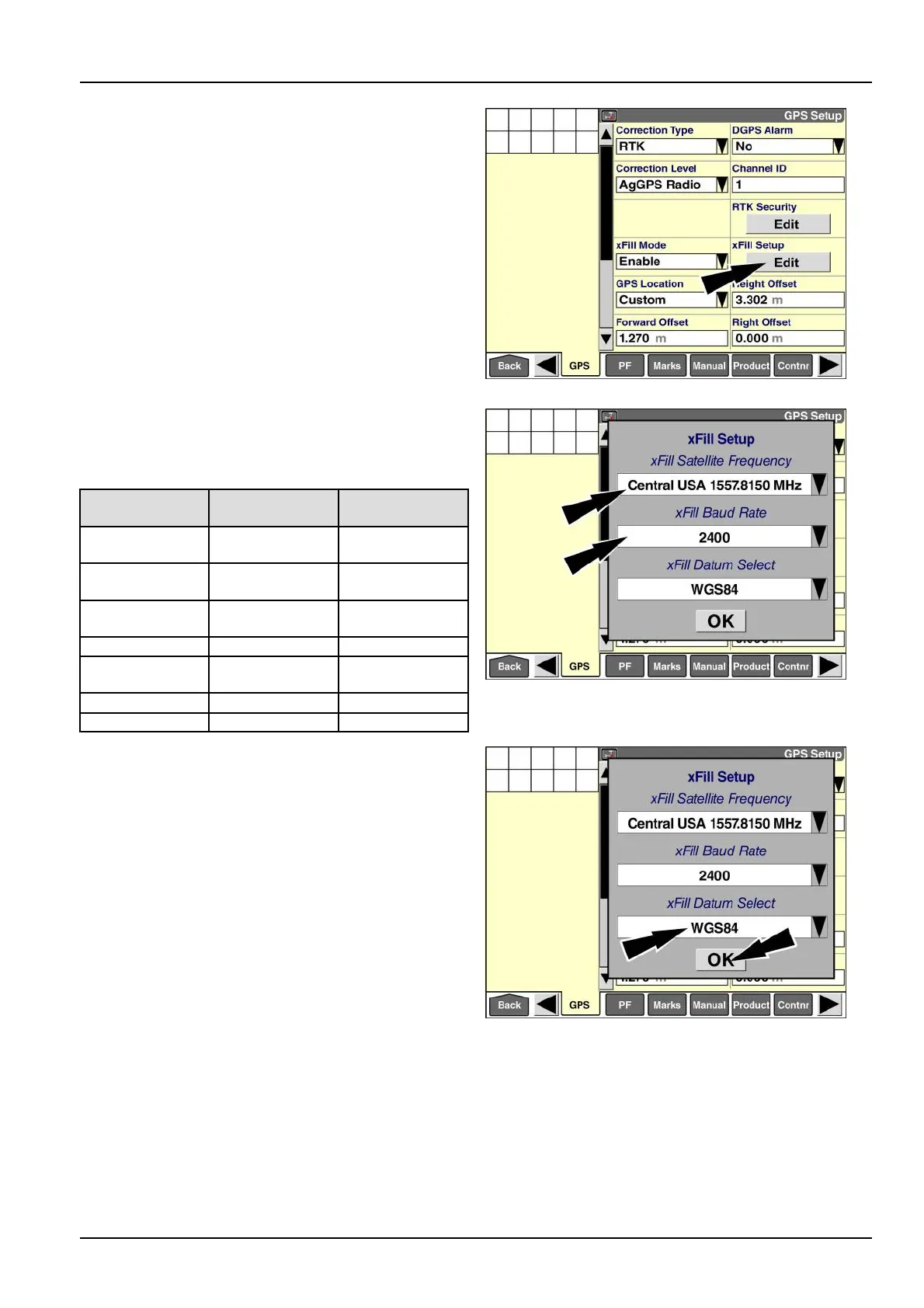
WhenxFill™modeisenabled,the“xFillSetup”window
displays.
Pressthe“Edit”buttoninthe“xFillSetup”windowtoac-
cessthe“xFillSetup”pop-upwindow.
RAIL14DSP1544BA32
Usethe“xFillSatelliteFrequency”windowandthe“xFill
BaudRate”windowtoselectthecorrectsatellitefre-
quencyandbaudrateforyourregion.Refertothebelow
table:
Region
Satellite
frequency
Baudrate
WesternNorth
America
1557.8615MHz600Bd
CentralNorth
America
1557.8150MHz2400Bd
EasternNorth
America
1557.8590MHz600Bd
Canada
1539.8325MHz600Bd
South/Central
America
1539.8325MHz600Bd
Europe/Africa
1539.9525MHz600Bd
AsiaPacic
1539.8325MHz600Bd
RAIL14DSP1543BA33
Usethe“xFillDatumSelect”windowtoselecttheco-
ordinatesystemwithwhichyourbasestationwassur-
veyed.Withthecorrectcoordinatesystemselected,the
AFS372GNSSreceivertranslatesyourpositionandmin-
imizesdrift.Ifyourbasestationwasproperlysurveyed
withinthelastveyears,thexFill™errorwilltypicallybe
lessthan15cm(6in)over20min.
Pressthe“xFillDatumSelect”windowtoaccessthe
pop-upoptionswindow.
Theavailableoptionsare:
•
“WGS84”
•
“ITFR2008”
•
“NAD83”
•
“ETRS89”
•
“GDA94”
Pressthecorrectcoordinatesystem.
Pressthe“OK”buttontosavethenewvalues.
RAIL14DSP1543BA34
3-59



 To Next Page