3-SETUP
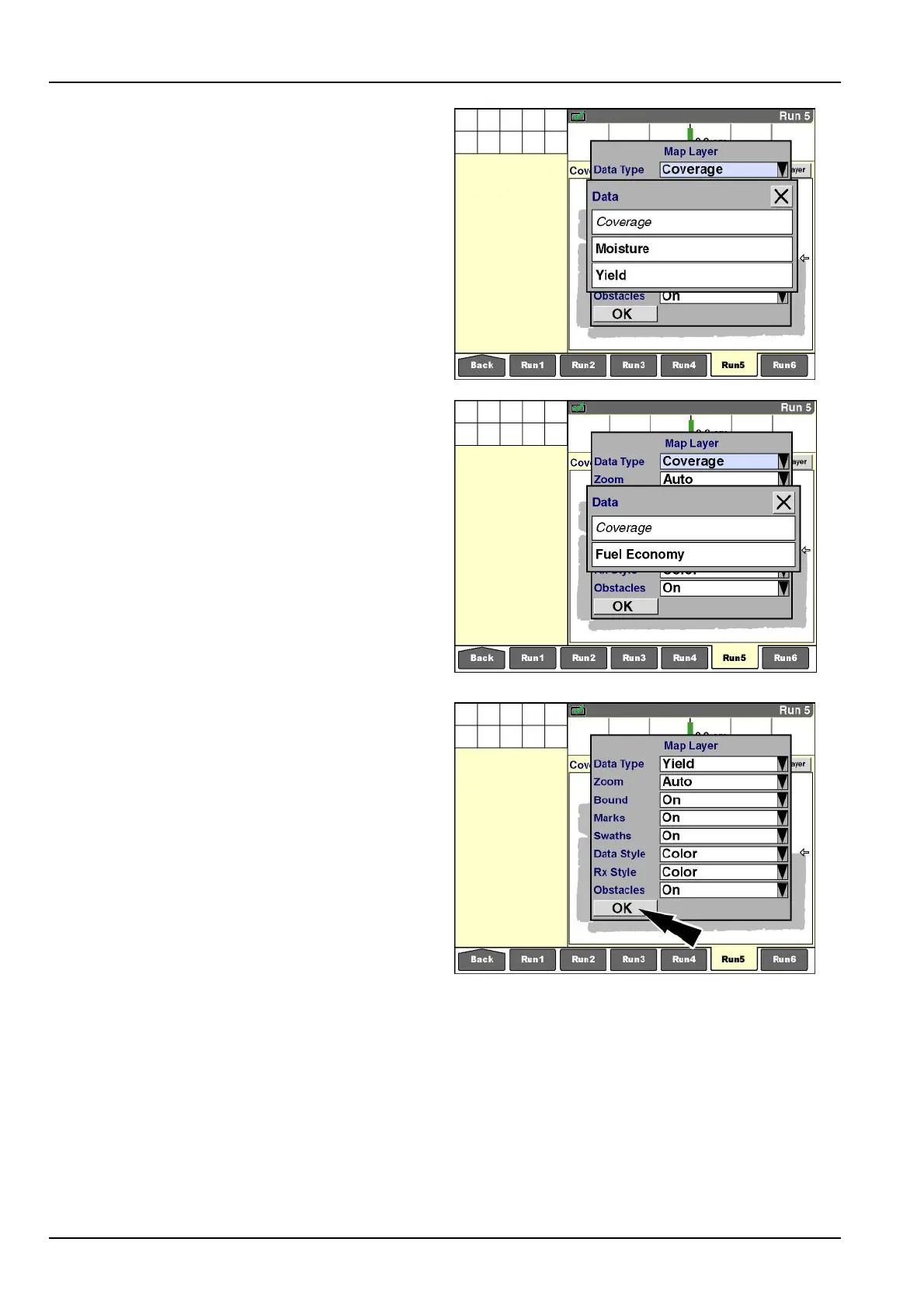
“DataType”
“Coverage”isthedefaultdatatypethatiscommontoall
applicationsonthedisplay.“Coverage”showsthepath
ofthevehicle(withitsimplementorheader)throughthe
eldwhenworkmodeisdetected.
Theotheravailabledatatypesdependonboththe
vehicleandtheapplicationthatisinuse:
•
Onsomecombines,theadditionaloptionsare“Mois-
ture”and“Yield.”
•
Onsometractors,theadditionaloptionis“FuelEcon-
omy.”
•
Whenthe“AsApplied”applicationispresent,theop-
tionsmaybe“Granular,”“Liquid,”“Seed,”“SeedLeft,”
“SeedRight,”“ManApp1,”“ManApp2,”“ManApp3,”and
“ManApp4.”
Pressthedesiredselection.
RCIL11DSP272BBG9
RCIL11DSP273BBG10
The“MapLayer”windowupdateswiththenewsetting.
Pressthe“OK”buttontoclosethe“MapLayer”window.
RCIL11DSP274BBG11
3-148



 To Next Page