4-OPERATION
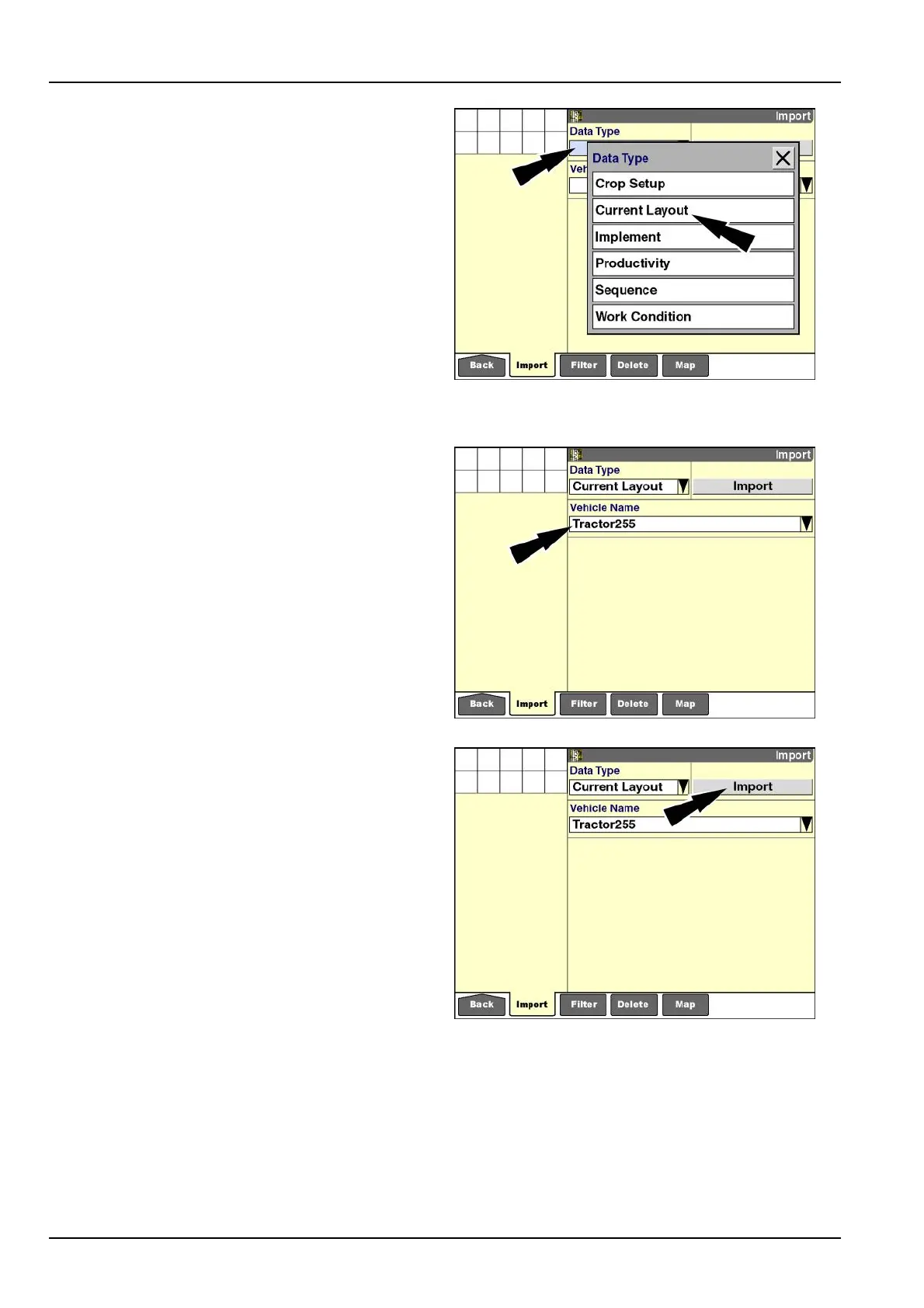
Pressthe“DataType”windowtoaccessthepop-upop-
tionswindow.
Theoptionsthatdisplayarevehicle-dependent.Forex-
ample,“Implement”and“Sequence”areuniquetotractors
anddonotdisplayforcombines.
Thedisplaysupports20currentlayouts,20implements,
40workconditions,and30sequencesforthecurrentve-
hicle.
Amessagedisplayswhenimportingadditionaldataex-
ceedsthemaximumnumberallowedforthedatatype.
Toimportadditionaldatawhenthemaximumnumber
isreached,currentinformationinthedisplaymustbe
deleted.Deletionofdatatypesisexplainedlaterinthis
chapter.
Pressthedesiredselection.
RCIL11DSP299BBG3
Pressthe“VehicleName”windowtoselectthepop-up
optionswindow.
PressthedesiredvehicleID.
NOTE:Thecurrentvehicle’snameneverdisplays:the
currentvehiclealreadyhasitsowninformation.Onlythe
namesofothervehiclesdisplay.
RCIL11DSP300BBG4
Pressthe“Import”button.
RCIL11DSP300BBG5
4-4



 To Next Page