6-MAINTENANCE
Replacementofthebattery
1.SetthebatterydisconnectswitchtoOposition(OFF
position)tocutoffanypowersupplyintheelectrical
systemofthemachine.
2.Opentheenginehood.
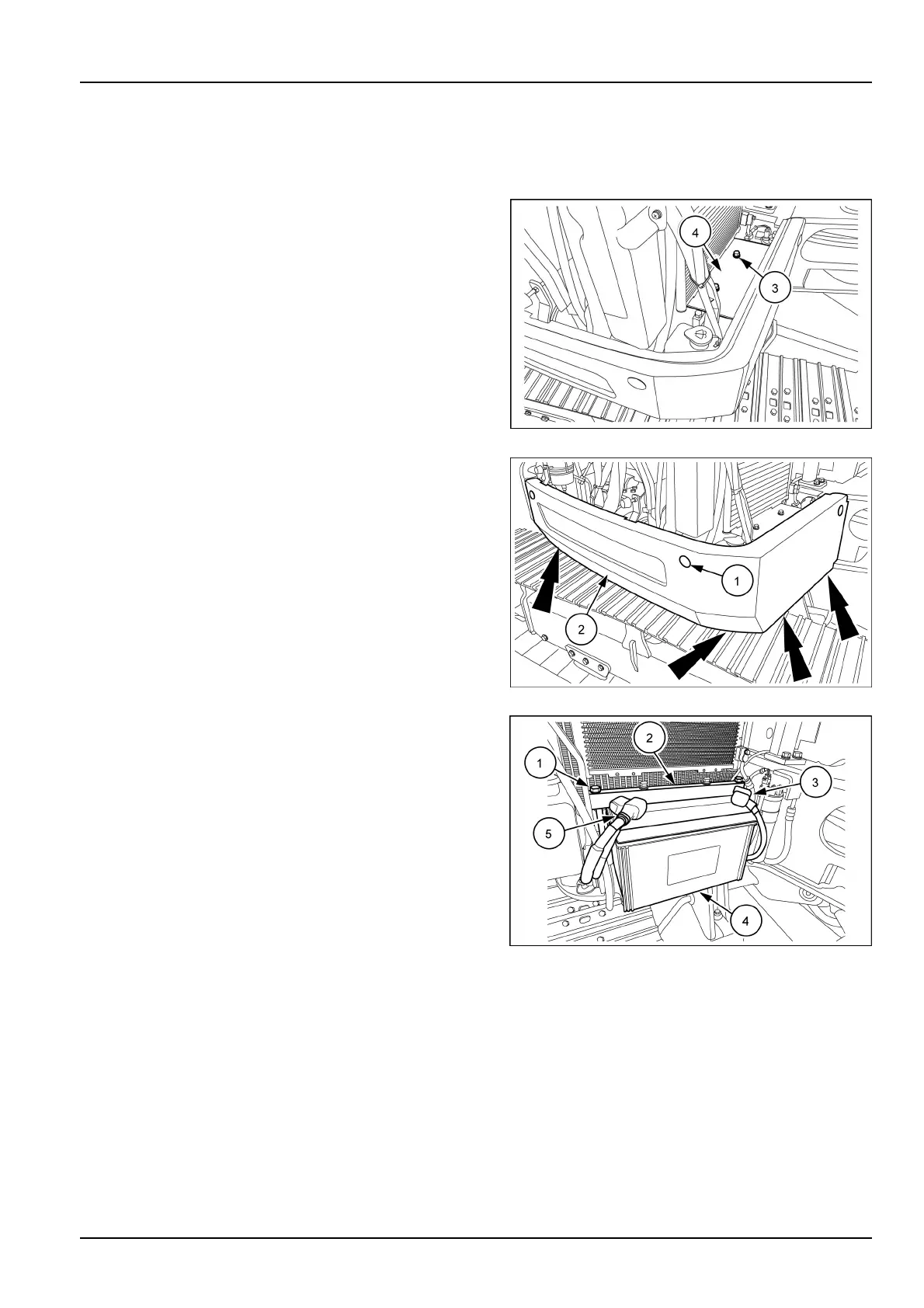
3.Useawrench[17mm]toremovethetwobolts(3),and
thenremovethebatterypanel(4).
SMIL16MEX1101AB1
4.Removetheprotectivecaps(1).
5.Useawrench[13mm]toremovethesevenbolts,then
removetheright-handsidepanel(2).
SMIL16MEX3680AB2
6.Cut-offthenegative-terminalcable(-)(3).Next,cut-off
thepositive-terminalcable(+)(5).
7.Useawrench[17mm]toremovethetwobolts(1),and
thenremovethesupportbracket(2).
8.Removethebattery(4).
9.Positionthenewbattery(4)onthemachine.
10.Installthesupportbracket(2)andthenuseawrench
[17mm]totightenthetwobolts(1).
11.Cleanthecablesandthebatteryterminals,andapply
grease.
12.Connectthepositive(+)(5)andthenegative(-)(3)
cabletothepositiveandthenegativeterminalofthe
batteryrespectively.
SMIL16MEX3681AB3
6-41



 To Next Page