16
Step 8: Check Drone Working Condition
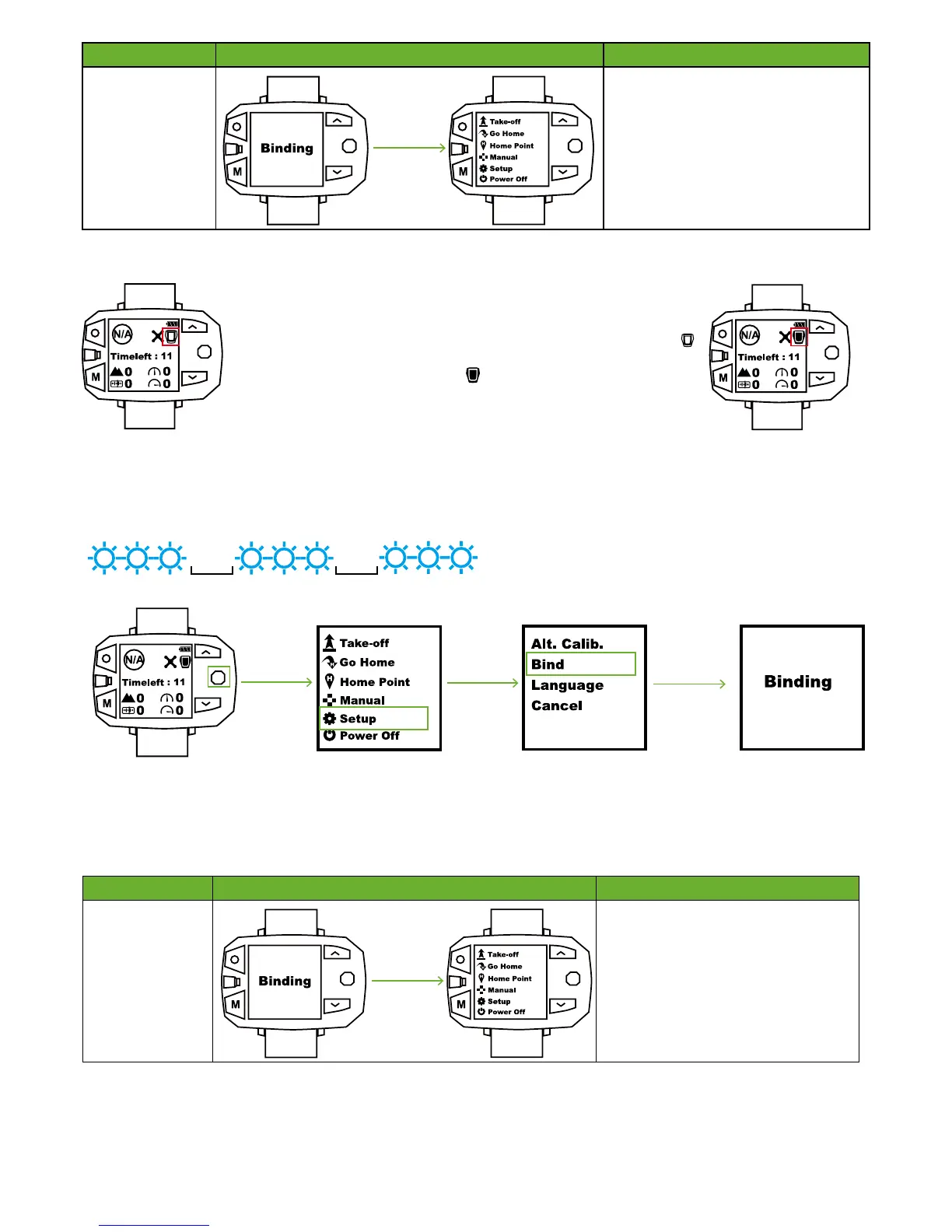
When should I bind Follow Module & Sports Watch?
1. Activate Follow Module Binding Mode
After Follow Module has been turned on, press Power button for five to six times to enter binding mode.
When Blue Light of Follow Module blinks 3 times at intervals of 0.5s, binding mode enables.
0.5s
0.5s
Turn on Drone and check the working condition of gimbal. Ensure whether or not the Yellow LEDs blink correctly.
Devices OK Symbol Instructions
Drone & Sports
Watch
If Bind is OK, Sports Watch will switch to
Menu Interface.
If binding fails, Sports Watch will stay in
the “Binding…” Interface. You should press
STOP button to disable binding mode.
Power cycle Drone and Sports Watch to
enter binding procedures again.
3. How to know binding is OK?
2. Activate Sports Watch Binding Mode
① In Flight Interface of Sports Watch, toggle Nav. Button to right to enter Menu Interface.
② In Menu Interface, choose Setup option.
③ Select Bind option.
④ Binding between Follow Module and Sports Watch will auto begin.
Devices OK Symbol Instructions
Follow Module &
Sports Watch
If Bind is OK, Sports Watch will switch to
Setup Interface.
If binding fails, Sports Watch will stay in
the “Binding…” Interface. You should press
STOP button to disable binding mode.
Power cycle Follow Module and Sports
Watch to enter binding procedures again.
① Please turn on Follow Module and Sports Watch.
② In Flight Interface of Sports Watch, if the Follow Module icon shows as
, please finish binding procedures.
③ If the Follow Module icon shows as , please ignore this step.
How to bind?



 To Next Page