59
Please DO NOT attach any propeller to the drone in this step!
① Enable One-key take-off (press and hold L Button for over 3s) and check whether or not four motors can turn on properly. If
lacking any one of them, drone will fall down directly.
Step 6: Drone Test
Step 7: Attach / Detach Propellers
Attach Propellers
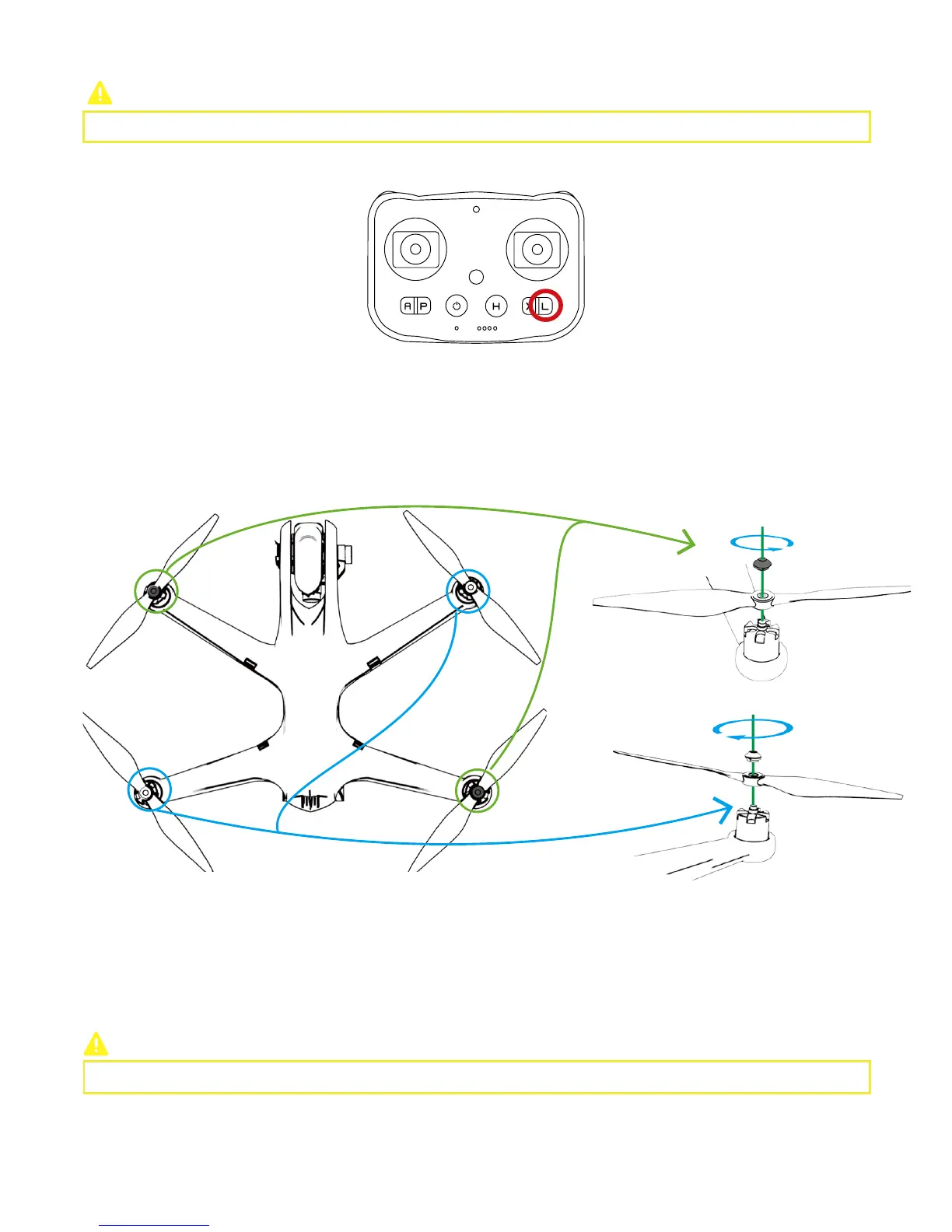
CEEWA Drone uses 10-inch propellers. White and Black nuts on the propellers indicate the rotation direction of propellers and where
it should be attached.
Please activate One-key Take-off on the level surface.
(2)Detach
Hold the motor. Counter-clockwise spin propellers on M1 and M3, while clockwise spin propellers on M2 and M4
.
Step 8: One-Key Take-off
Remote Controller:
Make sure the connection is OK.
Press L Button until Remote Controller vibrates twice shortly and then vibrates once for a longer time. One-Key Take-off activates.
During taking-off, the buzzer will beep to warn.
② Toggle Sticks to observe whether or not motors can rotate normally.
③ Enable One-key land (press and hold L Button for over 3s) and check whether or not four motors can stop.
M1
M2
M3 M4
Black Nut
Please fix each propeller tightly before flight.



 To Next Page