78
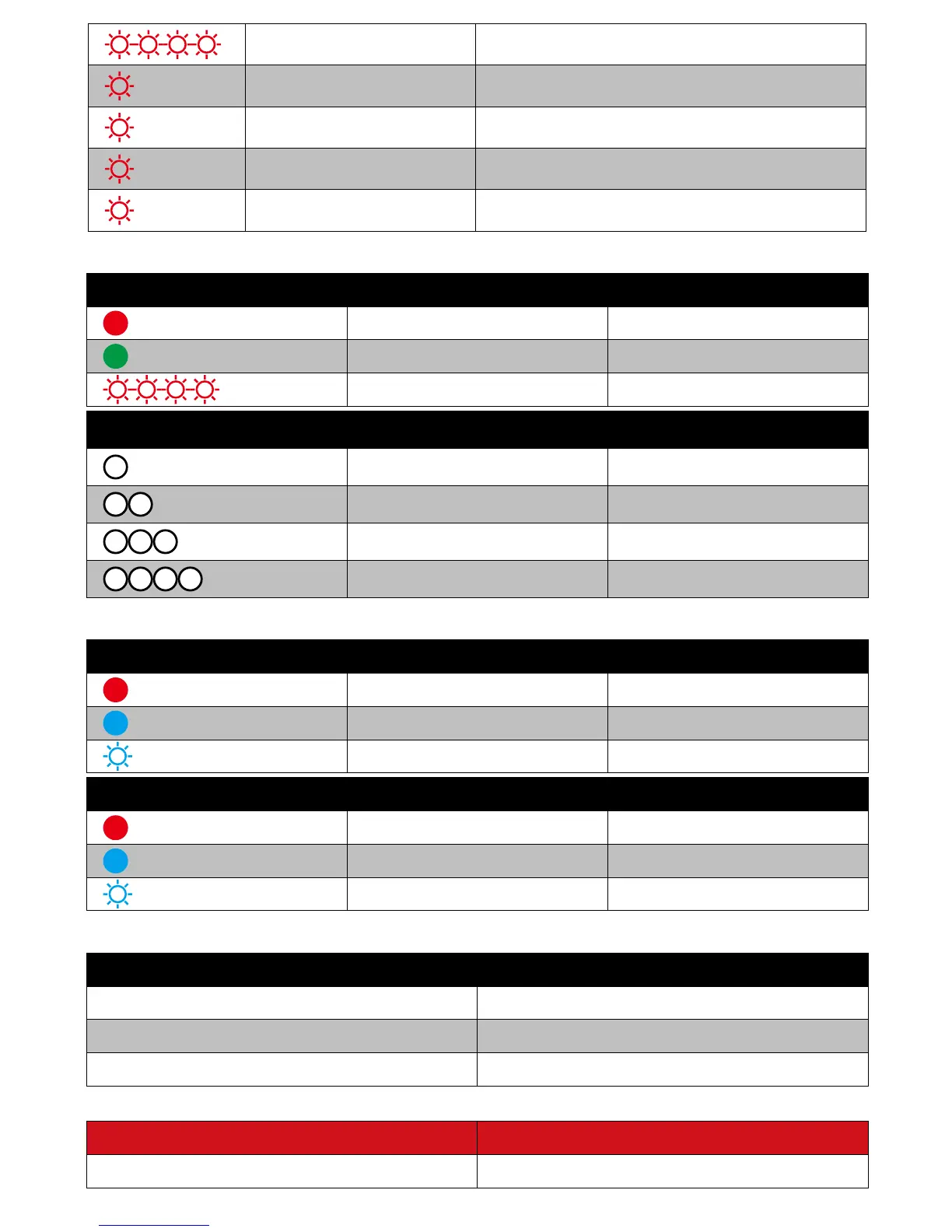
Red Light blinks. Less than 10%
Red Light blinks once. 25%
*2
Red Light blinks twice. 50%
*3
Red Light blinks 3 times. 75%
*4
Red Light blinks 4 times. Full
3. Remote Controller LEDs
Status LED
Red Light is on. Drone Disconnects with RC.
Green Light is on. Drone Connects with RC.
Red Light blinks. Bind with other devices.
Power LEDs
LED 1 is on. 0-25%
;
LED 1 and LED 2 is on. 25%-50%
;
LED 1, LED 2 and LED 3 is on. 50%-75%
;
All the LEDs are on. 75%-100%
;
4. Image Transmission LEDs
Ground System LEDs
灯
Red Light is on. Turn on the power.
Blue Light is on. Connection to Image Transmission is OK.
Red Light blinks. Connecting.
Image Transmission LEDs
Red Light is on. Turn on the power.
Red Light is on. Connection to Ground System is OK.
Red Light blinks. Connecting.
5. Sports Watch Vibration
Normal
Press STOP button Vibrate once.
Switch to Follow Mode Vibrate three times.
Motor STOP Vibrate twice.
Errors
Watch First-Level Low Battery Alarm Prompts for 5s & Vibrate once



 To Next Page