Website:
http://www.ceewa.com/index.php?case=archive&act=list&catid=15
QR Code:
CEEWA APP requires: iOS 8.0 or later.
Android OS4.3 or above with Bluetooth 4.0.
Image Transmission: 5G Wi-Fi should be supported by your smartphone.
Step 1: Check Drone
Step 2: Check Arms & Buckles
Step 3: Check Smart Battery
Step 4: Check Battery Level
Before using the drone, check its components and ensure they are not broken or aging.
Make sure the battery of Smart Battery, remote controller, follow module and camera is enough.
Make sure the arms can fold and unfold smoothly, buckles can be turned on and off.
If you find buckles cannot be fixed tightly and correctly, please ask to change new buckles from costumer service.
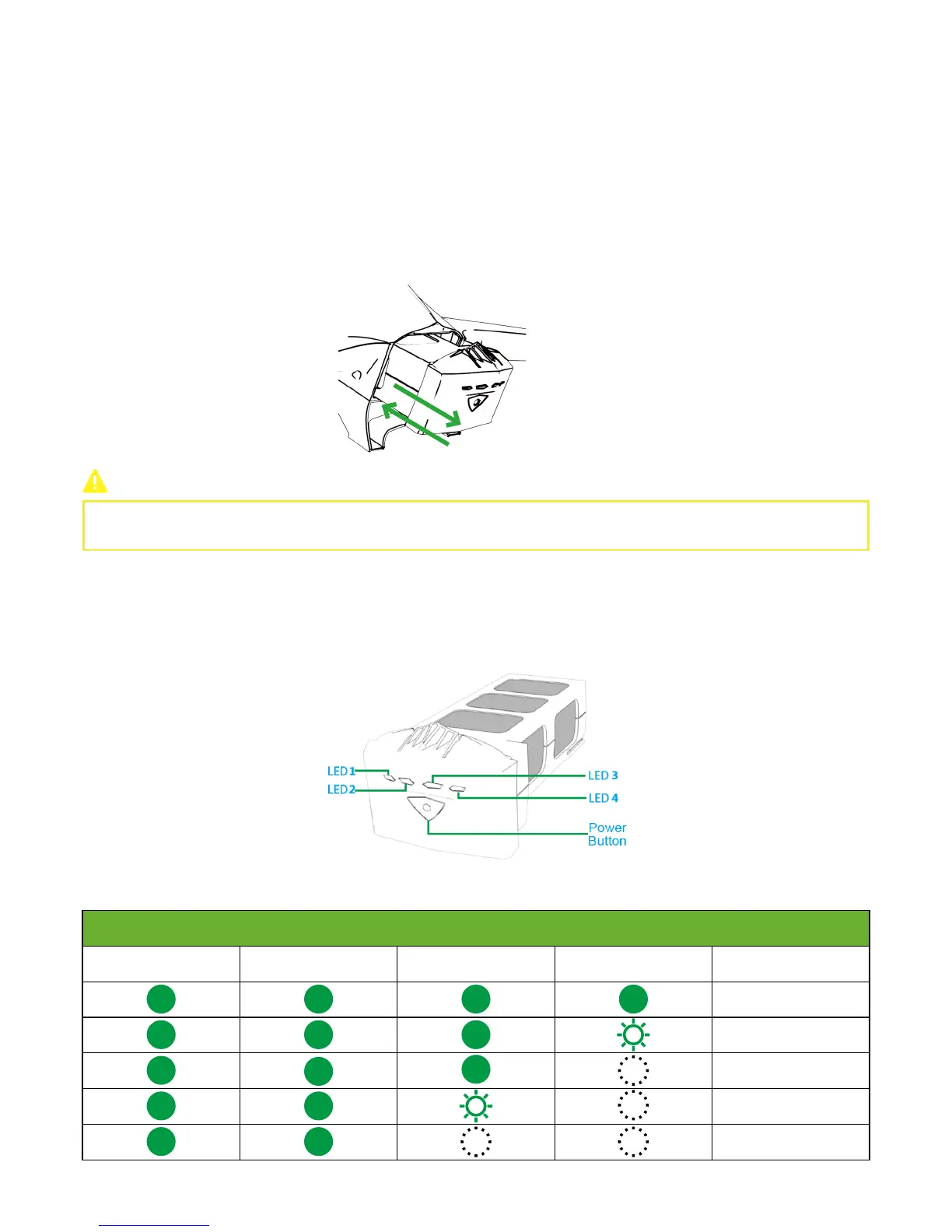
Ensure Smart Battery can be inserted into the drone and lock tightly.
When inserting the battery, DO NOT damage the pins inside the drone.
Smart Battery Level Check & Charging
Press the Power Button once to check the battery level.
LEDs are defined below:
1. Check Battery Level
Battery Level
LED1 LED2 LED3 LED4 Current Level
87.5%~100%
75%~87.5%
62.5%~75%
50%~62.5%
37.5%~50%



 To Next Page