25
M1
M2
M3 M4
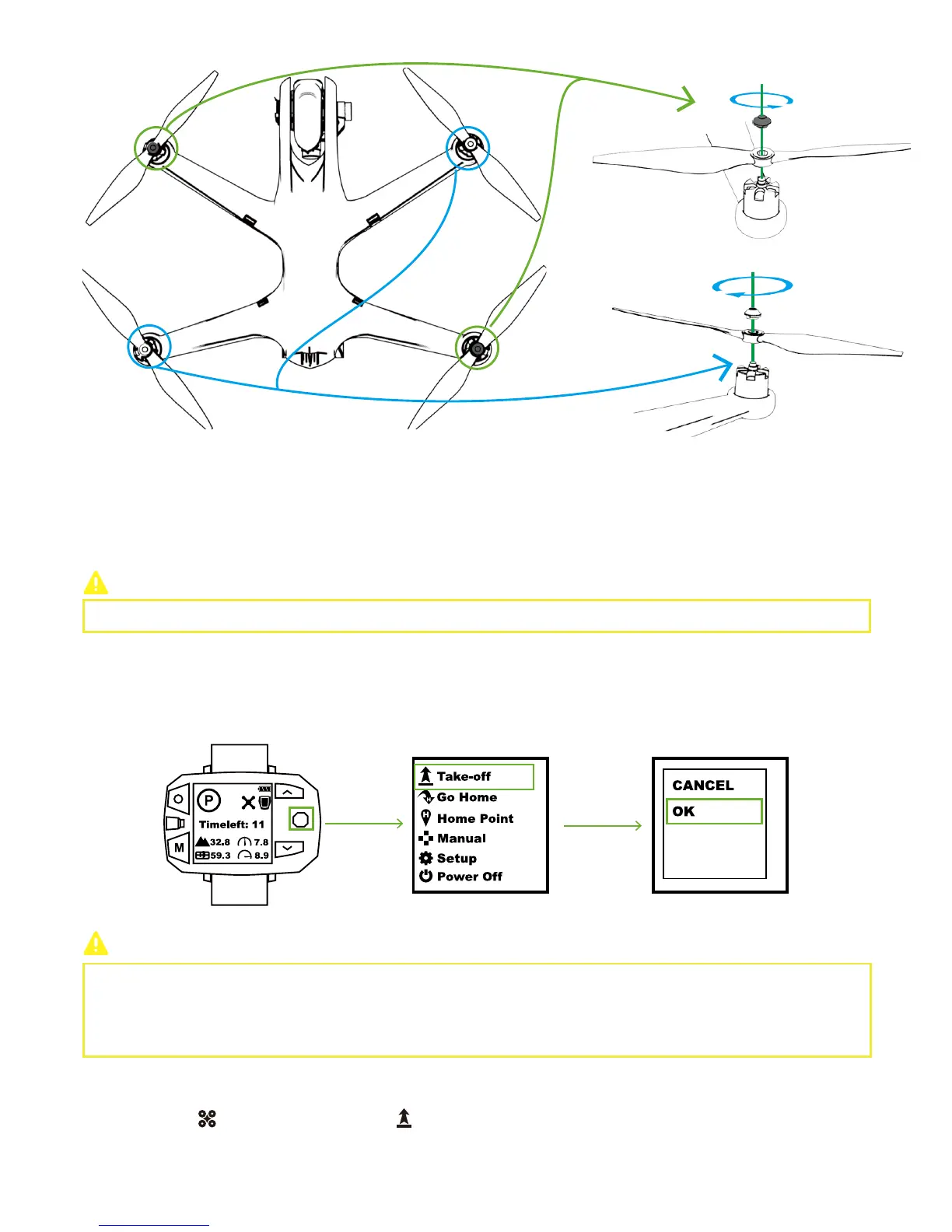
Black Nut
Please fix each propeller tightly before flight.
Please activate One-key Take-off on the level surface.
(2)Detach
Hold the motor. Counter-clockwise spin propellers on M1 and M3, while clockwise spin propellers on M2 and M4
.
Step 8: One-Key Take-off
Sports Watch:
CEEWA APP:
Make sure the connection between Drone and Follow Module is correct.
Toggle Nav. Button to the right & enter Menu Interface. Select “Take-off” option and choose “OK” in the pop-up window. One-Key
Take-off activates.
When Drone has connected to Sports Watch:
Drone will ascend to 5 meters and hover to wait for the next order.
When Drone has NOT connected to Sports Watch:
Drone cannot take off.
In Flight Interface ( ), tap One-Key Take-off icon ( ) and slide the white slider to confirm take-off.
Black Nut
White Nut
White Nut



 To Next Page