73
Before Go-Home, Altitude & Distance between Drone and
Home Point:
How to go home?
Distance
>
5m
Altitude
<
Preset Go-Home Altitude
Drone will ascend to your preset Go-Home Altitude, and then go
home.
Distance
>
5m
Altitude ≥ Preset Go-Home Altitude
Drone will go home directly.
Distance
<
5m
Altitude
<
5m
Drone will ascend to 5 meters, and then go home.
Distance≤5m
Altitude≥5m
Drone will go home directly.
How to set Go-Home Altitude?
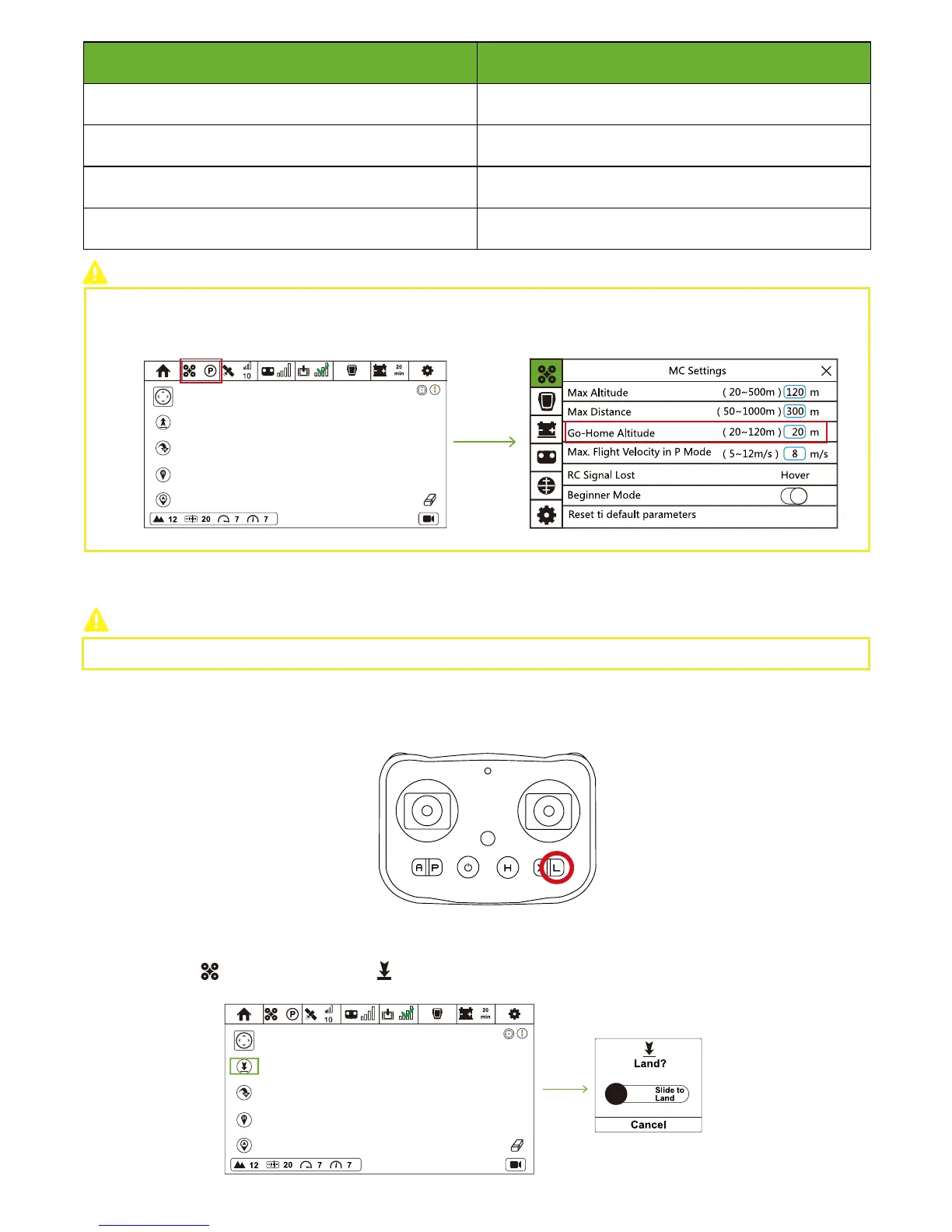
In flight interface, tap "Drone" icon to enter MC setting interface. Set a reasonable value in Go-Home Altitude column.
Step 15: One-key Land
Please land the drone on the level ground.
Press L Button, and One-Key Land activates. During landing, Remote Controller vibrates to alert.
CEEWA APP:
Remote Controller:
In Flight Interface ( ), tap One-Key Land icon ( ) and slide the white slider to confirm landing.



 To Next Page