1. Activate Follow Module Binding Mode
After Follow Module has been turned on, press Power button for five to six times to enter binding mode.
When Blue Light of Follow Module blinks 3 times at intervals of 0.5s, binding mode enables.
Devices OK Symbol Instructions
Drone & Sports
Watch
If Bind is OK, Sports Watch will switch to
Menu Interface.
If binding fails, Sports Watch will stay in
the “Binding…” Interface. You should press
STOP button to disable binding mode.
Power cycle Drone and Sports Watch to
enter binding procedures again.
Devices OK Symbol Instructions
Follow Module &
Sports Watch
If Bind is OK, Sports Watch will switch to
Setup Interface.
If binding fails, Sports Watch will stay in
the “Binding…” Interface. You should press
STOP button to disable binding mode.
Power cycle Follow Module and Sports
Watch to enter binding procedures again.
Step 10: Calibration
Please turn on BLUETOOTH of your smartphone.
CEEWA APP requires: iOS 8.0 or later.
Android OS4.3 or above with Bluetooth 4.0.
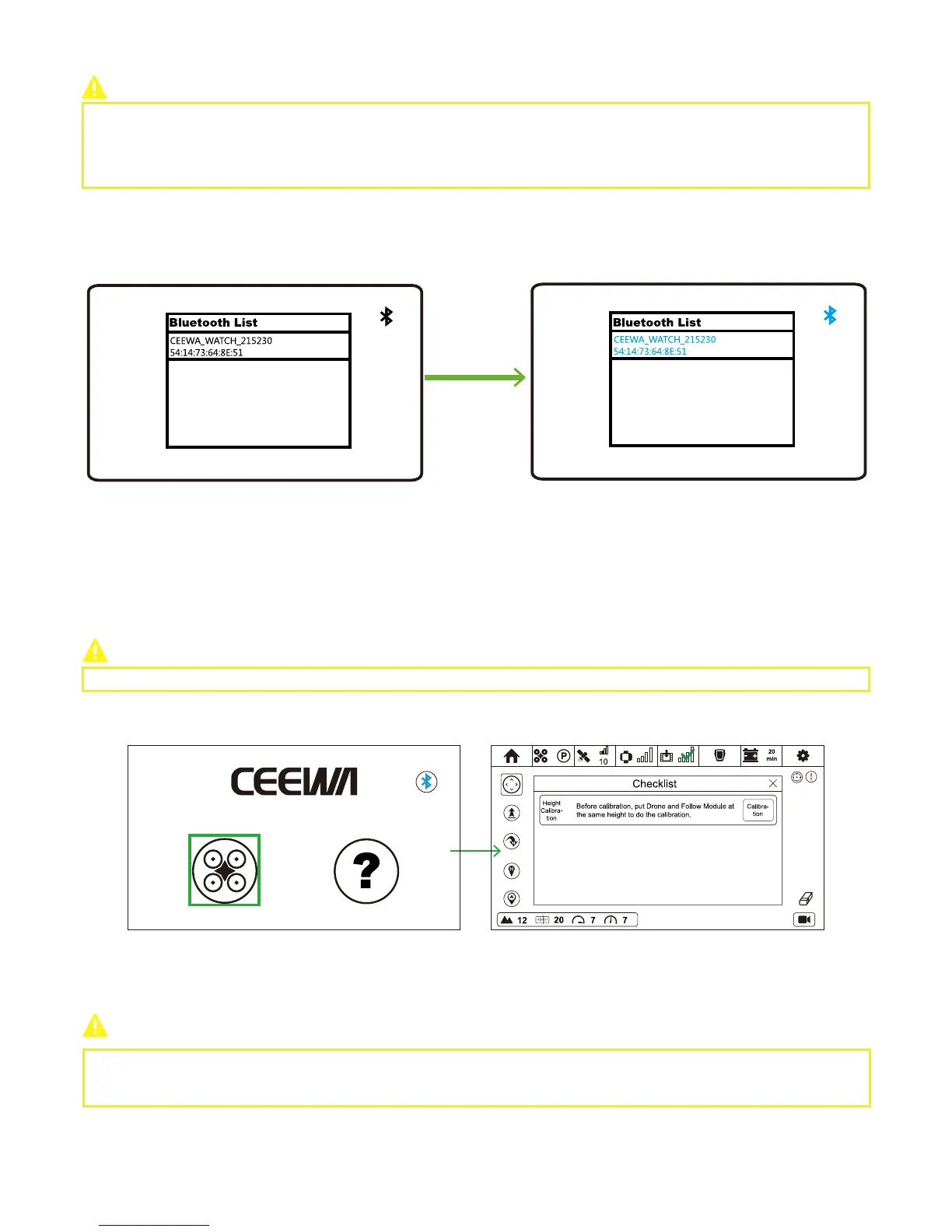
You should pair Sports Watch to CEEWA APP through Bluetooth.
① Power on Sports Watch.
② Turn on CEEWA APP and choose your desired device in the pop-up window. The Bluetooth name of Sports Watch usually starts
with CEEWA_WATCH.
③ Choose Sports Watch in the window and wait for connection. When the device name and Bluetooth icon on the upper right
corner turn to blue, pairing finishes. All the above steps show when you pair them for the first time, and CEEWA APP will auto
connect it since then.
④ If you want to change the auto-pairing device, just tap the Bluetooth icon on the upper right corner and select your desired
device in the pop-up window.
If the Bluetooth icon becomes white, it implies that CEEWA APP disconnects with Sports Watch or RC.
If the Bluetooth icon alternately blinks blue and white, it means that CEEWA APP is trying to connect.
If the Bluetooth icon becomes blue, connection has been built.
Drone Compass Calibration and Follow Module Compass Calibration should be finished outdoors.
After pairing, please click Flight icon to enter Flight Interface.
Sports Watch and Remote Controller cannot be used at the same time.
Step 9
:
Turn on CEEWA APP & Pair to Watch



 To Next Page