26
Step 9: Check Status
Step 10: Adjust Drone’s Attitude
If drone hover steadily after taking-off, over ten GPS Satellites have been found, connection between Smartphone & Sports Watch
and Follow Module & Sports Watch are normal, and P Mode enables, please move to next step.
If drifts happen after hovering or warning tips show on the screen of APP and Watch, please land the drone as soon as possible.
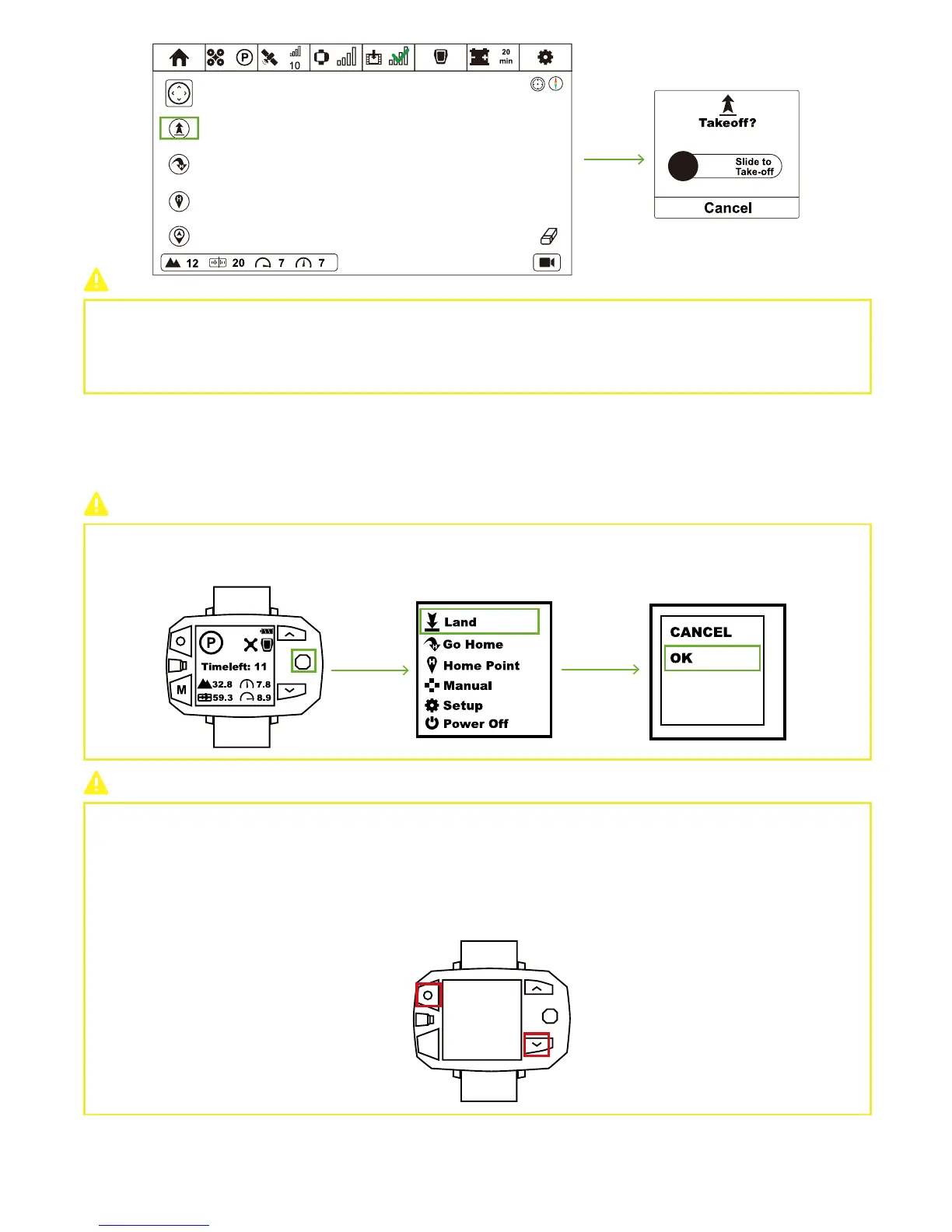
In Flight Interface, toggle the Nav. Button to the right to enter Menu Interface. Select Manual option to adjust the attitude of Drone.
Otherwise, press STOP Button for over 5s wo enter Manual Interface.
When Drone has connected to Sports Watch:
Drone will ascend to 5 meters and hover to wait for the next order.
When Drone has NOT connected to Sports Watch:
Drone cannot take off.
How to land?
How to react when losing control of Drone?
If something emergent occur, like losing control of drone, you could make the drone motor stop to avoid dangers.
Please be cautious to enable this function.
Once being triggered, motors would stop immediately and fall down directly.
Sports Watch:
press STOP button and Down Button at the same time.
Toggle Nav. Button to the right & enter Menu Interface. Select “Land” option and choose “OK” in the pop-up window. One-Key
Land activates.



 To Next Page