24
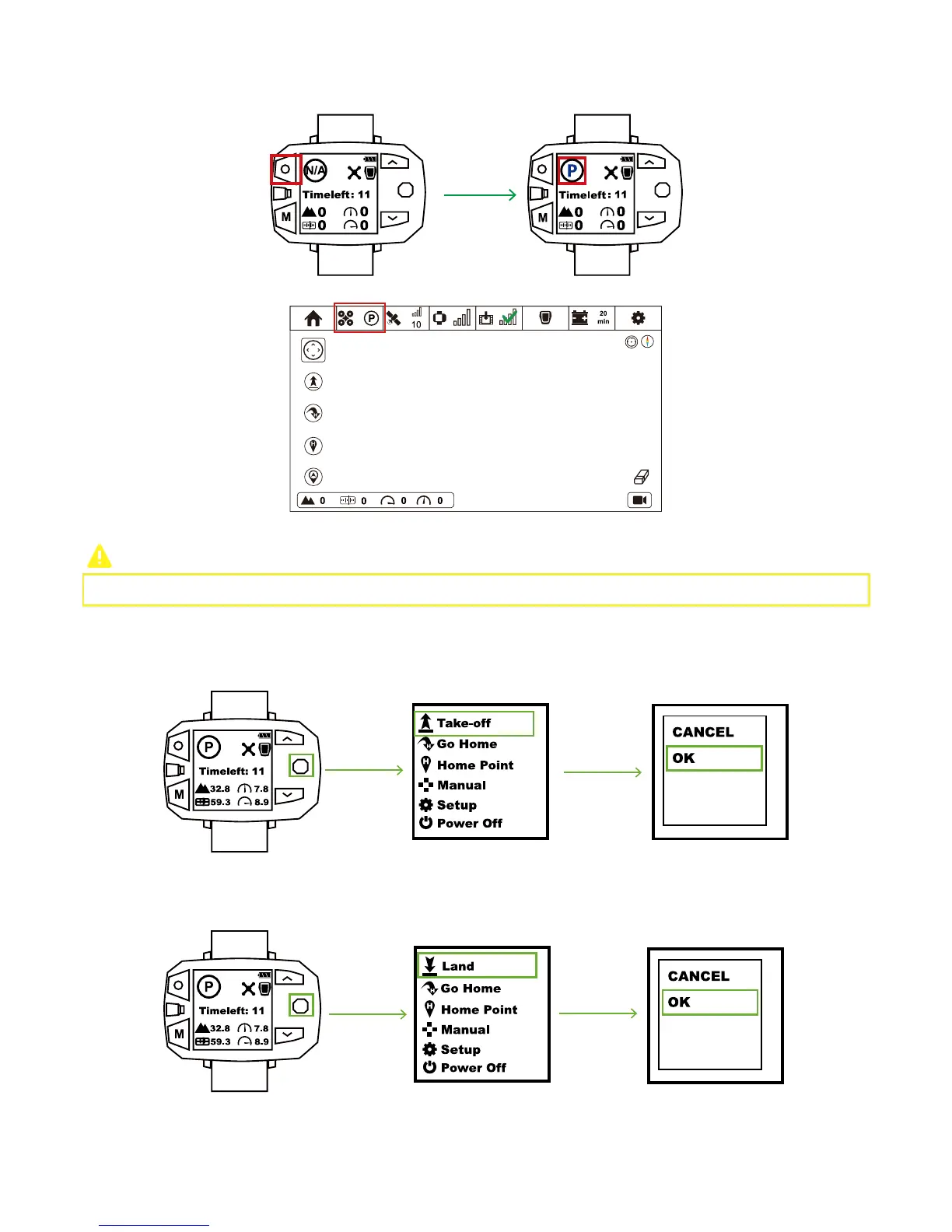
Step 5: Switch to P Mode
Sports Watch:
Press STOP Button and observe whether or not P Mode has been activated.
You can also check P Mode in Status Bar of CEEWA APP:
Please DO NOT attach any propeller to the drone in this step!
① Enable One-key take-off and check whether or not four motors can turn on properly. If lacking any one of them, drone will fall
down directly.
Step 6: Drone Test
Step 7: Attach / Detach Propellers
Attach Propellers
CEEWA Drone uses 10-inch propellers. White and Black nuts on the propellers indicate the rotation direction of propellers and where
it should be attached.
② Press STOP Button for over 5s to enter Manual Interface. Toggle Nav. Button and press UP/DOWN to observe whether or not
motors can rotate normally.
③ Enable One-key land and check whether or not four motors can stop.
Toggle Nav. Button to the right & enter Menu Interface. Select “Take-off” option and choose “OK” in the pop-up window. One-Key
Take-off activates.



 To Next Page