(1) When should I Calibrate?
① When drifts happen in A mode, calibration should be finished.
② It is suggested to do Gyro calibration regularly by putting the drone on the horizontal ground.
(2)Calibration Steps
① Ensure Drone has connected to CEEWA APP.
② Place Drone in the level ground.
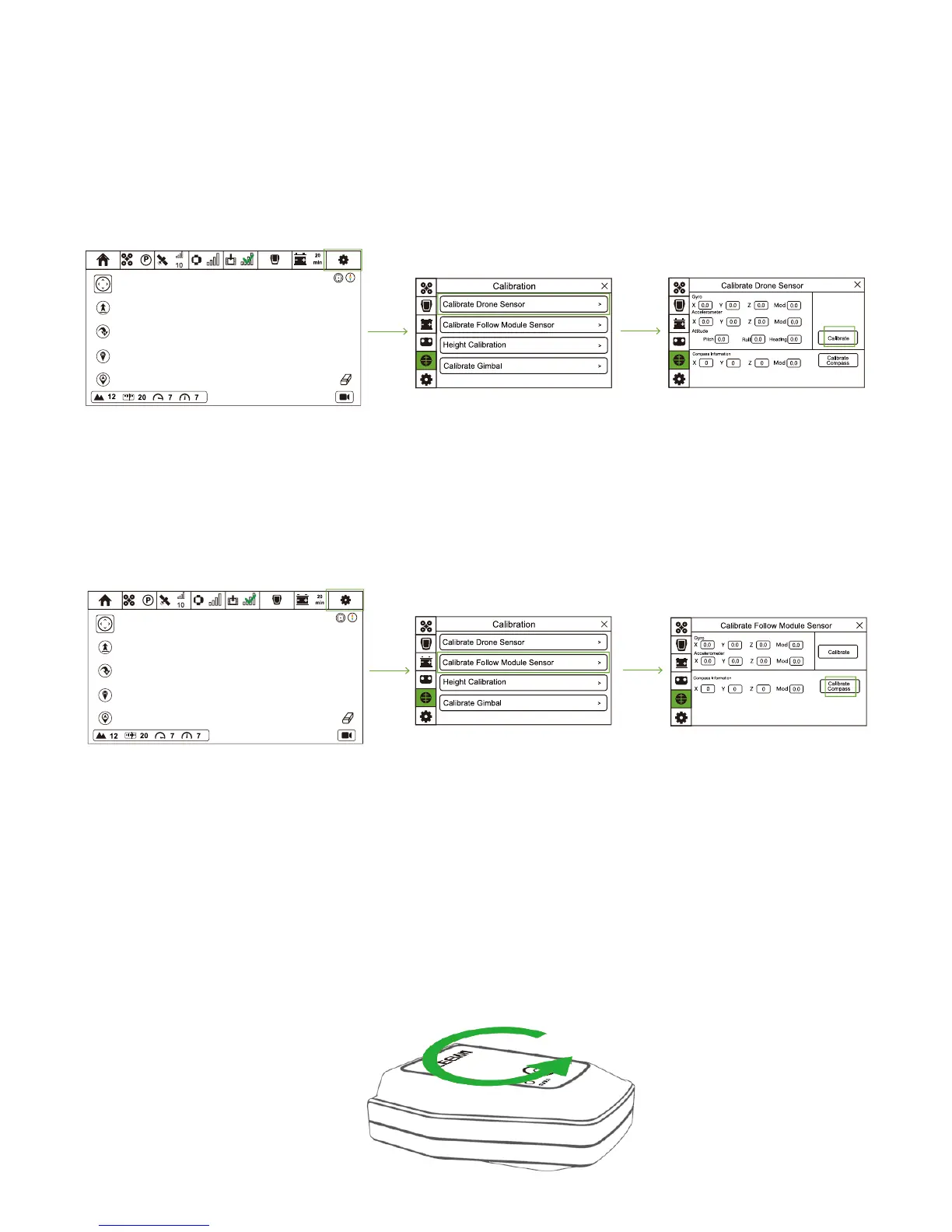
③ Turn on CEEWA APP and enter Flight Interface. Tap “Others” icon and choose Calibration icon to enter Calibration interface.
④ Select “Calibrate Drone Sensor” option and choose “Check”. Drone will auto check its status. If calibration should be done,
“Calibrate” will be replaced by “Calibration” and do the calibration according to the tips.
2. Gyro Calibration
3. Calibrate Follow Module Gyro
(1)When should I Calibrate?
It is suggested to calibrate Follow Module Sensor regularly on the horizontal ground to achieve a better flight experience.
(2)Calibration Steps
① Turn on CEEWA APP and enter Flight Interface. Tap “Others” icon and choose Calibration icon to enter Calibration interface.
② Select “Calibrate Follow Module Sensor” option and choose “Check”. Drone will auto check its status. If calibration should be
done, “Check” will be replaced by “Calibration” and do the calibration according to the tips.
③ If calibration fails, please repeat Step 1-2.
4. Follow Module Compass Calibration
(1)When should I Calibrate?
① It is suggested to finish Follow Module Compass Calibration at first time.
② Moreover, finish the calibration regularly to achieve a better flight experience.
(2)Calibration Steps
① Turn on CEEWA APP and enter Flight Interface. Tap “Others” icon and choose Calibration icon to enter Calibration interface.
② Select “Calibrate Follow Module Sensor” option and choose “Calibrate Compass”.
③ When Blue Status LED blinks slowly, rotate the Follow Module horizontally.



 To Next Page