33
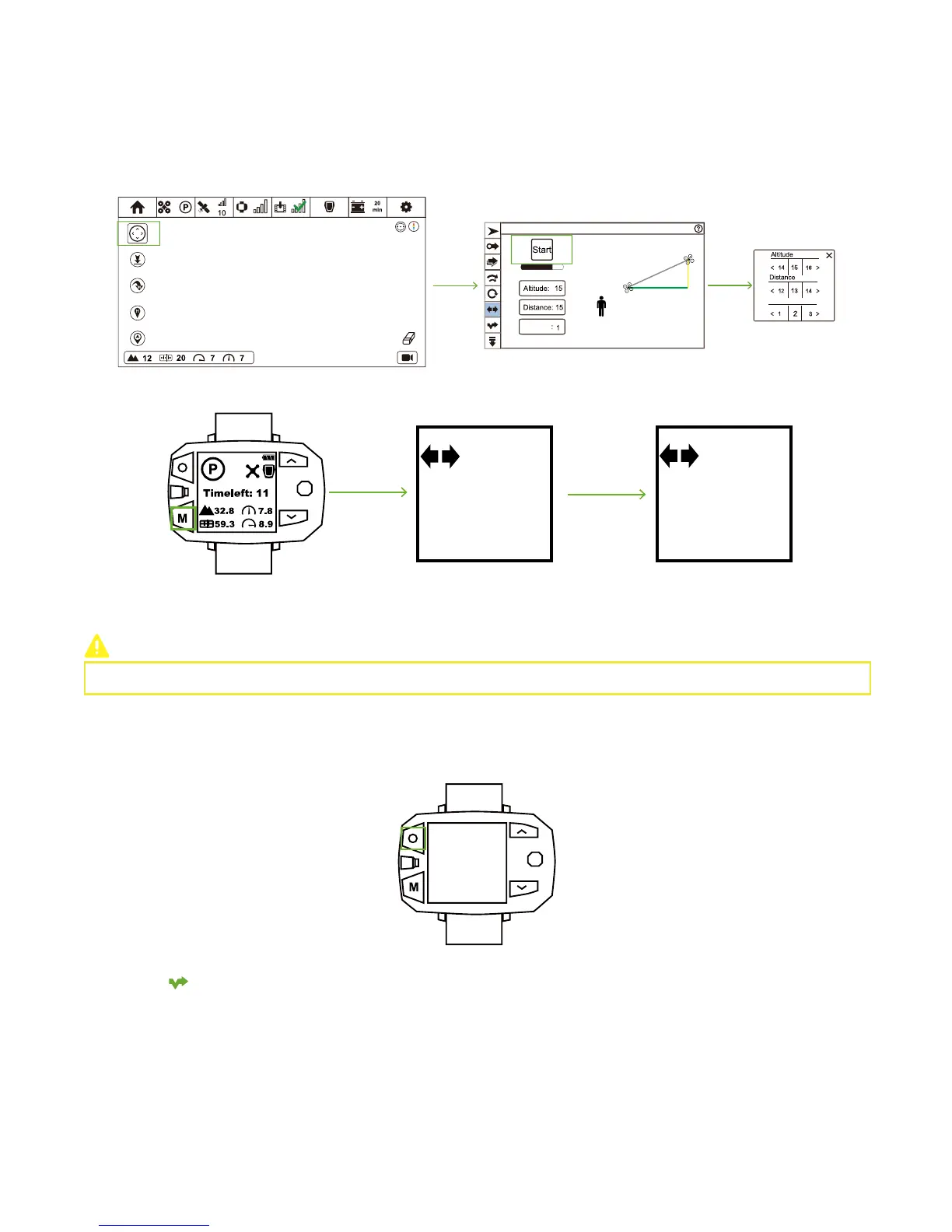
① Ensure Drone has taken-off.
② Click Follow Mode icon and enter Follow Mode menu.
③ Click Selfie icon and enter Selfie menu.
④ Click Altitude, Distance and to adjust appropriate flight parameters in the pop-up window.
⑤ Click "Start". After all parameters have been uploaded, Selfie enables.
How to activate?
CEEWA APP
:
Orbit
Vcircle
Vcircle
D
H
Sports Watch:
Sele
H: 15
D: 13
S: 1
H: 15
D: 13
S: 1
Sele
3
GO
When connection is OK, press Mode Button repeatedly until Selfie icon shows on the screen. After 3 times of beeps, Selfie enables.
How to deactivate?
Sports Watch:
When pressing STOP button, “Hovering…” shows in the screen and Sports Watch vibrates once. At this moment, Follow Mode has
been cancelled.
You need to set more than one waypoint in the map. These waypoints will auto generate route, and Drone will fly along this route
with Follow Module. If Follow Module goes beyond the route range, Drone will stay and hover at the nearest waypoint with camera
pointing to the direction of Follow Module.
CEEWA APP will auto check the reliability of route. If the route is not reasonable, waypoints will turn to red.
Hovering
Please modify parameters through CEEWA APP.
Follow-Line
① Ensure Drone has taken-off.
② Set waypoints in the map and these waypoints will automatically turn form a route. Click these waypoints to set different height.
③ Click Follow Mode icon and enter Follow Mode menu.
④ Click Follow-Line icon and enter Follow-Line menu. Click "Start". After all parameters have been uploaded, Follow-Line enables.
How to activate?
CEEWA APP
:



 To Next Page