38
Smart Go-Home
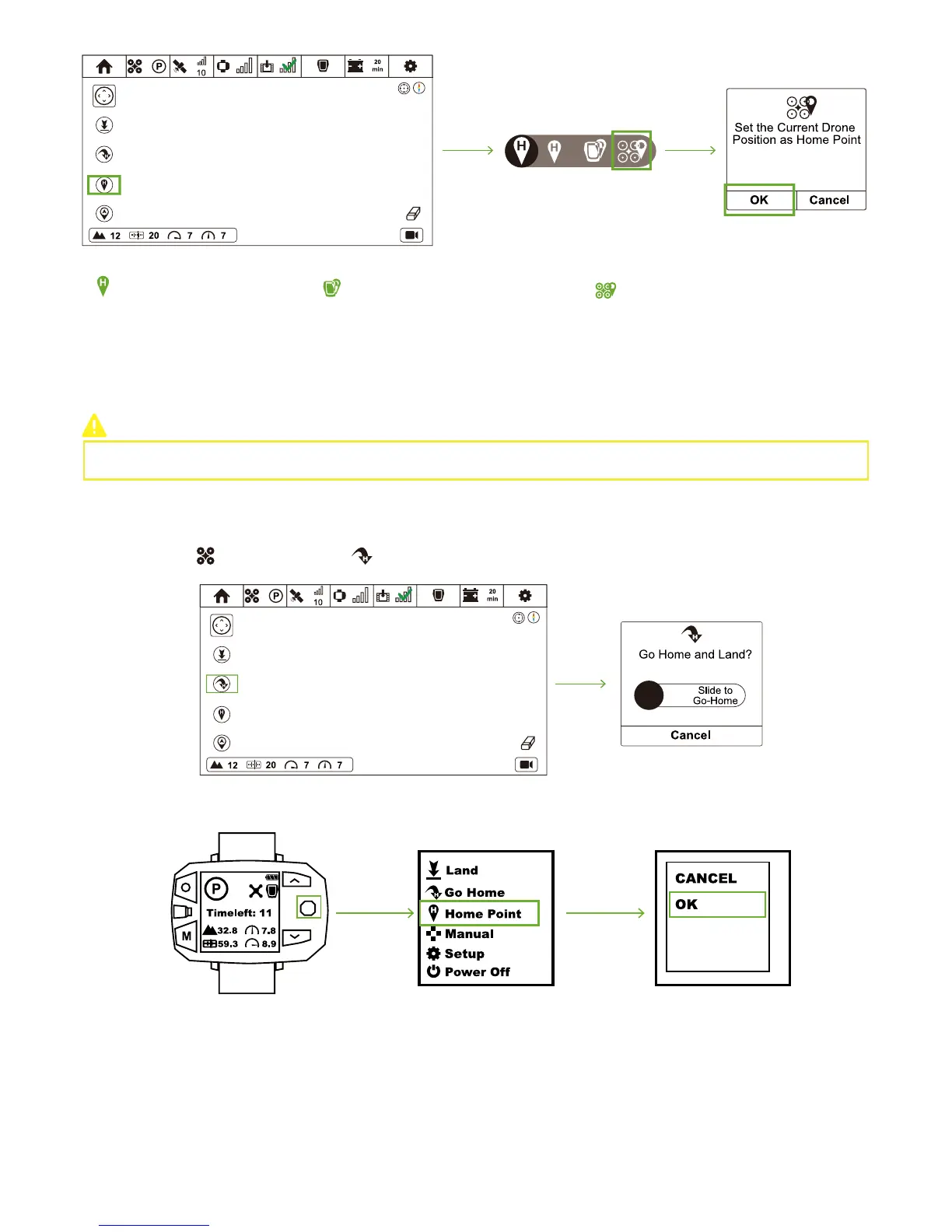
Set Take-off Coordinate as
the New Home Point
Set Follow Module Current
Coordinate as the New Home Point
Set Drone Current Coordinate as the
New Home Point
Enable Go-Home by Sports Watch / CEEWA APP. During Smart Go-Home procedures, you can control its orientation and height
through Watch.
It is suggested to enable Smart Go-Home in a safe and reliable environment to avoid obstacles.
How to activate?
CEEWA APP
:
Sports Watch
:
In Flight Interface ( ), tap Go-Home icon ( ) and slide the white slider to confirm going home.
How to deactivate?
Sports Watch:
When pressing STOP button, “Hovering…” shows in the screen and Sports Watch vibrates once. At this moment, Nav. Mode has been
cancelled.



 To Next Page