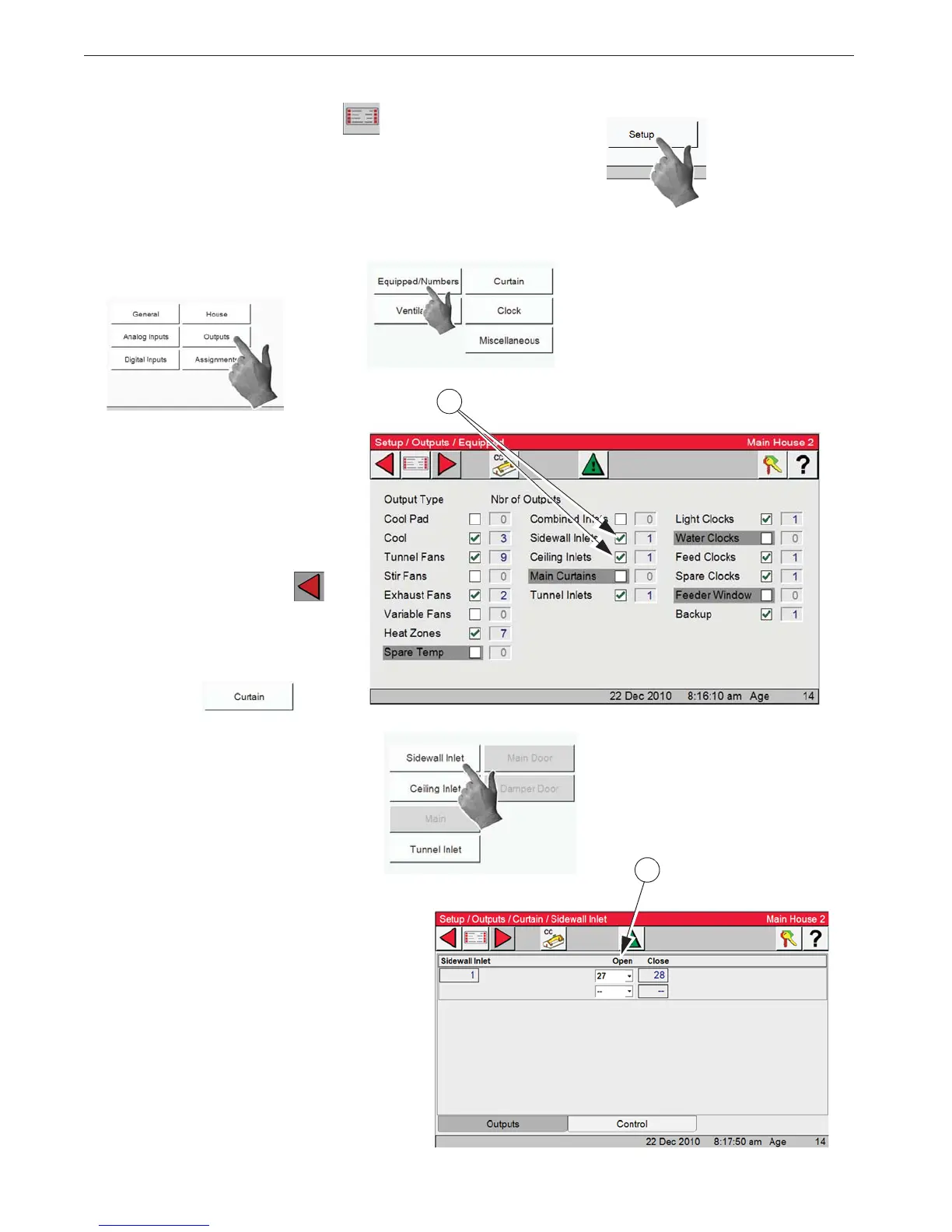
1. Select the Main menu button. 2. Select the Setup button.
3. Select the Outputs button. 4. Select the Equipped/Numbers button.
5. Select both the Sidewall inlets
and Ceiling inlets check boxes. The
number 1 will appear in the box to
the right. This shows that at least
one pair of relays are to be used.
(Open/Close)
6. Select the Back button to
return to the Outputs Screen.
7. Select the Curtain button
8. Select the Sidewall Inlet button.
9. In the Setup/Outputs/Curtain/
Sidewall inlet screen select the re-
lays that are to be assigned to the
Sidewall inlets. Select the Open re-
lay from the drop down and the
Close relay will be assigned by the
control. Only two sets of (Open/
Close) relays can be assigned. Ex-
ternal relays must be used if there
are more than two machines. Both
sets of relays are operated at the
same time.


 To Next Page