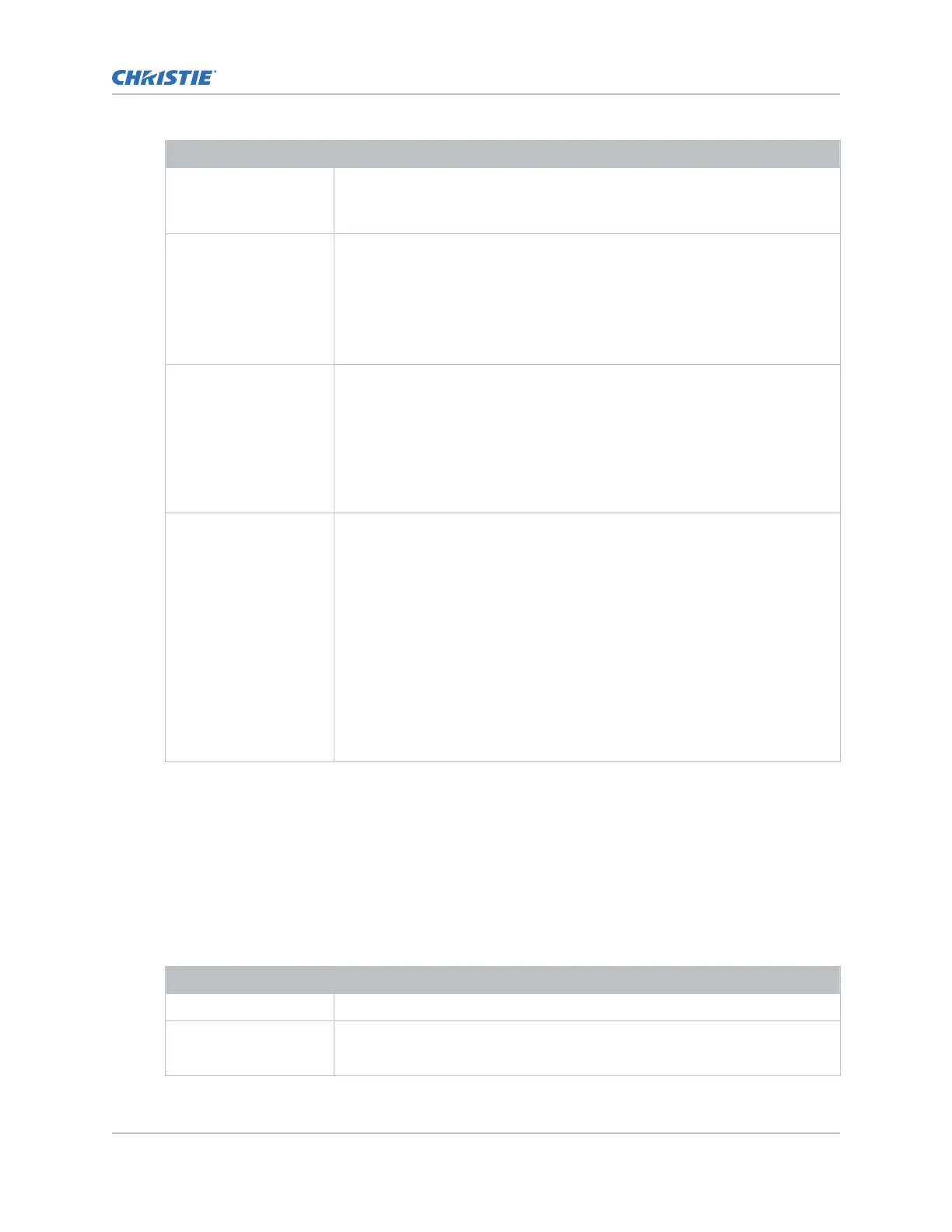
Field name Description
Data Format The bit-depth, sampling format, and color space of the input signal are
automatically determined from the metadata carried in the source.
A
uto (Default)
Scan Type Determines the input scanning format. Select one of the following:
• Auto (Default)—The scanning format of the input signal (interlaced or
progressive) is automatically determined from the metadata carried in the
source or by measuring scanning parameters of the source.
• Progressive—Forces the input signal scanning format to progressive,
overriding any metadata in the input signal.
3D Sync Input Mode Specifies whether a specific frame of input data has left eye or right eye data.
Select one of the following.
• Auto (Default)—The left-eye/right-eye 3D-sync information is
automatically determined from the metadata carried in the source or from
the specific input type selection.
• 2D mode—Forces the input signal to be interpreted as a 2D signal,
overriding any metadata in the input signal.
Color Space Specifies the method of internal color decoding that will be applied to the
currently selected input source. Select from the following.
• Auto (Default)—Appropriate color decoding are automatically selected
according to the input signal color format.
• RGB (Full Range)—Appropriate color decoding are selected according to
the input signal being a full-range, 12-bit per component, RGB color
format.
• RGB (Limited Range)—Appropriate color decoding are selected according
to the input signal being a limited-range, 10-bit per component, RGB
color format.
• XYZ—Appropriate color decoding are selected according to the input
signal being a full-range, 12-bit per component, XYZ color format.
4. Select Save.
Adding a channel for HDMI input
Create a channel to store customiz
ed projector settings for input devices connected to the HDMI port.
1. In the left navigation menu, select Channel Setup.
2. Select + Add Channel.
3. Complete these fields:
Field Name Description
Name The channel name
Input Type Select the input signal sources from one of the following:
•
HDMI Input - 1
Working with channels
CineLife+ User Guide 70
020-103073-10 R
ev. 1 (02-2023)
Copyright
©
2023 Christie Digital Systems USA, Inc. All rights reserved.
If printed, please recycle this document after use.












 To Next Page