Adjusting the image
Adjust the projector image.
Christie recommends warming the lens before completing these
procedures as focus may change as the lens warms.
Correcting vignetting
An image that is brighter at the center than it is at the sides needs vignetting correction.
If your image suffers from vignetting, the lens has reached the end of its offset travel range.
If your installation does not allow the image to be centered with the center of the screen,
move the entire projector in the direction of lens travel.
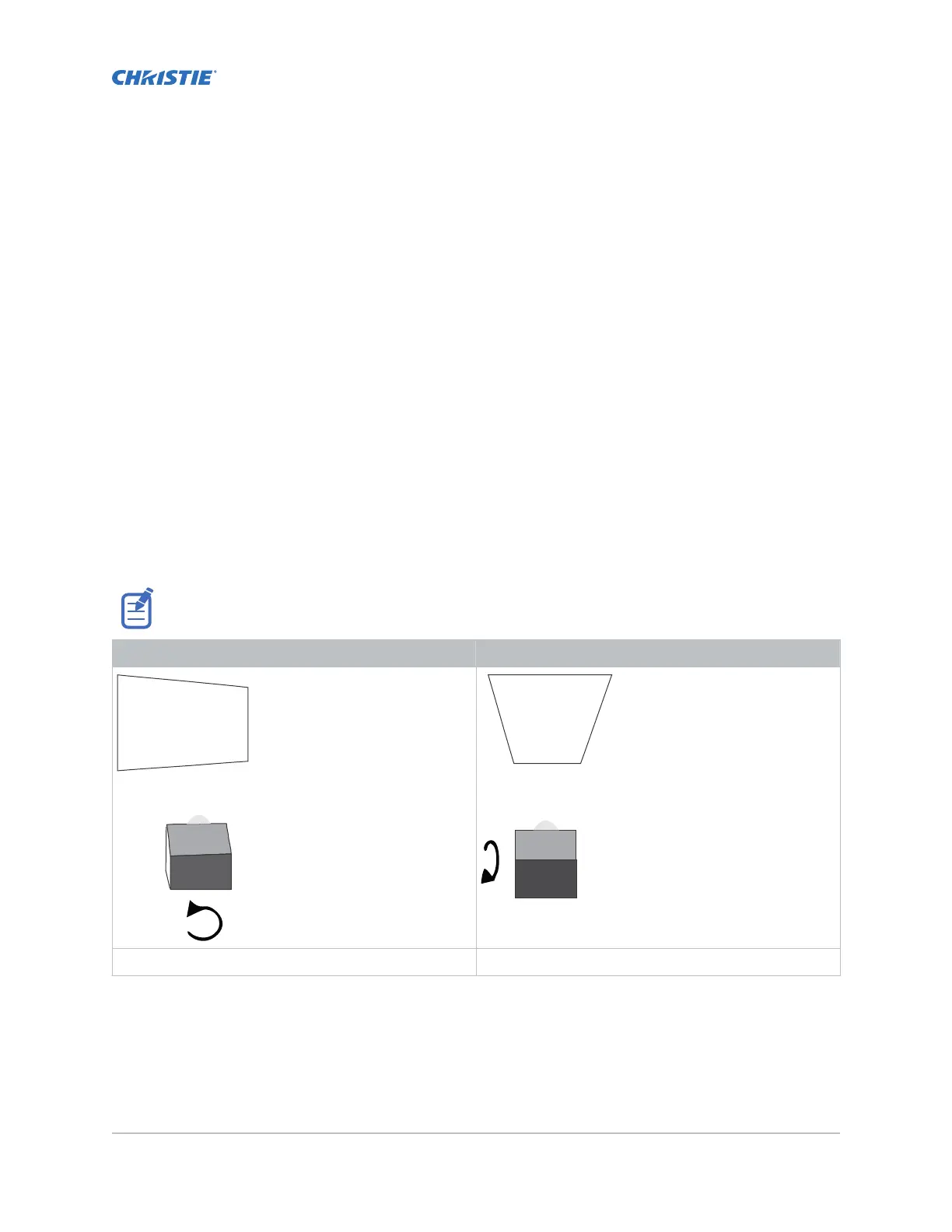
Correcting keystone effect
Keystone effect occurs when you project an image onto the screen at an angle. As a result, the image
appears distorted and resembles a trapezoid.
When making the adjustments, set the light source to minimum power.
Horizontal keystone Vertical keystone
Projector skewed horizontally to the screen Projector tilted vertically to the screen
1. If the image suffers from slight keystone effect, it can be corrected with electronic cropping.
2.
If the keystone effect is severe, unevenly adjust the feet to compensate for projector tilt.
Christie recommends using the lens offset to align the center of the image to the center of the
screen before correcting the keystone effect.
CineLife+ User Guide 86
020-103073-10 R
ev. 1 (02-2023)
Copyright
©
2023 Christie Digital Systems USA, Inc. All rights reserved.
If printed, please recycle this document after use.












 To Next Page