Adding a channel for Integrated Media Block
(IMB) input
Create a channel to store customiz
ed projector settings for input devices connected to the Integrated
Media Block (IMB).
1. In the left navigation menu, select Channel Setup.
2. Select + Add Channel.
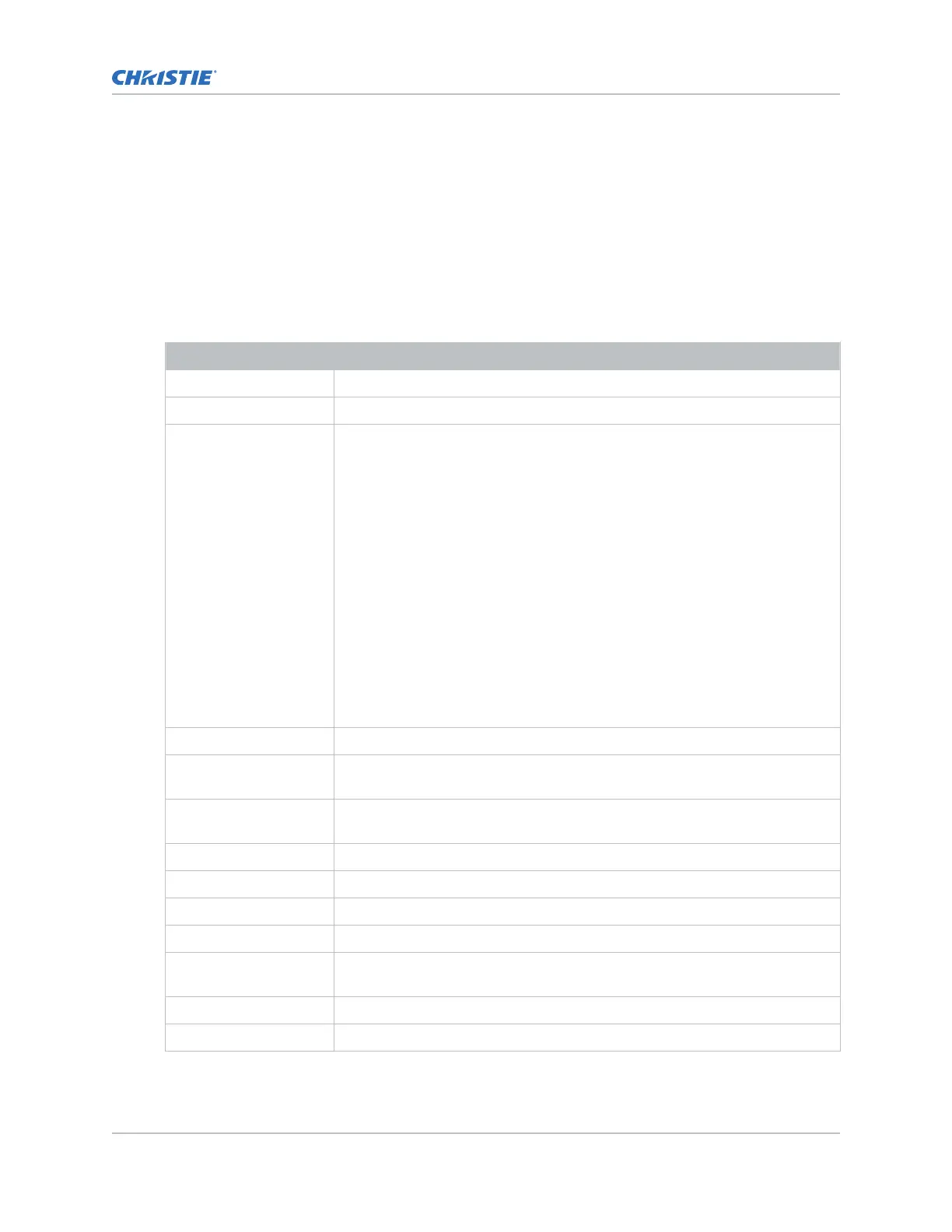
3. Complete these fields:
Field Name Description
Name Channel name
Input Type Select IMB.
3D Sync Input Mode For third-party IMBs, specifies how 3D input data is encoded.
•
2D Mode (Default)—No 3D synchronization is applied.
• 3D Frame Interleaved—For input that contains left-eye data followed by
right eye data.
• 3D Frame Interleaved Inverted—For input containing right-eye data
followed by left-eye data.
• 3D White Line/Blue Line—For input including metadata describing the 3D
encoding.
• 3D White Line/Blue Line Inverted—For inverted input including metadata
describing the 3D encoding.
• 3D Line Interleaved—The left-eye and right-eye data are sent on
alternating lines.
3D Sync Input Mode is not required when using the Christie IMB. For GDC IMB
devices, the recommended setting is 3D Line Interleaved.
ILS File Intelligent Lens System
™
(ILS) file associated with the channel.
2D Light Source File 2D light source file associated with the channel. Any changes made to the file
settings are applied to all channels using this file.
3D Light Source File 3D light source file associated with the channel. Any changes made to the file
settings are applied to all channels using this file.
2D MCGD File Measured Color Gamut Data file associated with the 2D image.
3D MCGD Left Eye File Measured Color Gamut Data file associated with the left 3D image.
TCGD File Target Color Gamut Data file associated with the channel.
Screen File Screen type, masking, cropping, and lens settings for the channel.
Gamma File The gamma correction required for the proper tonal range of the source
material.
3D File 3D settings file associated with the channel.
Source File The resolution and aspect ratio for the channel.
Working with channels
CineLife+ User Guide 72
020-103073-10 R
ev. 1 (02-2023)
Copyright
©
2023 Christie Digital Systems USA, Inc. All rights reserved.
If printed, please recycle this document after use.












 To Next Page