Automation
Use automation to control pla
yback, the projector, and external devices.
• Macros—A macro is a list of actions you define. For example, opening the curtains or turning
on the house lights at the end of playback. A macro can be activated by a global trigger or it
can be added to a playlist.
• Device Input Triggers—Input cues wait for events, such as a general purpose input (GPI)
state change or an Ethernet message received on the projector management IP address port
5111. An input cue in a playlist delays playback until an event occurs.
• Global Triggers—A global trigger combines an input cue with a macro. When the predefined
event for the input cue occurs, the output macro is triggered. For example, a fire alarm input
signal could cause playback to stop and the house lights to come on. A global trigger is always
active and is not dependent on specific playlist definitions.
On CP4450-RGB projectors, playback automation is controlled through the GDC Integrated Media
Block (IMB). For more information, refer to the documentation provided with your IMB device.
On CP44xx-RGB projectors, the GDC IMB automation cue ON_Projector does not function in Standby
mode. To automate your show, first use the Scheduler to power on the IMB.
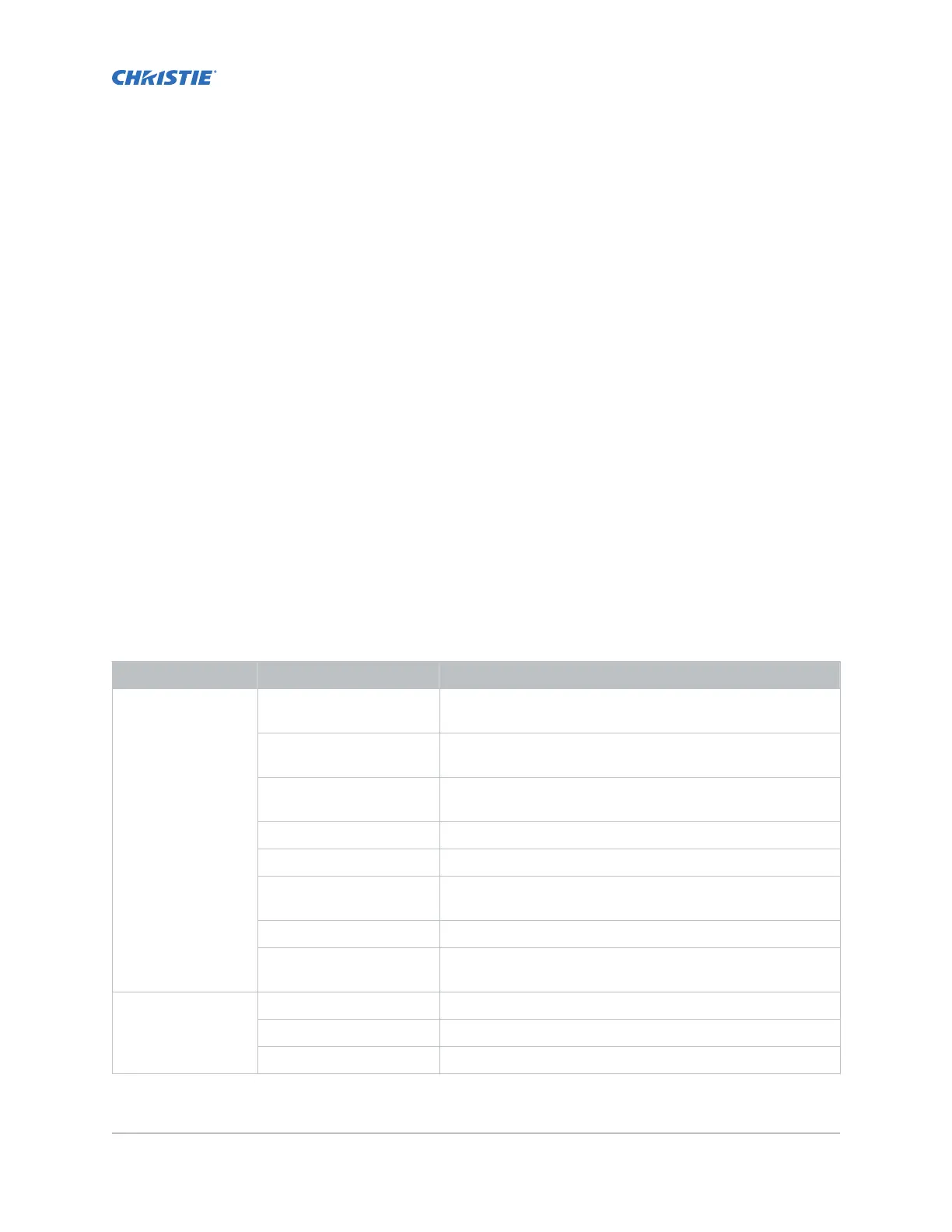
Available macro actions
The following macro actions are available to control automated events.
Action item Available actions Description
Automation Set Global Sets a global variable to be used in automation scripting
(intended for adv
anced scripting by Christie).
Print Generates a projector log entry when an automation macro
runs.
Get Global Allows the automation script to read the value of a global
variable (intended for advanced scripting by Christie).
Set GPO Sets the specified GPO pin to high or low.
Pulse GPO Pulses the specified GPO pin.
Get GPI Allows an automation script to read the GPI state (intended
for advanced scripting by Christie).
Delay Delays macro execution.
Wait On GPI Pauses the automation script and waits for the specified GPI
event to enter the specified state.
Projector Douser Open Opens the douser (shutter).
Douser Close Closes the douser (shutter).
Light Turns the light on.
CineLife+ User Guide 94
020-103073-10 R
ev. 1 (02-2023)
Copyright
©
2023 Christie Digital Systems USA, Inc. All rights reserved.
If printed, please recycle this document after use.












 To Next Page