Automatic Transformer Test System 3300/3302 User’s Manual
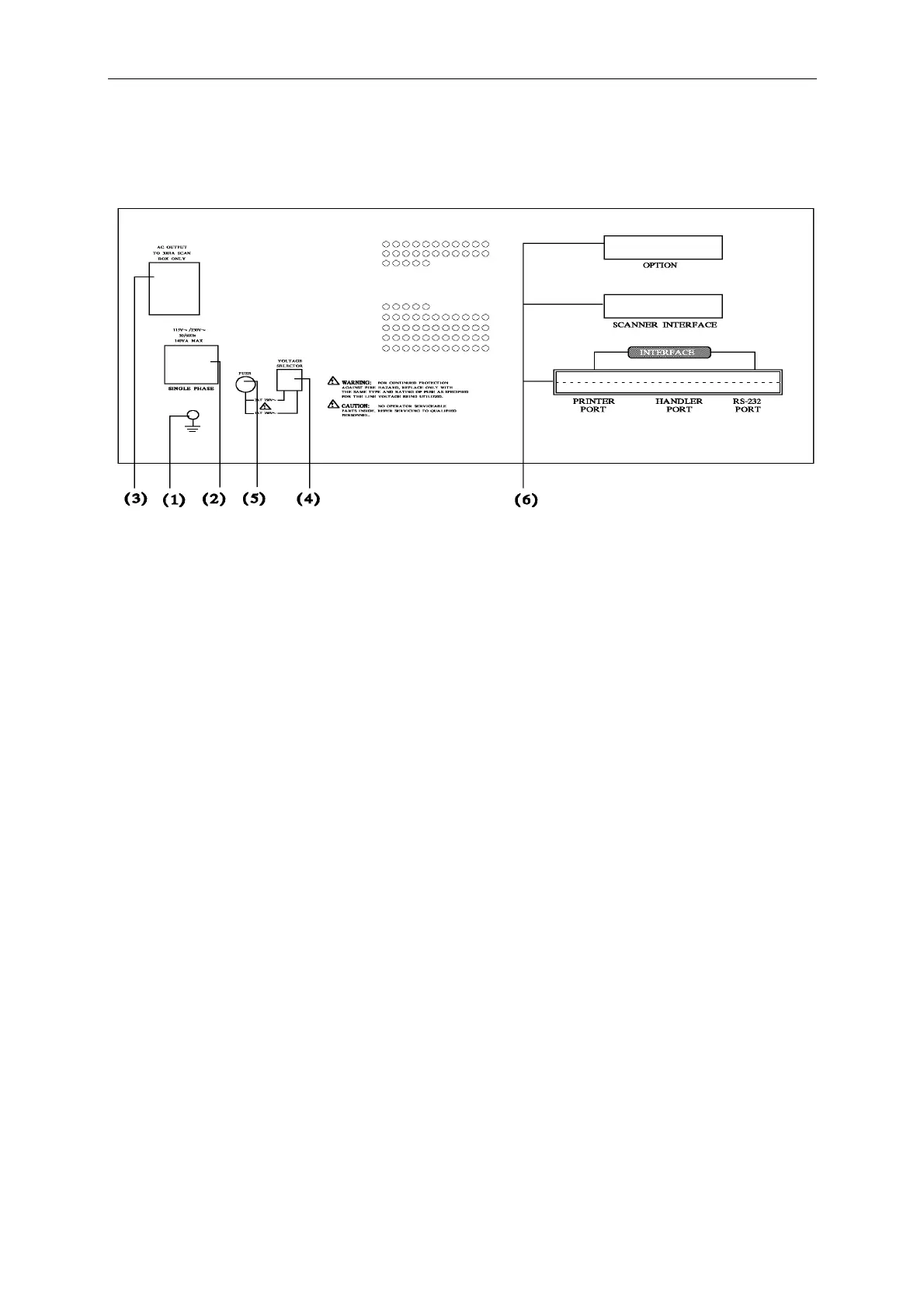
4.2 Rear Panel Description
(1) Ground Terminal:
This terminal connects the cover of this instrument directly, then connect to the ground to
avoid exterior obstruction that makes instrument connection uncompleted and influenced the
safety.
(2) AC Line Socket:
This socket is approved by (International Electrotechnial Commission) three line of socket
320, please use the proper wire like Belden SPH-386 or similar wire (#W12 010130).
(3) AC Output Line (for scan box):
This socket is appropriate for Model 3001A scan fixture only, the output source is identical to
the voltage of input source point.
(4) Power Voltage Switch
Using screwdriver to switch, be sure the power is off, then switch to require voltage position.
(5) Power Fuse
Power protection fuse. Spec and precaution replacement please refer [3.3].



 To Next Page