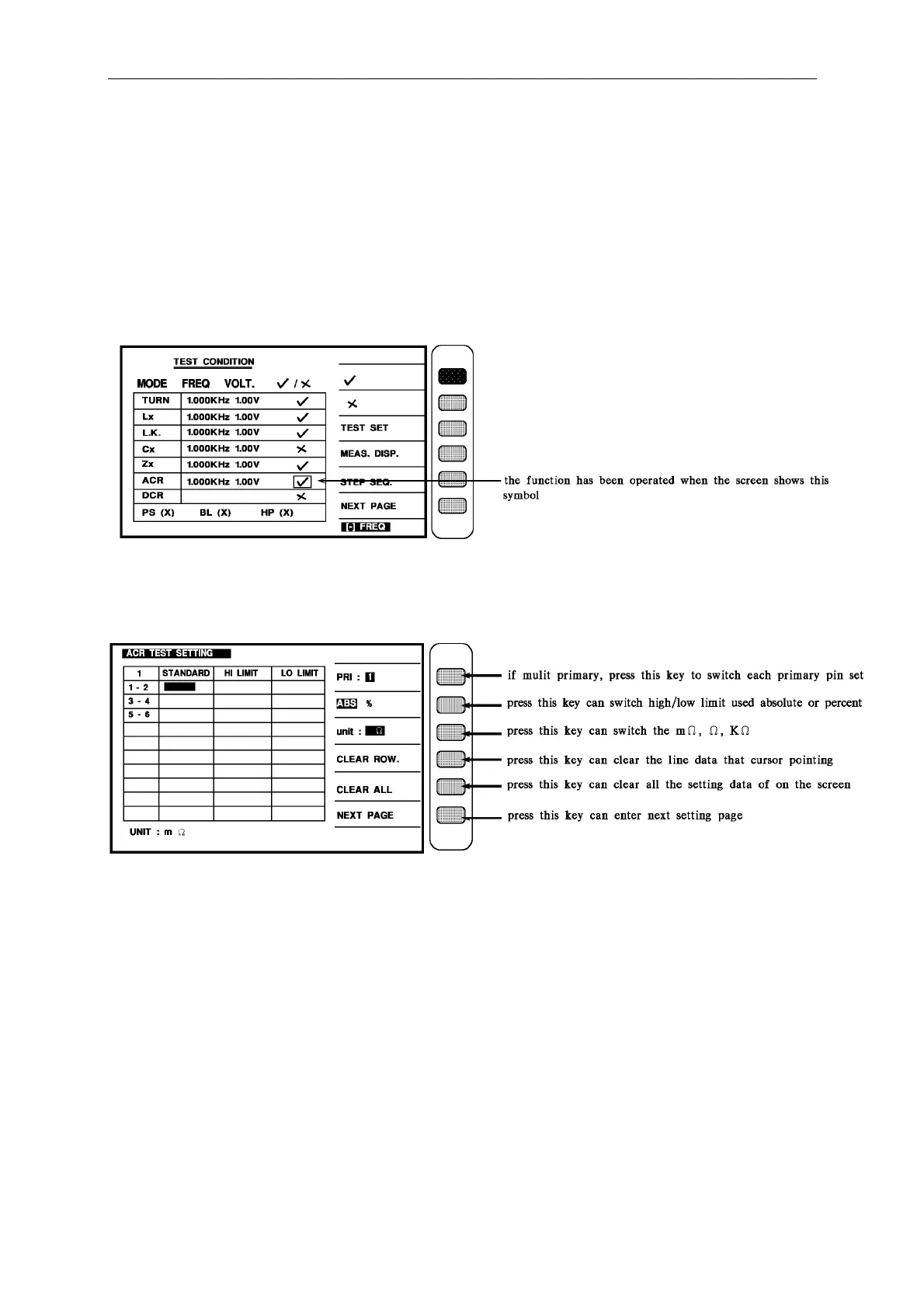
Panel Description
The above is this instrument default value from the factory, when want to change just move
the cursor to modify.
Notice: this function can be used under Lx, LK,
Q testing, addition on to input the test
conditions, the Lx, LK, Q should be opened then can test.
4.4.7 ACR Setting Description
Under the test condition setting input the ACR test voltage and freq., then open this function.
\
When this function has been opened, then the guidable operation will automatic enter each
setting screen that we have set already, and while enter ACR setting screen, the screen is as
below:
The description of each visible parameter are as following:
PRI : The first level pin setting
1-2, 3-4, 5-6 : The secondary turns of the transformer
STANDARD : The standard value of each turn
HI LIMIT. : The judgment of the Hi-limit value
LO LIMIT : The judgment of the Lo-limit value
When enter this screen then into the transformer ACR judgment setting, the same as above is
the guidable operation, just according screen block-light with number keys to input the value
then press [Enter] then automatic skip to next setting item, use this method to set till the last
item (the set secondary) then press [Enter] to change to the next parameter setting screen.
If want to change setting on the block-light, use the four keys under cursor to move.



 To Next Page