Automatic Transformer Test System 3300/3302 User’s Manual
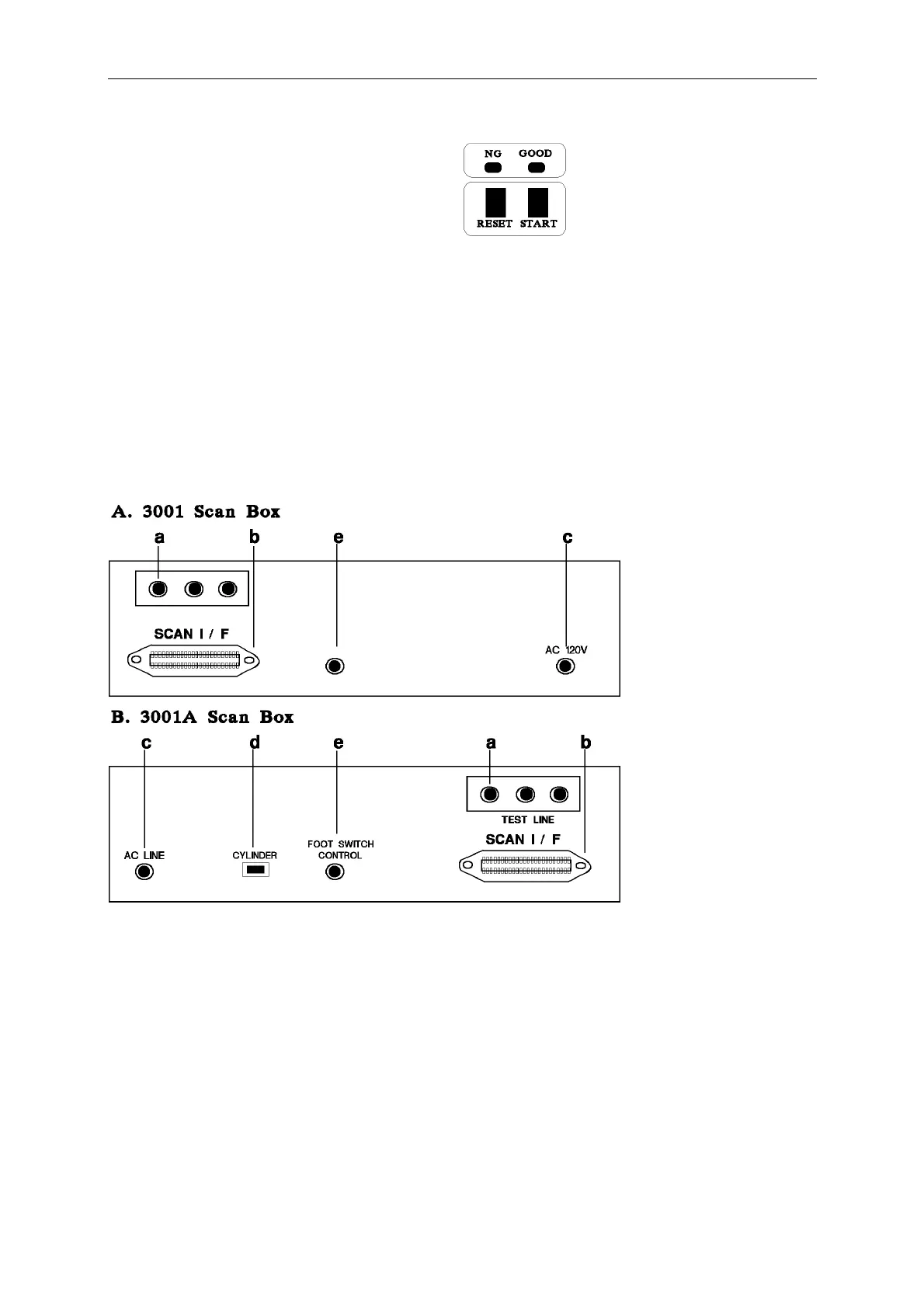
B. 3001A Scan Box
START : Trigger control key, when press this key then operate the test acting.
RESET : Reset the trigger control key, when press this key then stop all the test
to return original preparing test condition.
GOOD : Indicative light of the good, when every test item result are good, the
LED lights mean is that unknown is good.
NO GOOD : Indicative light of the no good, when one of the test items is no good,
the light will light and indicate that unknown is no good.
5.1.4 Scan Box Rear Panel Description
a. TEST CABLE INPUT TERMINAL
This test cable connects to the test point of the model 33XX.
b. SCAN I/F
To control the signal transfer wire of the scan test socket, this socket is through one line
connecting to rear panel.
c. POWER CORD (AC 120V)
This power cord can be used only for the rear panel of scan box AC 120V of model 33XX,
because 3001A use interior power source 120AC, so do not use others.



 To Next Page