Remote Operation
5.1.4.2 Setting Network Parameter (IP, Subnet Mask, Gateway)
1. When in Site LAN:
Only network setting is required on 63600 by setting DHCP to ON (Server specifies the IP
automatically) or OFF (specifies IP manually.)
Steps to set 63600 DHCP = ON for Chroma DC Load:
STEP 1:
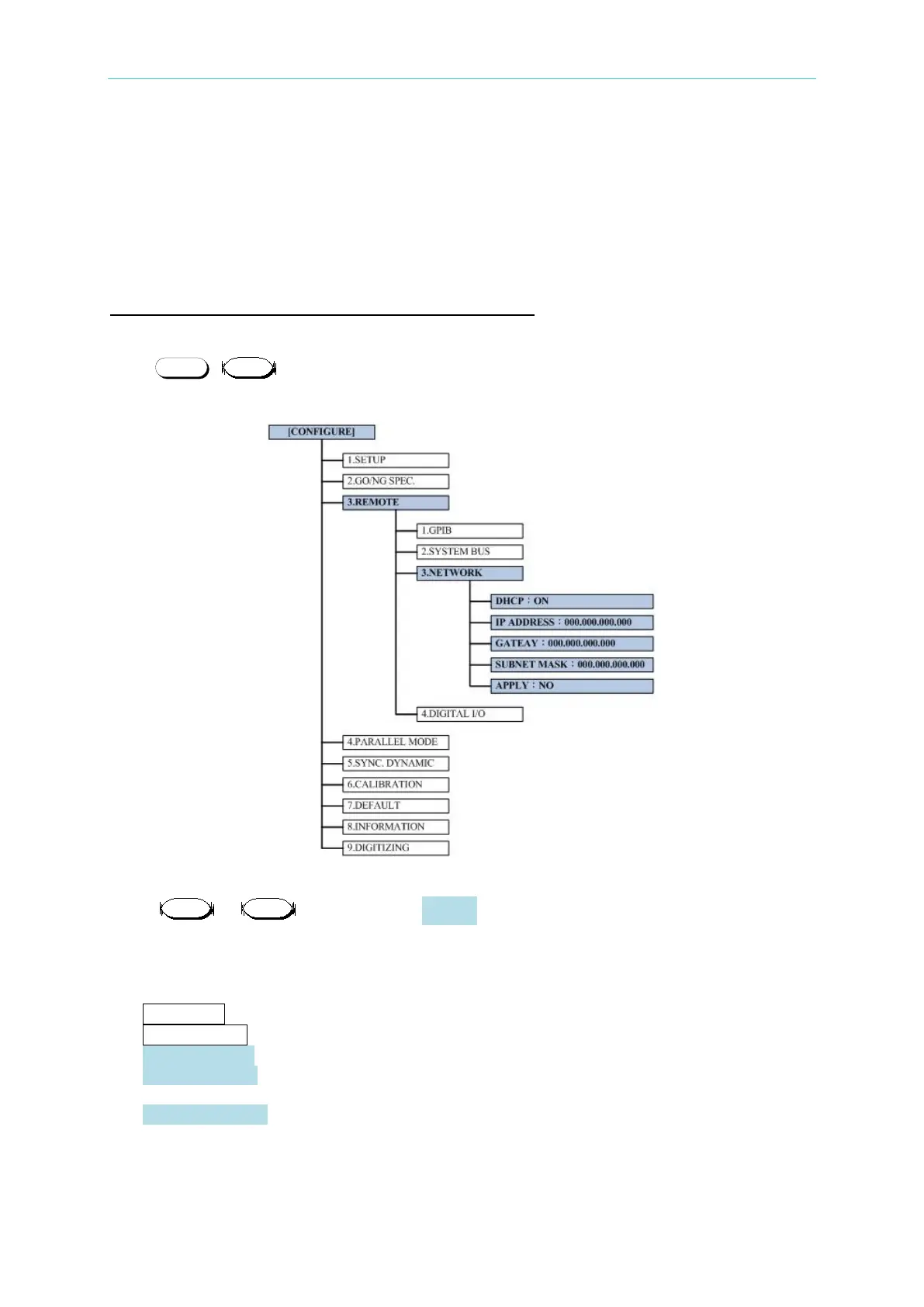
Press + on the front panel of any module to go to CONFIG screen and follow
the tree diagram shown below to locate the DHCP parameter to set it to ON.
STEP 2:
Press or directly to go to APPLY option and set it to YES, then confirm the
setting.
STEP 3:
The screen will show the networking setting status. The status messages are shown below:
a. Initiating… : The network card is initialing.
b. Connecting… : The network card is connecting.
c. Disconnection! : It is unable to connect to network.
d. DHCP Failure!! : It cannot find DHCP Server and is unable to specify the IP
Address via DHCP.
e. Not Properly Set : The network setting is wrong.
Once the setting is successful, the panel will show the updated network setting automatically
and clear the status message.



 To Next Page
 Loading...

