GE+ ACDC Installation and operation manual v11
67 / 121
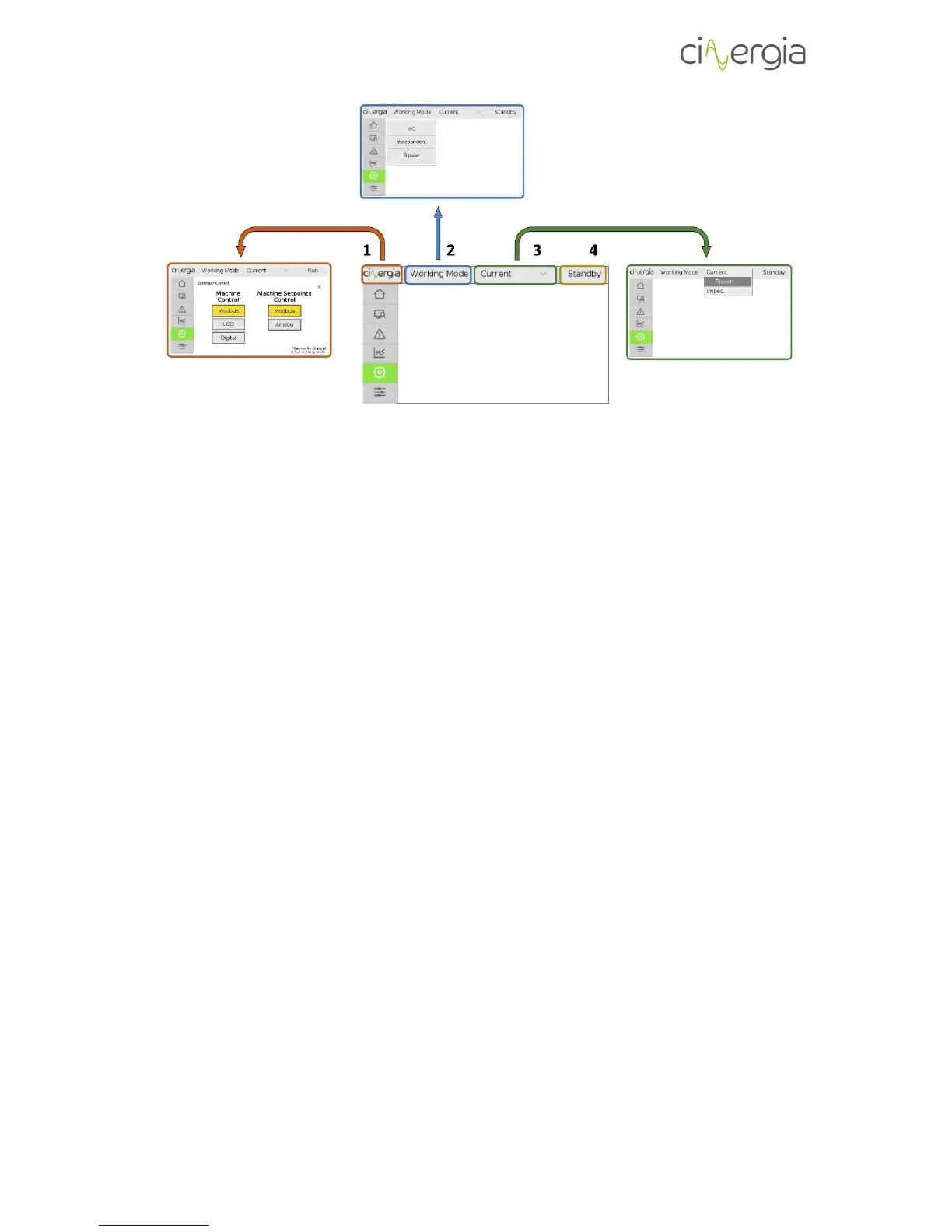
By means of the bar in the upper side of the touchscreen, the user is constantly aware and can
modify the following variables by pressing the touchscreen:
- Control of the equipment. The local touchscreen will go to the settings options where
the user can decide which is the control of the equipment (Modbus, LCD or Digital)
- Working connection mode. Information about the mode (AC/DC, Independent/Parallel
and Unipolar/Bipolar)
- Control mode. The user can modify the control of the equipment (Voltage, Current,
Power or Impedance). Current, Power and Impedance control is only available in DC
mode.
- State of the power supply. Information about the state (Initialization, Standby,
Precharge, Ready, Run or Alarm). When the equipment is in alarm, there will appear a
red sign.
The rest of information can be found throughout the lateral tabs.
6.2. Keyboard
There are different menus and submenus in the LCD touchscreen that requires to introduce
numbers. All them are introduced using a standard keyboard which is the same for all screens.
It is the following:



 To Next Page