GE+ ACDC Installation and operation manual v11
113 / 121
9.2.6. Limits
The user can define the limits of the equipment in this tab. The converter has its own factory
limits, but it is possible to introduce new ones.
The condition for these new limits is that they must be lower (in case of
maximum limits) or higher (in case of minimum limits) than the factory ones,
otherwise the equipment will introduce the factory limits.
Depending on the connection mode of the equipment (AC or DC), this tab will
automatically change and the parameters that will appear will be the ones
according to the mode.
I. AC Limits
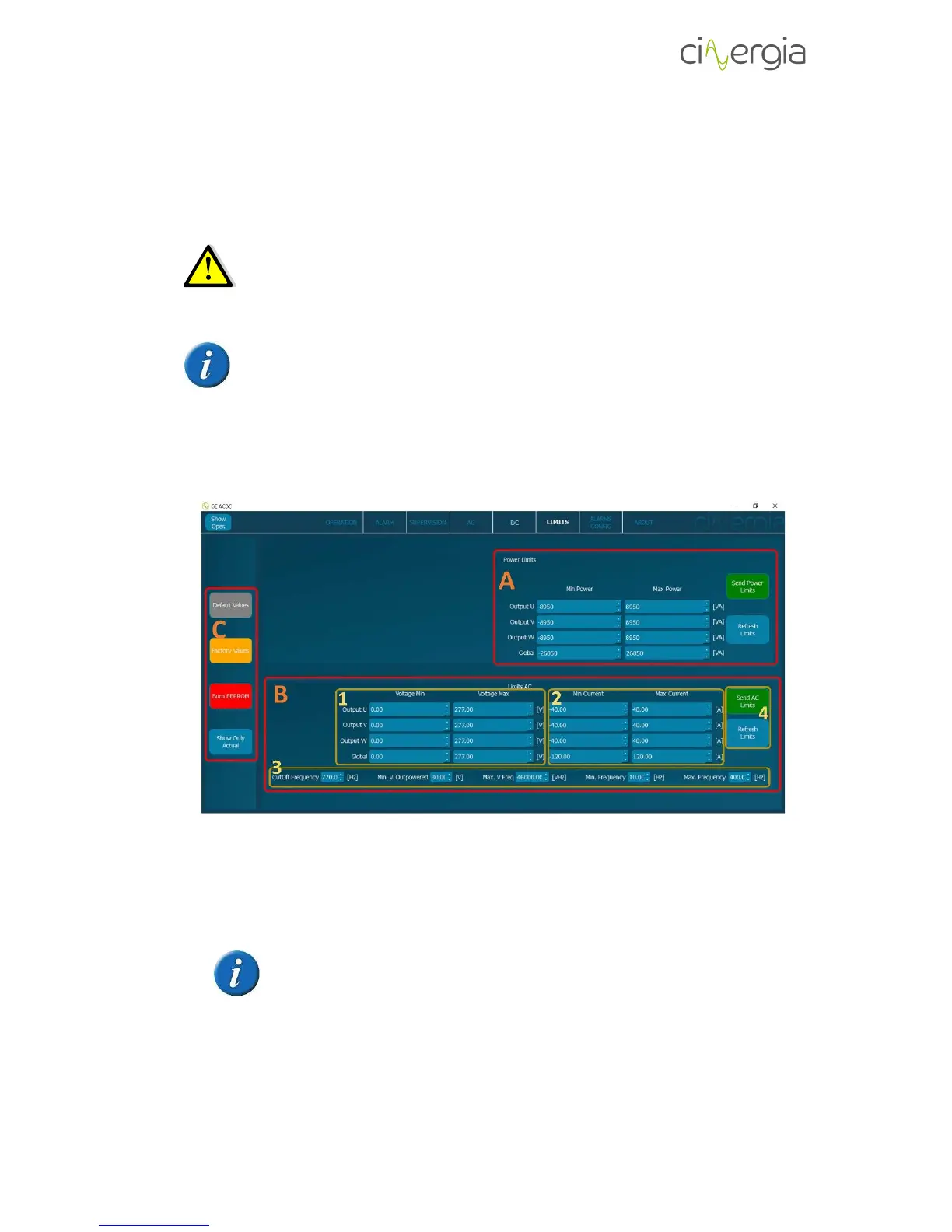
- A: Power Limits. The user can set the maximum and minimum limits for each phase.
Once the limits are ready, press Send Power Limits. By pressing Refresh Limits, the
converter will deliver the actual limit values.
If the user introduces limit values higher the accepted ones, the converter will
set the maximum allowed values. By pressing Refresh Limits, the user will
know which are the values of the converter in that moment.
- B: Voltage and current limits section.
1. Voltage limits. The user can set the maximum and minimum limits for each phase.



 To Next Page