GE+ ACDC Installation and operation manual v11
117 / 121
When the converter is switched off and on again, these limits will be erased
and substituted for the factory ones. It is possible to save limits in the
equipment in the EEPROM memory, but a password is required
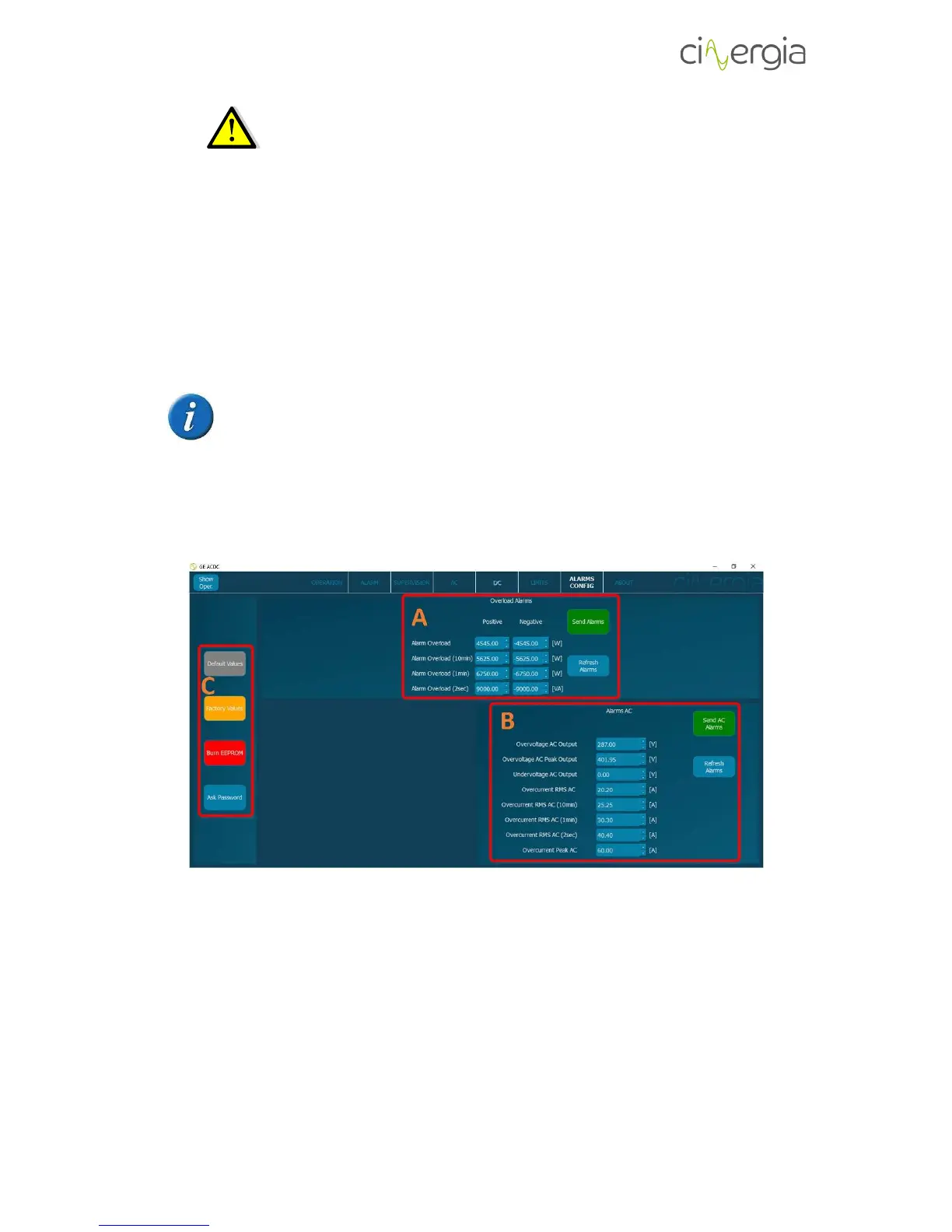
9.2.7. Alarms Configuration
This tab sets the alarms of the equipment. The difference between Limit and Alarm is that the
equipment can work during a certain time above the limits, but if there is some value that goes
further than some alarm parameter, the equipment will go to alarm state.
Depending on the connection mode of the equipment (AC or DC), this tab will
automatically change and the parameters that will appear will be the ones
according to the mode.
I. Alarms AC
- A: Set the overload alarms and once the values are ready press Send Alarms button. If
the user presses Refresh Alarms, the parameters that the converter has in that moment
will appear in the window.
- B: Set the AC alarms and once the values are ready press Send AC Alarms button. If the
user presses Refresh Alarms, the parameters that the converter has in that moment will
appear in the window.
- C: These buttons allow the user to operate with the values of the limits.



 To Next Page