GE+ ACDC Installation and operation manual v11
90 / 121
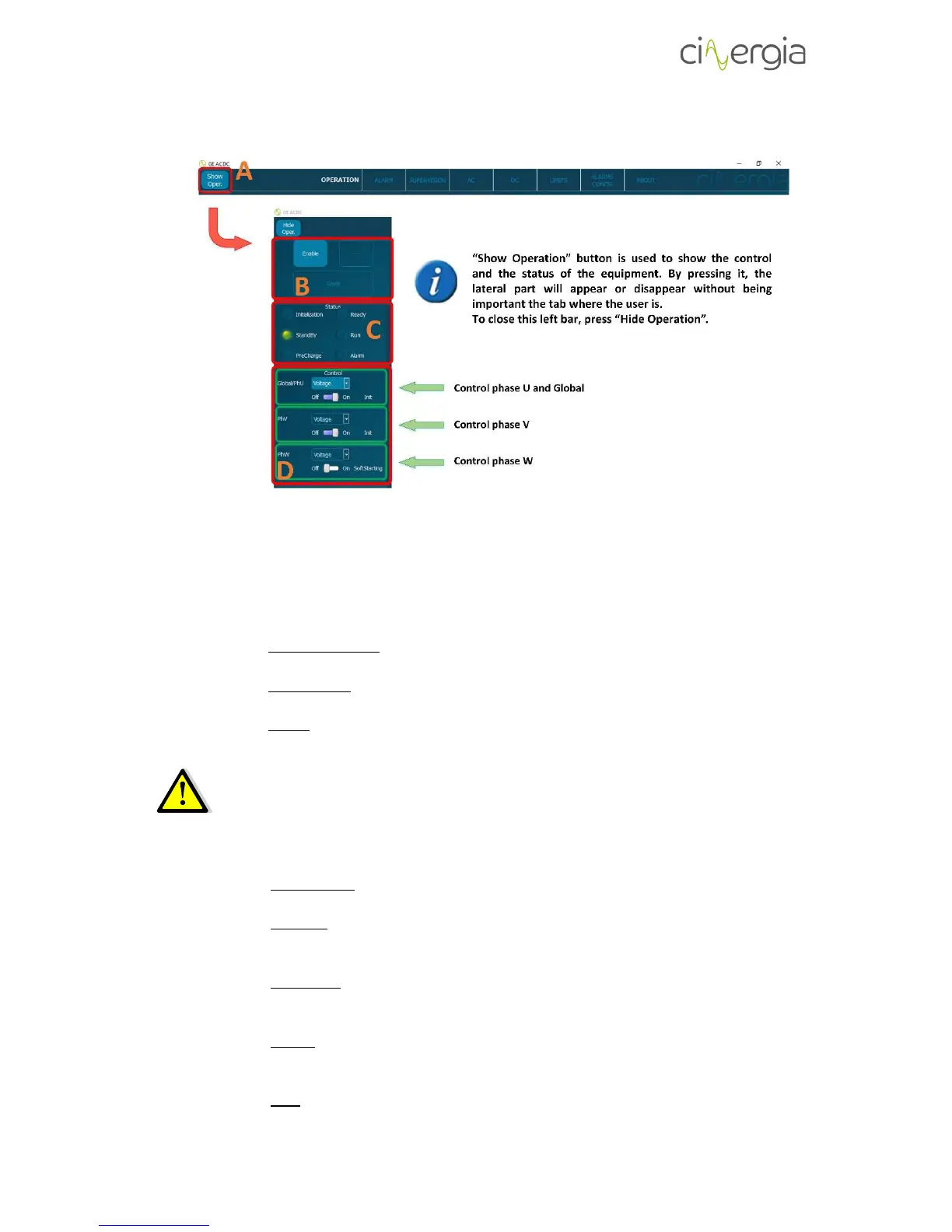
9.1. Show operational button
- A: “Show Oper.” button. It allows the user to see the lateral part of the interface with
the control and the status of the converter. It is useful to have a wider view of every tab
of the interface.
- B: Control the status of the equipment with the buttons:
- Enable / Disable. Enable button turns the equipment into Ready state. Disable
button turns the equipment into Standby state.
- Run / Ready. Run button turns the equipment into Run state. Ready button turns
the equipment into Ready state.
- Reset. Reset button turns the equipment into Standby state.
Before going to Run state, please be sure that all the connections between the EUT
and the Cinergia equipment are ready.
- C: Information about of Active Rectifier and Inverter status:
- Initialization. The converter control system checks the presence of all internal
components and the embedded PC loads the operating system.
- Standby. Keeps the converter in low power mode until an Enable signal is
received. There is no voltage in the DC link and no voltage/current is applied to
the output of the converter.
- Precharge. Internal transition state between Standby and Ready. During this
state the DC link is gradually charged through resistors until the rated DC link
voltage is reached.
- Ready. The converter is ready to operate but no PWM signal is sent to IGBTs.
The DC link is charged to the rectified voltage and there is no voltage/current
applied to the outputs.
- Run. The converter is completely operational: the inverter starts the control
algorithms and PWM. Setpoints can be sent.



 To Next Page