GE+ ACDC Installation and operation manual v11
97 / 121
2. When the equipment has any alarm, it is reflected in the status.
3. Press Reset to reach the standby state (no alarms).
9.2.3. Supervision
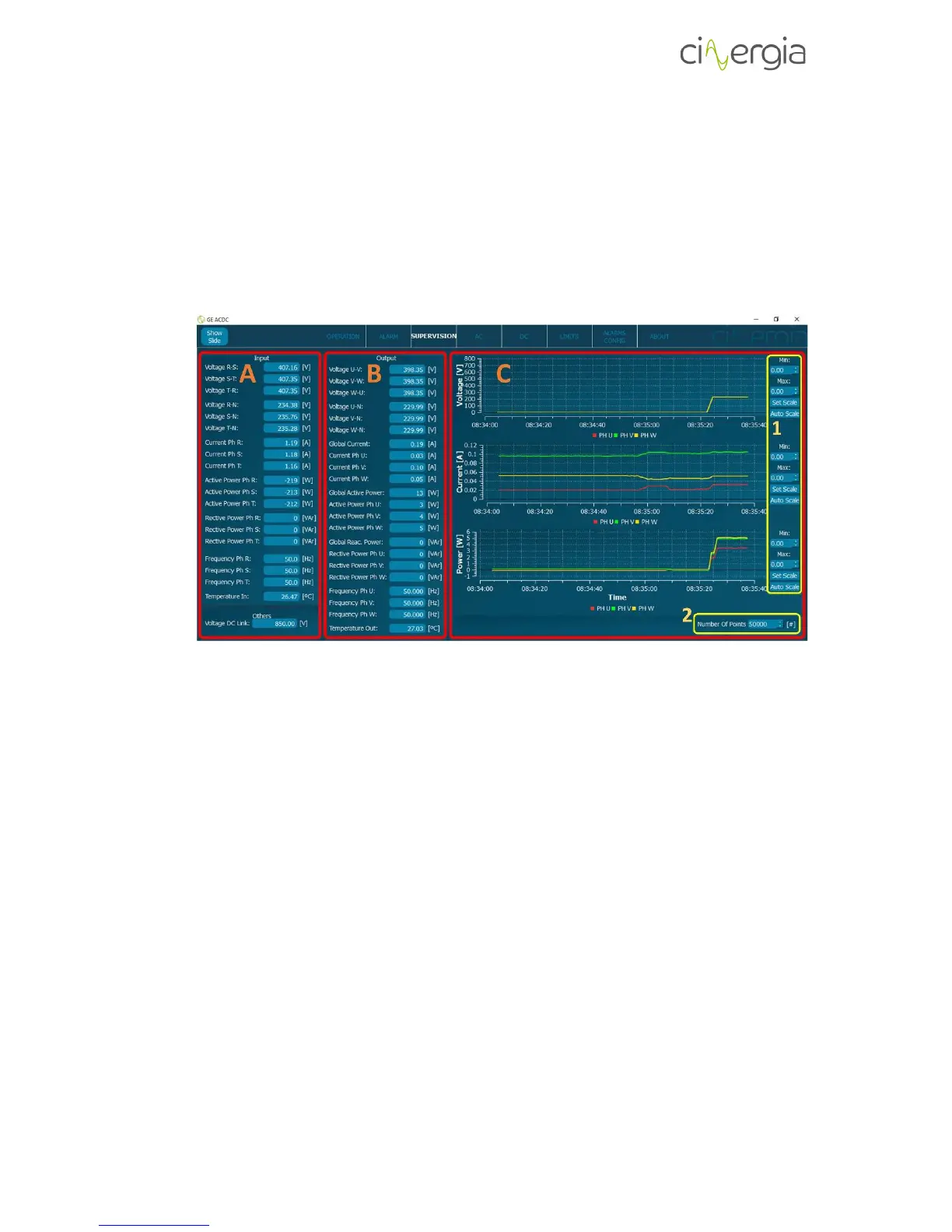
The supervision is an informative tab is where the user is able can see all the values of the
converter.
- A: Information about the parameters of the input (grid side):
- Voltage
- Current
- Active power
- Reactive power
- Frequency
- Temperature
- Voltage DC link
- B: Information about the parameters of the output (EUT side):
- Voltage
- Current
- Active power
- Reactive power
- Frequency
- Temperature
- C: Current trend plots:
- It displays 3 variables per graph. The first one is for voltage, the second one for
current and the third for power. Due to a long refreshing time, it is not possible
to detect fast current transients of the variables.
1. The user can set the maximum and the minimum for the vertical axes or can
use the Auto Scale, which will adjust the graph with the maximum and



 To Next Page