GE+ ACDC Installation and operation manual v11
54 / 121
5.3.6. Independent branch control
Separate mode is optional and it has an additional cost.
It is very important to be very aware of what is being connected in the output of
the Cinergia equipment. It will be able to work in different modes for each channel
(voltage or current source). It is in the user responsibility to use this mode properly.
Independent branch control allows to control each channel separately choosing the state and
the mode of each phase.
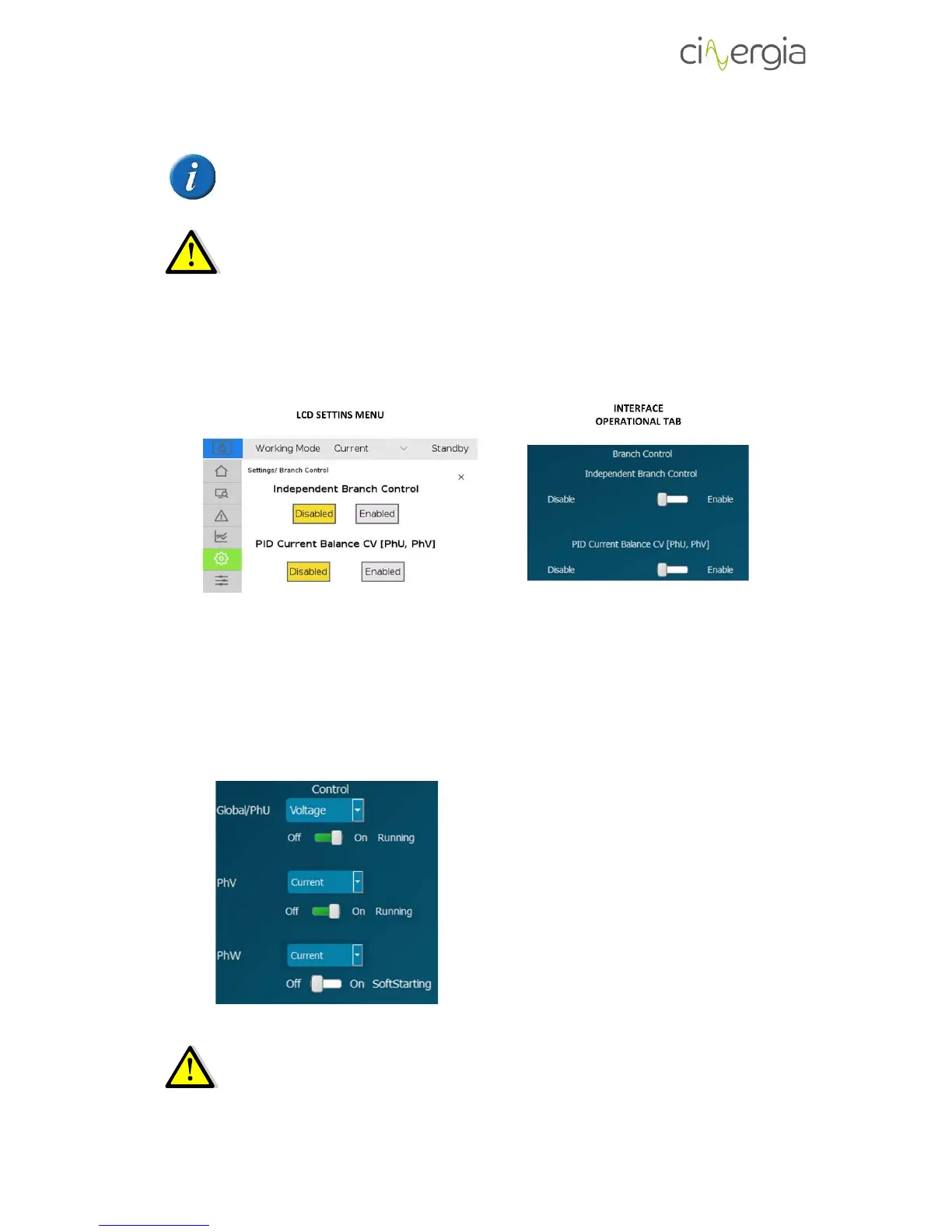
It is possible to activate this mode using the interface or the LCD touchscreen:
PID Current Balance CV [PhU, PhV] is only used in DC mode.
Depending on the mode of the equipment (AC or DC), this functionality will work differently:
- AC separated branch. The user can decide to activate or not each channel, but the
working mode will be the same for each one.
- DC separated branch. The user can decide to activate or not each channel and the mode
of each one.
In this example, the first channel and the second
one (U and V) are running whereas the W is on soft
starting. Both V and W are in current mode while U
is in voltage mode.
It is possible two have 2 channels in voltage mode,
but these channels must be U and V. Using this
option, the PID Current Balance CV [PhU, PhV] can
be activated and it will balance the current flowing
throw these two voltage channels.
In Current, Power or Impedance mode, the equipment controls current and it
requires a voltage source connected in the output of the Cinergia equipment. The
voltage source must be the first to be turned on. Once the Cinergia converter
reads the voltage in the inverter, the Run state can be applied.



 To Next Page