GE+ ACDC Installation and operation manual v11
85 / 121
6.3.6. Operational Panel
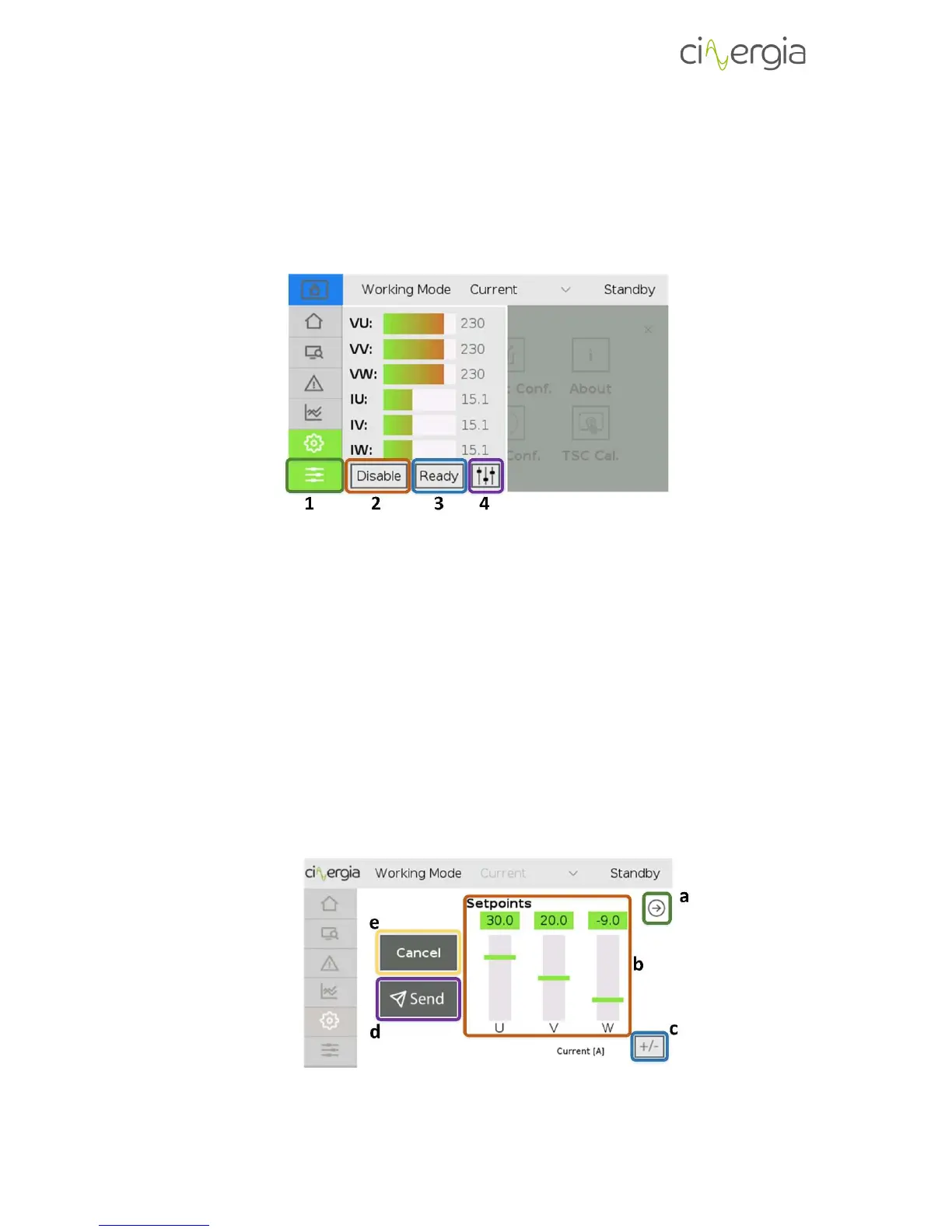
It is possible to view the voltages and the currents in the output of the converter at any time by
pressing the left-down button.
1. By touching this button, the LCD will show a supervision window without being
important the actual tab. To return to the previous (or another) tab, press the desired
tab in the left.
Control the equipment with the following buttons:
2. Enable and Disable the converter.
3. Set the converter into Ready or Run state.
4. Send the desired setpoints to the equipment. Depending on the kind of the equipment,
the available setpoints will be different. For example, a voltage source will not be able
to send current setpoints and a current source will not be able to send frequency
setpoints. The LCD touchscreen will make available the setpoints to be send. The
following image details how to send a setpoint:
a. Change the setpoint window to find the desired setpoint to change.



 To Next Page